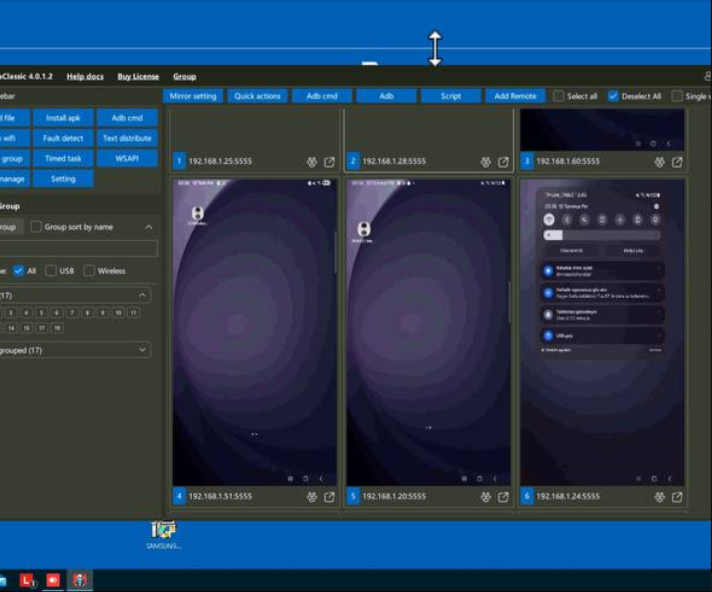
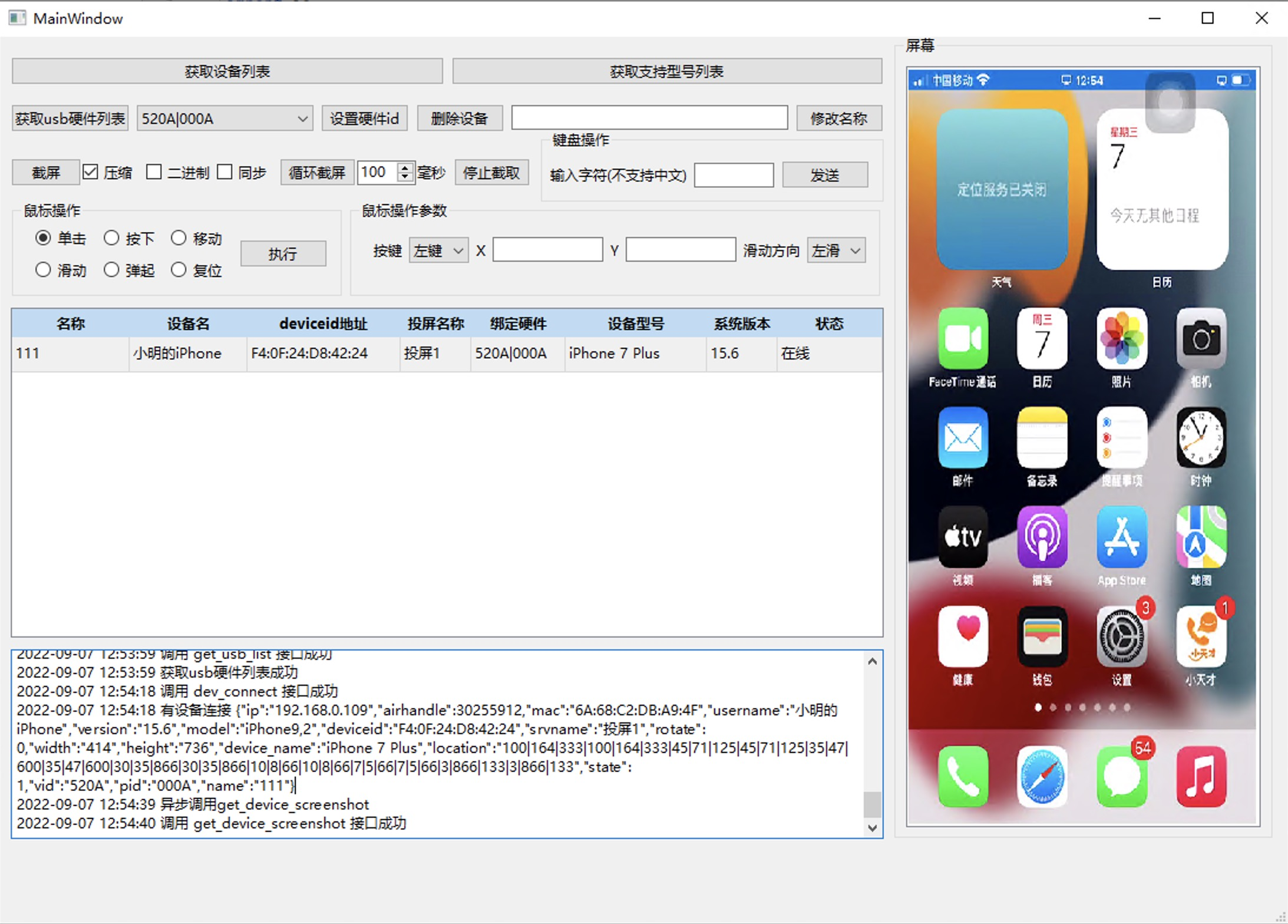
# Box Phone Farm Manual
We only provide box for development or testing use.pls do not use it for illegal
{% hint style="warning" %} **Note:**
After receiving the box, remember not to plug it into the computer first.
After setting the following steps PC , Then connect the power supply and plug it into the computer USB port.
{% endhint %}
{% hint style="danger" %} **WARN ! !**\ **1. Do not reset or update the phone system.**\ **2. Do not turn off the USB debugging option,Do not turn off Ethernet,**\ **3. For Root Phone Do not click on the update and installation of "Magisk".**
{% endhint %}
## 1.Compatibility
1. **Computer system: Windows 10/ 11 , Mac , Linux**
2. **To prevent port occupation, please uninstall mobile phone management applications and other software that can read the phone, and close or exit anti-virus software to avoid restricting the installation of management software.**
3. **Install Samsung phone driver"**[**Click Download**](https://developer.samsung.com/android-usb-driver)**"**
## **2.**Mirror Management Software
**1.**[**Panda - (Windows/Multi-Language / Free 40 Phone)**](https://doc.some3c.com/user-guide/pages/JjjojIyKxaiBPzzLwvtg#id-1.panda-for-windows)
{% hint style="warning" icon="triangle-exclamation" %} **(Do not attempt safe mode on phones without a screen)**
{% endhint %}
**2.Panda Classic - (Multi-Language Free 10 Phone)** [**Windows**](https://doc.some3c.com/user-guide/pages/JjjojIyKxaiBPzzLwvtg#id-2.panda-classic-for-windows) **/** [**Mac OS**](https://doc.some3c.com/user-guide/pages/JjjojIyKxaiBPzzLwvtg#id-3.panda-classic-for-mac-os)
**3.**[**QtScrcpy (Windows /Linux / Mac Free )**](https://github.com/barry-ran/QtScrcpy/releases)
## 3.**Download Authorization file. Replace Authorization file.**
1. [**Click to download the authorization file and unzip it**](https://ln5.sync.com/4.0/dl/b847f0f70#bkkqyhjc-u22t9pff-8t7eukdw-fpa2g6pv) **(Download Code on Your Box)**
2. **Replace the authorization file to "****C:\Users\\(your username)\\.android****"**
{% embed url="" %}
some3c.com
## 4.Restart computer
After the replacement is completed, you can try to restart the computer. Then turn on the power of the box and connect it to the computer USB port.
{% hint style="warning" %} **Note, please click "Allow" in the first screen mirroring unlock prompt box.**
{% endhint %}
some3c.com
some3c.com
some3c.com
## 5.In Areas using 110V Voltage
**Please note the voltage switch, for 110v customers.**
some3c.com
## 6. Mac OS User Guide
{% embed url="" %}
## 7. If you encounter a delay or lag in the operating screen
**can try, Click more, Dark screen, or Light screen(Not Samsung series.)**
{% embed url="" %}
## 8.**Simple Automated Tasks**
{% embed url="" %}
some3c.com
{% endembed %}
# Build Setup Mobile Farm Guide
Building Phone farming requires the following accessories and steps
## What needs to be prepared.
### 1.Phone Plan:
Select a sufficient number of Android phones such as Samsung, Xiaomi, Huawei, Redmi, VIVO, etc Android 6.0 and above. from the second-hand market or other channels according to your needs. (Contains battery)
some3c.com
### 2.Requirement
It is best to use the same model, including the screen or prepare a screen to enable USB debugging mode, or the motherboard of the mobile phone, set it up to automatically start when powered on (Remove the battery and switch to powering the motherboard)
some3c.com
{% hint style="info" %}
Not all models support power supply from the motherboard power cord
If it is not in the list, you can inquire whether it supports customization.
{% endhint %}
### 3.**USB HUB Board**
**Used to connect all mobile phones to the computer. (Standard 20 or 21 USB ports)**
**Software Package download**
{% file src="/files/P3dXcDHddlNzeNCIEQiK" %}
some3c.com
### **4.Power adapter**
**Provide stable power for all mobile phones (5V/40A or 5V/60A).**
some3c.com
### 5.**Data Cable**
**Connect the mobile phone and USB hub.**
some3c.com
### **6.Socket and Power cord**
**more convenient wiring**
some3c.com
### 7.Chassis and Dock HUB
Place the mobile phone and keep it tidy. Save space "[ Click to view](https://www.some3c.com/collections/phonefarm) "
| Chassis (power supply & data separation) | Dock HUB(power supply & data integration) |
| ------------------------------------------------------------------------------------------------------------------------------------------------------------------------------------------------------------------------------------------------------------------------- | ---------------------------------------------------------------------------------------------------------------------------------------------------------------------------------------------------------------------------------------------------------------------------------------- |
| | |
### 8.Mirror Android phone screen to computer
It is recommended to use Panda Mirror Screen Casting. It is permanently free for 40 mobile phones. It has powerful functions. "[Click Down](/panda-manual/download)"
some3c.com
### 9.Buy and View.
All the mentioned accessories, chassis, USB hub, can be found in Some3C store."[ Click to view](https://www.some3c.com/collections/phonefarm) "
> **Of course, we also provide some boxes that fully include phone motherboards, provide SIM card slots, and cameras as options. For details, please click:** [**Phonefarm.some3c.com**](http://phonefarm.some3c.com/)
## **Pnstallation Videos Provide**
* [ How to enable USB debugging](/panda-manual/usb-connect-phone).
* [How to connect via WiFi](/panda-manual/wifi-mode-connection).
* [How to connect via Ethernet.](/panda-manual/lan-mode-connection)
* [Xiaomi, Redmi, Huawei, OPPO connection problem.](/panda-manual/connection-faq)
### 1.USB HUB board Build.
{% embed url="" %}
some3c.com
{% endembed %}
### 2. Chassis Build.
{% embed url="" %}
some3c.com
{% endembed %}
### 3.Enable USB Debugging
{% embed url="" %}
{% embed url="" %}
# Panda Android Screen Projection
Panda Screen mirroring is completely free, no registration required, ready to use, smooth and stable, clear image quality, easy to operate,Mirror & Connect and control you Android using PC
### 1.Product interface
some3c.com
Panda Screen Mirroring is a software used to connect and manage Android phones on a computer. It is specially designed for batch screen mirroring management of Android phones. It can greatly improve the operating efficiency of managing Android phones on a computer, especially in batch operations, automated operations, In terms of remote operation, efficiency has been significantly improved.
### 2. Application scenarios
Panda Screencast is a connection tool that uses a USB cable or other connection methods to project the Android phone screen onto the computer screen through video streaming. The computer mouse is used instead of fingers to slide and click on the phone screen. The purpose is to facilitate mobile application developers to view and operate mobile application software on the computer. The connection between Android phone and computer is the connection method that comes with the Android system. Panda Screencast only plays a connecting role and does not make any modifications or damage to the mobile phone system, nor does it provide any auxiliary functions for any mobile application. It only provides the most basic connection function between Android and Windows.
### 3. Multi-language support
some3c.com
As the software continues to be updated, more language support will be added in the future, whichever is included in the actual software.
### 4.Main Functions
Due to the rapid pace of updates, this list is not exhaustive; please refer to the actual functionality of the software.
| Module | Function | illustrate |
| --------------------- | ----------------------------------------------- | --------------------------------------------------------------------------------------------------------------- |
| Operating software | Adaptation System | Windows 11、10 |
| | Compatibility range | All major Android phone brands and models |
| | System Scope of Application | All mainstream Android, HarmonyOS systems and their derivatives |
| | Dark theme | Freely switch between black and white themes |
| | Hide Control Panel | Hide control panel to automatically display |
| | Export configuration | Export/import phone number, name, and tag configuration file |
| | Customize shortcut keys | Customize shortcut keys for various functions |
| | | |
| Connect phone | Number of connections | single computer can support up to 500 connections. |
| | [USB mode](/panda-manual/usb-connect-phone) | Automatic recognition |
| | [OTG mode](/panda-manual/lan-mode-connection) | Multi-segment management, importing network segments, exporting network segments, full scan |
| | [WIFI mode](/panda-manual/wifi-mode-connection) | One-click switch to WIFI mode |
| | [Safe Mode](/panda-manual/safe-mode-connection) | An advanced connection mode that allows disabling both USB mode and accessibility mode. |
| | | |
| phone screen | Screen size | Customize screen size |
| | Screen resolution | Customize screen resolution |
| | Screen frame rate | Customize screen frame rate adjustment |
| | One-click screen off | Phone screen off |
| | Screenshot | Save screenshot from phone to computer |
| | Synchronous operation | Batch synchronization operation |
| | | |
| Keyboard input | Keyboard and mouse synchronization | Mouse and keyboard synchronized input |
| | Two-way adhesive | Two-way copy and paste between computer and mobile phone |
| | Shortcuts | Send preset content with one click |
| | Chat tools | Compatible with third-party tools such as Customer Service Treasure, Chat Treasure, and Customer Chat Treasure. |
| | Import/Export | Backup and share quick phrase list |
| | Batch input | Batch import account passwords |
| | Text distribution | One-click input of different text content into different mobile devices |
| | File distribution | Copy different files to different mobile devices with one click |
| | | |
| Controlling the phone | System Functions | Quickly access phone settings, Wi-Fi settings, input method management, and accessibility settings. |
| | Install APK | Batch install APKs to mobile phones |
| | Transfer files | Batch transfer files to phone or photo album |
| | Export file | Export phone files to computer |
| | Screenshot to computer | Save screenshot from phone to computer |
| | Large screen rotation | Control the large screen to switch between portrait and landscape modes. |
| | Fixed large screen | Fixed control large screen and small screen are laid out side by side |
| | Application Management | One-click quick launch of applications, uninstallation of applications, and clearing of application cache. |
| | Mobile phone grouping | Custom phone tags |
| | Grouping and sorting | Mobile phone tags can be sorted freely |
| | Show only selected | Show only the phones in the selected tab |
| | ADB command | ADB command console, customizing ADB command shortcuts |
| | Random Delay | Randomly increase operation delay during synchronous operation |
| | random offset | Randomly add position offset during synchronization operation |
| | Control small screen | Directly control all small screens |
| | Ctrl select | Once opened, the phone will only be selected by holding down Ctrl. |
| | Multiple selection out of sync | When multiple phones are selected, press the Alt key to operate one phone at a time. |
| | Switch input method | Switch input methods across all devices with one click |
| | | |
| | | |
# Download and install
Panda’s only official website download web: panda.some3c.com
## 1.Panda For Windows
{% file src="/files/1jjMNVinbXGrx1avmNoZ" %}
{% hint style="warning" %}
【 Panda 】and【 Panda Classic 】licenses are not interchangeable. Please take note.
{% endhint %}
## 2.Panda Classic For Windows
{% file src="/files/7kvweCrCqKmvcehLVjWj" %}
{% hint style="warning" %}
【 Panda Classic】and【 Panda 】licenses are not interchangeable. Please take note.
{% endhint %}
## 3.Panda Classic For Mac OS
{% hint style="warning" %}
【 Panda Classic】and【 Panda 】licenses are not interchangeable. Please take note.
{% endhint %}
[**1.For ARM 64 (M1, M2, M3, M4...etc,)**](https://mega.nz/file/s8o1kB4L#mbiSU9xy7BFnWaWIS8eIAS80yi1SU5xzAPrxZImK6D0)
[**2.For Intel X64** ](https://mega.nz/file/J4gFxCqR#qQDThL-6Vui2rSWLHbU3cIbhGxay1Muivpoyy8Kkl5o)
{% hint style="info" %}
**Remove system security blocks** (Frequently Asked Questions):
Because it's not available on the App Store, when you first double-click to open it on macOS,
The system may display a message saying
"**Cannot open because Apple cannot check if it contains malware**".
**Solution**:
Open "System Settings" -> "Privacy & Security" on your Mac, scroll down to find the "Security" section, click "Open Anyway," and enter your Mac password to run normally.
{% endhint %}
## 4. Installation failure problem.
If the following prompt pops up during the installation process, it is because there is a folder permission problem when installing the Microsoft Edge Webview2 component. Simply delete the C:\Program Files (x86)\Microsoft folder, or change the folder name.
The official download address of WebView2 from Microsoft is:
## 5. Conflict reminder
When using Panda Screen Mirroring, please close other similar screen mirroring software.
Panda Screencast is stable and reliable, but when used with other similar screencasting software, there will be conflicts such as ports being occupied and programs being locked, which may cause users to experience many abnormal problems such as the inability to cast from their mobile phones, a small number of mobile phone screens being cast, and the failure of group control functions. For your user experience, please close other screencasting software.
## 6. What are the compatible systems for Panda Mirror Screen Casting?
| Compatible computer system | Compatible Android version | Compatible mobile phone models | Adapted simulator |
| ------------------------------- | --------------------------------- | -------------------------------- | ------------------------------------- |
|
Windows 11 64
|
Android 6 above
|
Samsung series
|
Lightning simulator
|
|
Windows 10 64
| |
Xiaomi series
|
Adding...
|
| | |
Redmi series
| |
| | |
OPPO series
| |
| | |
Huawei series
| |
| | |
Pixel series
| |
| | | 1.Adding.... | |
{% hint style="info" %}
When you use a non-compatible computer system or mobile phone model, some abnormalities may occur.
We are planning to add support for other phone models, give us some time and it will come later.
{% endhint %}
## 7.What should I do if it prompts that the software is already running?
When you open the software, it prompts "Panda is already running" because there are other programs in the system occupying port 9999, which makes it impossible to start normally. The solution is also very simple. Open the system's task manager, find the program process with port 9999 and end it, then you can open the software and use it normally
## 8.What should I do if it says the system has stopped running?
Usually, this is due to incompatibility of Windows 7 system. It is recommended to use Windows 10 or Windows 11 system.
## 9.What should I do if the software crashes?
When the user's computer was upgraded from win7 to win10, wmic had changed the original directory structure, and the environment variables did not follow the table, causing the wmic command to fail.
Solution
1. Win+R, run sysdm.cpl
2. Advanced - Environment Variables
3. System Variables - Path - Edit
4. Add C:\Windows\System32\wbem (note the capitalization)
# USB Connect Phone
## 1.USB Connection
USB screen projection steps
Step 1: Turn on the USB debugging mode of your phone.
some3c.com
Step 2: Use a USB data cable to connect to the computer.
some3c.com
Step 3: Open \[Panda].
## 2..How to turn on USB debugging mode?
Different models of mobile phones have different ways to open it. Please search on Google.
Different Android system versions have slightly different ways to open USB debugging.
The following uses Samsung, which is more common in the market, as an example to explain.
Step ①
Step ②
Step ③
Step ④
Step ⑤
Go to Settings on your phone and tap "About phone"
Click "Software Information."
Click the version number 3-7 times in a row until the prompt "Developer mode is enabled" appears.
Return to the settings interface, and "Developer Options" is now displayed.
Click "Developer Options", turn on "Developer Options", and then turn on "USB debugging".
### 1.Enable the following options in the developer mode options.
\[USB debugging] - turn on
\[Allow USB installation] - turn on (for installing the screen projection keyboard to facilitate keyboard typing)
Xiaomi/ Redmi phones need to turn on \[USB debugging-security settings], otherwise they can be mirrored but cannot be operated
VIVO phones need to turn on \[simulated clicks], otherwise they can be mirrored but cannot be operated
Huawei or Honor phones need to turn on \[allow USB debugging only in charging mode]
### 2.Change the USB charging mode to \[Transfer File] or \[MIDI]
### 3.Use a USB data cable to connect the phone and computer
The cable must have a data transfer function, because some cables can only be used for charging
It is best to connect the cable to the USB port on the back of the computer host, which is more stable, and it is best to plug it into the USB2.0 port on the back of the host (black USB port)
## 3.USB mode screen projection is unstable?
Solution
* The cable cannot be connected (replace with the original cable)
* The tail plug of the mobile phone is damaged (replace the mobile phone device)
* The USB port of the computer motherboard is not powered enough (try to use the USB2.0 port on the back of the host, or increase the power supply of the host)
* If a hub is used, the hub may be underpowered (try to reduce the number of devices connected to the hub)
## 4.What should I do if USB screen projection fails?
1. Is the system Win7? If yes, it is recommended to upgrade to Win10 or install Android driver.
2. Is the Android system version of the phone above 7.0? Because it is not compatible with those below 7.0, it cannot project the screen.
3. What phone model is it? If it is Huawei, please follow the steps below.
{% hint style="info" %}
1. Huawei phone connection steps:
2. Install Huawei Mobile Assistant on the computer
3. Use a USB data cable to successfully connect the phone and Huawei Assistant
4. The phone will push the Huawei driver, click to install
5. After the driver is successfully installed, exit Huawei Mobile Assistant on the computer
6. Replug the USB cable, the phone will pop up an authorization box, click to allow
7. If it still doesn't work, please try restarting the phone
{% endhint %}
8) Make sure the USB cable supports data transmission, because some USB cables can only charge, and USB cables that can only charge cannot project the screen.
9) Make sure the USB cable is plugged into the USB2.0 port on the back of the computer host, because the USB port on the back of the host is more stable.
10) Make sure the computer can normally recognize the mobile device connected to the USB cable. If the computer cannot recognize it normally, Panda will not recognize it even more.
11) Click \[Fault Detection] on the Effect Guard software page to see if the mobile device can be recognized. If there is a device and it is not authorized, please re-plug the USB cable or restart the phone. The authorization box will pop up on the phone page. Please click Allow. If there is no device, it means that the computer has not recognized the mobile device. Please check if there are any omissions in steps 1, 2, 3, 4, and 5.
# WIFI Mode Connection
## 1.WIFI mode connection steps
1. The phone needs to use a USB cable to successfully project the screen
2. [Refer to the USB connection tutorial and successfully connect to Panda with a USB cable](https://doc.some3c.com/panda-manual/pages/Ta8WFt0VjRJp0rhTislN#id-1.usb-connection)
3. Turn on WIFI on the phone and successfully connect to the network
4. The wifi connected to the phone and the network connected to the computer need to be in the same local area network
5. Right-click the small screen and click \[Switch to WIFI mode]
6. After the transfer is successful, the word WIFI will be displayed in the upper left corner of the phone, as shown below
some3c.com
## 2.How to change the USB mode to WIFI mode?
1. Right-click the small screen and a pop-up window will pop up.
some3c.com
2.Click the button to switch to WIFI mode, and the selected device will start to switch modes.
some3c.com
3. After the conversion is successful, the word WIFI will be displayed in the upper left corner of the small screen.
{% hint style="info" %} Note: USB to WIFI necessary conditions:
1.the mobile phone must be connected to WIFI
2. The WIFI network connected to the mobile phone must be in the same LAN as the network of the host computer
{% endhint %}
## 3.How to switch all mobile phones to wifi mode in batches?
1.In Panda, press Ctrl+A to select all phones. Then click "More" on the right and click Wi-Fi mode.
some3c.com
## 4.Unable to switch to Wi-Fi mode?
1. Is the router connected to the computer the same as the router connected to your phone?
2. Is the network between the computer and the phone interoperable? Follow the steps below to verify:
3. Press win+R on the computer keyboard
4. Enter cmd in the pop-up run window and press Enter to open the terminal window
5. Enter "ping 192.168.1.112" in the terminal window (the IP address after ping is the real IP address of your phone)
# LAN Mode Connection
Necessary conditions: OTG\&USB dual-mode chassis
## 1. OTG\&USB dual-mode chassis
OTG\&USB dual-mode chassis supports both USB screen projection and network cable screen projection
1. [First set the chassis to USB connection mode](https://doc.some3c.com/panda-manual/pages/Ta8WFt0VjRJp0rhTislN#id-1.usb-connection)
2. Connect the computer host with a USB cable and successfully project the screen
3. And use a network cable to connect the chassis to the router, which must be the same router as the computer..
4. Find \[OTG Settings] in the Panda window
some3c.com
5.Type in the terminal: ipconfig Enter the network gateway address in step 3. Click Add.
some3c.com
6.After completion, click the \[Enable] button. The default port is 5555 and generally does not need to be modified.
some3c.com
7.After clicking "Enable", manually press double-click. (A6/A8 chassis only requires a click)the chassis button
some3c.com
8.Then click Scan and wait.
some3c.com
Video Demonstration
{% embed url="" %}
some3c.com
{% endembed %}
## 2.Serial port software control switching
The chassis connects to the computer via a serial port, and the USB/OTG mode is switched via software.
1.Search and run "RUN" open "devmgmt.msc"
2.After connecting the chassis to the computer via USB cable, locate the corresponding CH340 port in Device Manager, and then connect the corresponding serial port in the software.
{% hint style="info" icon="note" %}
Some chassis do not support serial port software.
{% endhint %}
The serial port software includes functions such as "adjusting fan speed", "setting default boot mode", "USB/OTG switching", and "shutting down/restarting" the chassis.
## 3. Is screen projection in WIFI/OTG mode unstable?
Solution
1. Router problem (it is recommended to replace the enterprise-level router)
2. If too many devices are connected to a router, it may cause signal interference and network instability (it is recommended to build a soft router)
3. If the phone is locked, it may cause wifi disconnection
## 4. What should I do if my mobile phone cannot scan?
Solution
1. Is the router connected to the computer the same as the router connected to your chassis? If not, are the networks between the two routers interoperable? If not, please ask a network professional to check.
2. Is the chassis a dual-cut chassis (supports OTG and USB) or a non-cut chassis (supports OTG only)? If it is an OTG chassis, you need to connect to the Panda in USB mode first. After the connection is successful, click to start port 5555, then manually switch the chassis to OTG mode, and enter the network IP connected to your chassis, such as 192.168.1.1 to 192.168.1.255. After entering, click Add, and then scan. If it is a non-cut chassis, directly enter the network IP and scan.
some3c.com
# Accessible Mode Connection
Accessible connection method can turn off the developer mode of the mobile phone .Accessible requires the mobile phone to connect to WIF or OTG and ensure that it is in the same LAN as the host com
## 1. Accessibility mode connection settings.
{% hint style="info" %} Important reminder!!! Important reminder!!! Important reminder!!! Important reminder!!!
Box Phone farm motherboard users please use with caution, because barrier-free reconnection requires manual authorization on the mobile phone screen,
so mobile motherboards must not turn off developer options
{% endhint %}
1. When using Accessibility for the first time, you must first use ADB to successfully project the screen
2. There are three ADB projection methods: USB, WIF, and OTG
3. After successfully projecting the screen using adb, right-click and click \[Switch to Accessibility Mode]
some3c.com
4.Click \[Confirm to Accessibility] again on the pop-up window.
some3c.com
5.If the \[Screen Casting Assistant] is not installed on your phone, it will automatically install it for you. If it is already installed, just ignore it.
some3c.com
6.On your phone, click Connect to PC.
some3c.com
7. After clicking Start Now, an authorization accessibility box will pop up. Click the Cast Assistant to enter the Cast Assistant authorization page and enable the option.
8. After authorization, the phone will reconnect and enter barrier-free mode. At this time, you can turn off the developer mode of the phone.
# Safe Mode Connection
## 1.How to switch from ADB mode to safe mode?
{% hint style="info" %} Important reminder!!! Important reminder!!! Important reminder!!! Important reminder!!!
Box Phone farm motherboard users please use with caution, because Safe mode reconnection requires manual authorization on the mobile phone screen,
so mobile motherboards must not turn off developer options
{% endhint %}
1.Move the mouse to More Functions, and a pop-up window will appear. Find the Safe Mode option in the More Functions pop-up window and click it.
some3c.com
2.Click Next and manually turn off the \[USB debugging] option on your phone.After turning off the USB debugging option, the Panda software will automatically restart.
some3c.com
3. When switching from \[ADB Mode] to \[Safe Mode], since each phone needs to install the USB driver one by one, the screen projection will be slower when there are many phones, so please wait patiently.
some3c.com
4.At this time, you need to manually click on the phone screen to authorize the USB accessory permission for \[Security Assistant]
some3c.com
5.After following the above steps, you can achieve safe screen projection (turn off developer options)
some3c.com
> ● If the phone does not pop up the authorization box after the driver is installed, you need to change the USB charging mode to the file transfer (MTP) mode and re-plug the USB cable
>
> ● When Panda switches to \[Safe Mode], ADB screen projection (screen projection with USB debugging turned on) cannot be used
>
> ● Because \[Safe Mode] disables the ADB debugging function, related adb functions cannot be used
# Panda Setting & Use
## 1.How to switch the interface to dark mode?
Place the mouse on the control panel icon and left-click to switch the theme of the entire Panda Android screen projection interface.
some3c.com
## 2.How do I switch theme colors?
Click System Settings, find the theme color option in the settings pop-up window, and click the color block with your mouse to select the theme color.
some3c.com
## 3.How to fold and secure the control panel?
Put the mouse on the control panel and left-click to collapse the panel. If you want to fix the panel, move the mouse to the rightmost side of the software and the control panel will appear. At this time, click with the mouse to fix the control panel.
some3c.com
## 4.How do I switch the control panel to the left?
Click System Settings. Find the Control Panel Position option in the Settings pop-up window and click Left or Right. The control panel will switch left and right.
some3c.com
## 5.How to control single and batch?
Individual control
Batch control
Click the magnifying glass of the small window, or double-click a separate window to control it separately.
Click the magnifying glass of the small winUse the mouse to select some or all of them, then double-click or click the magnifying glass in one of the windows to control the batch.
## 6.How to hide the magnifying glass button on small screens
Click System Settings. Find the small screen magnifier option in the settings pop-up window. Click it to show or hide it.
some3c.com
## 7.How do I switch between automatic and manual scanning?
Click System Settings. Find the Network Scan Mode option in the Settings pop-up window. Click on Automatic Scan or Manual Scan with your mouse. After the change, you need to restart Panda for it to take effect.
{% hint style="info" %}
Mode Description:
● Automatic scanning: When casting in OTG mode or WIFI mode, if you restart Panda, it will automatically cast in OTG, WIFI mode
● Manual scanning: When casting in OTG mode or WIFI mode, if you restart Panda, you need to manually scan the IP to cast the screen
{% endhint %}
some3c.com
## 8. What if I can't input?
1. Check whether the \[Cast Screen Keyboard] is installed and enabled normally. The operation demonstration is shown in the figure
2. If it is not installed, click \[Install Cast Screen Keyboard] first
3. After installation, click Switch to \[Cast Screen Keyboard] to type, paste and copy normally.
some3c.com
## 9.How to keep the screen of the mobile phone always on?
Move the mouse to the system settings and left-click, find the phone screen status option and click the Keep on button. After selecting, restart the client to take effect
some3c.com
## 10.How to turn off the mirrored device?
Click on a device and turn off the Mirror option for that device from the list.
some3c.com
## 11.How to rotate the small screen
| Individual rotation | Batch rotation |
| --------------------------------------------------------------------------------------------------------------------------------------------------------------------------------------------------------------------------------------------------------- | --------------------------------------------------------------------------------------------------------------------------------------------------------------------------------------------------------------------------------------------------------- |
| | |
## 12.How to adjust the window size, image quality, and frame rate?
1. Drag the slider with the mouse to adjust the size, image quality, and frame rate of the small screen.
2. You can also use the shortcut key ctrl+mouse wheel to adjust the size of the small screen
some3c.com
{% hint style="info" %}
Note:
1. The higher the frame rate of the small screen, the higher the requirements for the computer and network. If you feel a delay when operating the mobile phone screen, please reduce the frame rate of the small screen to the minimum
2. If the image quality of the small screen is blurred, you can enlarge the size of the small screen
{% endhint %}
## 13.How to record automated script tasks
Right - click on the phone window and select "Record Action." View the video guide.
Can execute custom script tasks. Executing tasks means you need to select a JS file or a bat file. The js file requires the installation of the screen projection assistant, but the bat file does not.
{% embed url="" %}
## 14.How to hide the operation sidebar
Double-click the window, click the dot, and click the Close option.
## 15.How to install APK to mobile phones in batches?
Press Ctrl+A to select all phones, then double-click a window and click Install APK. A window will pop up to select the APK you want to install, then click Install. Note:
* The speed of installing APK is related to the size of the APK file.
## 16.How to distribute text in batches?
Select the device to which you want to distribute the text.
Use separator "----" to customize fields such as "account email address, phone number, etc." Each line corresponds to one device.After setting, click the icon to enter.
## 17.How to use shortcut phrases?
Double-tap the screen, select the shortcut phrase, and then select the phone to enter. Tap Enter.
## 18.How to achieve automatic screen sliding?
Select the phone that needs to slide automatically, right click, select Auto, then select the direction, number of cycles, and number of seconds between each slide. Click Start.
## 19.How to Use ADB Command Console
Select a single phone, or select some phones, right-click, click ADB. Then select the command
## 20.How to use delayed synchronization?
1. Click on the panel's more functions, then click on delayed synchronization
2. You can set the minimum time to 1 second and the maximum time to 3600 seconds, and select the operation option that needs to be delayed
3. After setting, close the pop-up window, and the operation of the mobile phone will be delayed according to the sequence number.
## 21.How to modify phone parameters?
1. Click on the panel more functions, then click on the phone parameter option
2. The resolution option allows you to enter the phone resolution value, the DPI option allows you to enter the DPI value, and the battery option allows you to enter a value from 1-00
3. After entering the relevant values, click Confirm to modify the phone and it will take effect immediately, but the resolution and DPI displayed in the "Device List" need to restart the client to refresh.
4. The Restore Phone Default button can restore the selected device resolution and DPI to the default value of the phone, ignoring the battery
## 22.How to extract APK?
1. Double-click a single window. In the application list on the right control bar, place the mouse on the APP application icon that needs to extract the APK and a pop-up window will pop up. Find the Extract APK button on the pop-up window, click and confirm
2. The APK is being extracted. The larger the APK, the slower the extraction. Please wait patiently
3. After the extraction is successful, click the Open Directory button to see the extracted APK file
## 23.How to turn on or off small screen control via shortcut keys?
1. Use the panel switch to turn on or off the small screen control
2. Click the shortcut bar icon and click the shortcut bar description to find the small screen control shortcut key option. When turned on or off by default, press ctrl+s. You can customize the shortcut key
## 24.Merge adb authorization files
{% embed url="" %}
1.In the "More" pop-up window, find "Merge Authorization Options" and click
2.In the first step, select the new authorization files "adbkey" and "adbkey.pub", click OK, and **do not select the two authorization files under "C:\Users\Administrator\\.android".**
3.Then connect the unauthorized chassis to the computer. Panda will help you merge the authorization files. After the merger is completed, it will automatically go to the third step.
4.The fourth step requires you to manually click the authorization box of the mobile phone window in Panda Screen Mirror, click "Allow" in all mobile phone windows, and then click the "I have authorized all" button. program will complete the final merge, just click Finish.
{% hint style="success" %}
**We will back up the previous authorization files for you to the backup folder under the Panda installation directory.**
{% endhint %}
## 25.How to chang mobile phone number or mobile phone name
Right click the window you want to change, then click the number or name to modify
## 26.How do I use the 【Mobile Sharing】 function?
**1.Function Introduction**
\
When you need to temporarily transfer the use of your locally connected Android device to someone else, you can initiate device sharing through this feature. The system will establish a connection by generating a unique "sharing code," and the recipient can take full control of the device after entering the code. To ensure device security and business compliance, the sharing party has the highest management privileges and can check the status or forcibly revoke control of the device at any time through "Manage Sharing."
\
**⚠️Important Note:**
\
Login restrictions:Both the sharer and the receiverYou must log in to your accountThis function can only be used when logged in; the relevant entry will be unavailable if you are not logged in.
\
Mutual exclusion logic:Once the device is in "sharing" mode, the sharing party should avoid operating the phone locally to prevent command conflicts with the recipient. Control will only automatically revert to the sharing party when the sharing party actively stops sharing or the sharing expires.
\
**2.Which version supports device sharing?**
\
You can initiate sharing, acquire devices, and manage services independently via the PC client. Supported client versions:
\
Panda Android Screen Mirroring v9.12.213 and above
\
**3.Step 1: Initiate device sharing (sharing party)**
\
Whether you wish to lend out a single device or multiple devices, you can find the sharing option through the following methods:
\
**3.1 Access via right-click menu**
\
Applicable scenarios:When one or more connected local mobile phones are selected on the main interface.
\
Operating instructions:mouseRight-clickSelect the device card (or right-click after selecting multiple devices), and choose from the context menu that appears."Shared devices".
**3.2 Setting the expiration date and generating a sharing code**
\
Operating instructions:Clicking will bring up a time selection drawer; please select "Share".Deadline/Time.
\
Tag Management:After confirming the time, a 9-digit sharing code will be generated in a pop-up window. You can directly copy the sharing code; the system will automatically generate a default tag, or you can edit the tag for better recognition. Click "OK" to close the pop-up window.
**3.3 Changes in Machine Status**
\
Results feedback:After successful sharing, the device card interface will change: a green indicator will appear in the upper left corner.Share iconThe middle area is displayedShare codeandExpiry dateThe bottom status bar displays "Screen casting is normal".
**4.Step 2: Obtaining and using the equipment (the acquiring party)**
\
4.1 Accessing the Entry Point
\
Operating instructions:After logging into the client, the recipient clicks on the top menu bar.More features-> Select"Get Share".
**4.2 Enter the sharing code**
\
Operating instructions:In the pop-up "Get Sharing Device" window, enter the 9-digit sharing code provided by the sharing provider, and click on the right.“Identification”Button.
**4.3 Confirm Acquisition**
\
Operating instructions:After successful system recognition, a device information preview will be loaded. Click"Confirm Acquisition"Click the button, and the system will display "Retrieval successful".
\
**4.4 Getting Started**
\
Results feedback:After a short wait, the sharing device will appear in the device list. The card will display the word "Share" and the specific expiration time. Double-click to connect and control it.
**5.Step 3: Managing and Stopping Sharing (by the Sharing Party)**
\
**5.1 Check sharing status**
\
Operating instructions:The sharer clicks the top menu bar.More features-> Select"Management Sharing".
\
Interface description:On the management page, you can quickly filter devices and view the current sharing status using the three tabs: "All," "Sharing," and "Expired."
**5.2 Stop sharing (revoke permissions)**
\
Applicable scenarios:When it is necessary to terminate the equipment loan early, or when an anomaly is discovered and control needs to be regained immediately.
\
Operating instructions:
\
In the "Manage Shares" list or device list, find the device that is being shared.
\
Click on the device cardStop sharingButton (or right-click menu to select Stop).
In the pop-up confirmation box, select the stop range (single unit or batch), and click.Confirm to stop sharing.
# Connection FAQ
## 1.Xiaomi Redmi is out of control?
Xiaomi Redmi series phones need to turn on \[USB debugging] \[USB installation] \[USB debugging security settings] to control
some3c.com
## 2.VIVO phone cannot be controlled?
VIVO series phones need to turn on \[USB debugging] \[USB simulated click] settings to control
some3c.com
And turn on "USB Safety Permissions", then you enable USB debugging successfully
## 3.Huawei Honor phone cannot be recognized?
Huawei or Honor phones need to download the corresponding mobile assistant on their official websites (ignore for other brands of phones)
Huawei Mobile Assistant: ;
Honor Mobile Assistant:
1. Install the mobile assistant on your computer
2. Use a USB data cable to successfully connect the phone and assistant (the mobile assistant has a connection tutorial)
3. The assistant will push the Huawei or Honor mobile phone driver to the phone, click to install
4. After the driver is successfully installed, turn off the mobile assistant and re-plug the USB cable
5. If it still doesn't work, try restarting the phone
## 4. Computer Problems
### 1. What is the upper limit of device connection? Panda Android Mirror Screen Casting Software itself has no limit on the number of connected mobile phones. The number of connected devices is determined by the user's computer motherboard or router.
some3c.com
USB connection mode
1. Theoretically, the motherboard of an ordinary home computer host supports a maximum of 127 USB connections, but most motherboard manufacturers limit the number of USB connections to 40. Therefore, under normal circumstances, a home computer host can only connect to 40 devices.
2. The motherboard of a commercial server usually adopts the X79 or X99 architecture, which has no limit on the number of USB connections and can be unlimited in theory.
OTG or WIFI connection mode
1. If you use network connection modes such as OTG or WIFI, the number of connections is not limited by the computer motherboard, so there is no need to consider the problem of the computer motherboard. But it is limited by the performance of the router.
2. Usually, home routers can only support up to 20 devices for stable use, and more will cause frequent disconnection. Enterprise routers can usually support up to 40 devices for stable use, and more will cause frequent disconnection.
3. The most cost-effective router solution is soft routing. In theory, a soft routing device can support hundreds of devices for stable use at the same time. Of course, the premise is that your bandwidth must be sufficient. If the upstream and downstream speeds of the bandwidth are not enough, it will still be stuck.
### 2. What if the device cannot be detected?
First, check whether the computer (open this computer) recognizes the device. If the computer does not recognize the device, the software cannot recognize it, so you need to find the problem with the computer. If there is a device in the computer and the software cannot recognize it, there are probably the following reasons Cause analysis:
1. The mobile phone USB debugging switch is not turned on;
2. The device has not installed the mobile phone driver;
3. Adb conflict, there are multiple different versions of Adb.exe files in the system. Solution:
4. Check USB debugging in the mobile phone developer options.
5. Refer to the mobile phone driver installation problem to install the driver.
6. Refer to the Adb conflict resolution method.
### 3. What to do if USB controller resources are insufficient?
some3c.com
First turn off the \[XHCI] item under \[USB] in \[BIOS], then try to change the USB port of the computer, and finally try to use a specific USB expansion card. If some motherboards have extra card slots, you can buy a USB expansion card. One expansion card can carry about 15 devices. It depends on the computer motherboard.
### 4.What should I do if the Panda device is detected and it says it is not authorized?
1. Find a merchant to obtain the adb authorization file (adbkey, adbkey.pub),
2. Put these two files in the C:\Users\Administrator.android folder, overwrite them, and then restart the computer.
## 5.How to check device status using the device list?
Click on the panel "Devices" to view the status of all devices.
## 6.What should I do if it prompts that the device is disconnected from the server?
{% hint style="info" %} **Common reasons**
The user's local computer has incorrect time or time zone, which will cause disconnection with the server
**Uncommon reasons**
The user has opened a VPN, which causes the connection delay with Panda to be too high.
The user has opened a proxy server in the computer settings.
The user has opened a packet capture tool, which causes Panda to fail to connect.
**Solution**
1.Change the computer local time to the current time\
2.Exit VPN, IP proxy tool, and then restart Panda,\
3.Exit the packet capture tool (such as Wireshark, Fiddler, etc.)\
4.Reconnect your computer to the Internet.
{% endhint %}
## 7.What should I do if the screen goes black or the connection is disconnected when using a certain type of app?
{% hint style="info" %}
Problem
1. The phone screen goes black when paying
2. The phone screen goes black when entering the password
Reason
1. The phone system's security protection mechanism for sensitive interfaces.
{% endhint %}
> Operation steps
>
> 1. Manually turn off input protection: Phone's built-in settings ---- Input method settings ---- Secure keyboard/Secure input
> 2. Manually turn off payment protection: Phone's built-in settings ---- Payment protection
> 3. Unsolvable situations
> 4. Android 11 or Hongmeng 2 and above versions cannot be solved for the time being due to security restrictions of the phone system.
## 8.What to do if there is a delay between the mobile phone screen and the computer screen?
### 1.Try reducing the frame rate of the small screen to the minimum
### 2.Check whether the \[Random Delay] switch is turned on. If it is turned on, please turn it off.
### 3.Check whether the \[Synchronization Delay] switch is turned on. If it is turned on, turn it off.
### 4.It is recommended to replace a computer with a higher configuration. The more CPU cores there are, the smoother the operation will be. It is recommended to try to update the data cable. The data transmission rate of the data cable may be too low.
## 9.Panda crashes Continuous Exit
### 1.Close panda open the computer C:\Users\Administrator (your account name) directory and delete the ".updateFiles" folder
### 2. Panda pause loading
Uninstall the Panda software, and open the computer "C:\Users\Administrator (your account name)\AppData\Local" Delete the "xiaowei" folder, and then reinstall the Panda.
{% hint style="warning" %}
"AppData" is a hidden folder. Search Google for how to show hidden folders.
{% endhint %}
## 10.What should I do if my computer fails to automatically recognize my phone after booting up or suddenly disconnects?
### 1.USB Selective Suspension: The system may be shutting down power to the USB ports to save power.
Open Control Panel > Power Options. Select your current power plan, click Change plan settings > Change advanced power settings. Expand USB settings, and disable USB selective pause. Save the settings and restart your computer.
### 2.USB Sleep Power Supply: Some motherboards completely disconnect power to USB ports after shutdown.
\*Restart your computer and enter the BIOS/UEFI settings (press Del/F2 or other keys during startup). The method to open the BIOS varies depending on the motherboard; please search on Google.\
\*Look for options like "USB Power Delivery in Sleep Mode" or "ErP Ready" and make sure they are enabled.\
\*Save settings and exit
# Members and Versions
## 1.How to purchase and activate Panda Android Control Membership?
Operation steps
1. Click the control panel version information,
2. You can see the purchase membership button on this page, click to purchase membership
some3c.com
{% hint style="info" %}
Note:
● One account can be logged in on multiple computers
● One activation code can only be used on one computer. If there are two computers, you can log in with one account, but you need to purchase two activation codes
{% endhint %}
## 2. What is the difference between the free version and the VIP version?
All functions of Panda Android Screen Mirroring are permanently free. The functions of the free version and the member version are exactly the same. The only difference is the maximum number of screen mirroring devices. The details are as follows
| Function | Free | Member |
| :----------------------: | :--: | :--------------: |
| ADB Connection | 40 | No restrictions. |
| Accessibility Connection | 5 | No restrictions. |
| Secure Connection | 2 | No restrictions. |
| API interface | none | support |
| Phone Sharing | 5 | No restrictions. |
## 3.Why is it not a membership version after successful purchase?
You need to activate it manually. After completing your purchase, go to the Panda page, 1.click on your email account, 2.then go to the "Activation Code Purchase Records" page, 3.click on the activation code, and activate it manually.
## 4.Can the activation code be bound to a different computer?
You can change the binding, and the interval between each change is 2 hours. Each activation code can support a maximum of 10 computers.
1. The same activation code can only be activated and used on one device at the same time. Multiple devices cannot use the same activation code at the same time, but you can change the binding.
2. When a new device uses the same activation code to activate a new device, the old device will be automatically squeezed out and forced to return to the free version.
3. Each activation code can only be activated once every 2 hours, and each activation code can only be changed on a maximum of 10 computers.
# API Documentation
## 1. API request address
ws\://127.0.0.1:22222/\
## 2. API request structure
Both the request and response are JSON data structures, and the request parameters are of string type unless otherwise specified.
1. Request example:
```Plain
{
"action":"pushEvent",
"davices":"all",
"data":{
"type":"2"
}
}
```
1. Response example:
```Plain
{
"code": 10000,
"message": "SUCCESS",
"data": null
}
```
\
## 3. API public parameters
**3.1. Request parameters**
The following table shows the description of public request parameters.
Parameter name
type
Is it required?
Example value
illustrate
action
string
YES
"pushEvent"
Request event type, case insensitive
devices
string
yes
"all"|"xxx,xxx"
Device serial number/serial number, all means all, multiple device serial numbers are separated by English commas, if there is no serial number, you can use [IP:port] to pass the value. You can view it in the device list-serial number, or use [Get Device List] to obtain it.
data
json
no
Request parameters
JSON, optional
**3.2. Return parameters**
Explain the criteria for determining success and exception returns. Also, explain the format of the returned data (such as JSON/XML).The following table shows the description of public return parameters.
| Parameter name | type | Example value | illustrate |
| -------------- | ------ | ------------- | ----------------------------------------------------------------- |
| code | int | 10000 | Return code, default 10000 |
| message | string | "SUCCESS" | Response message, default "SUCCESS" |
| data | json | null | It is JSON when there is data, and null when there is no content. |
\
## 4. API public response code
1.This article lists and explains the common response codes. If you want to know the error codes related to the business logic of a certain interface, please refer to the documentation of the interface.
| status code | error code | error message | illustrate |
| --------------- | ---------------------------- | ------------------------------------------------------ | ----------------------------------------------------- |
| For example:400 | For example:InvalidParameter | For example:The request contains an invalid parameter. | For example: the request contains invalid parameters。 |
| 10000 | 10000 | | Request successful |
| 10001 | 10001 | | Request failed |
2.How to test the API interface functions?\
Search for "websecoket online testing tool" in your computer browser and go to .
> 1.Panda software needs to be kept running.
>
> 1.Enter the server address and click Connect.
>
> 2.Enter the API statement and click send to execute.
3.What to do if the API interface is unusable?
> Cause Analysis
>
> 1.The devices field was not entered correctly.
> \
> 2.The client has enabled safe mode or accessibility mode.
1.When the device is connected via USB, the device serial number should be entered in the devices field.
2.When the device is connected via WiFi or OTG mode, the device should be filled with the IP address and port number.
3.Safe mode and accessibility mode disable USB debugging on the phone, preventing the execution of interface commands.
## 5. API List Checklist
List all provided APIs
| serial number | API | ACTION | illustrate |
| ------------- | ------------------------------- | --------------- | ----------------------------------------------------------------------------------------------------------------------------------------------------------------------------------------------------- |
| 1 | Get device list | list | Get the list of currently connected devices |
| 2 | Update device name and number | updateDevices | Modify the name and sorting number of the device |
| 3 | Execute adb command | adb | To execute the adb shell command, you only need to pass the command after \[adb shell], there is no need to pass \[adb shell] |
| 4 | screenshot | screen | Capture the picture of the current frame of the mobile phone and save it in the \[D:\Pictures] directory of the computer by default. |
| 5 | screen control | pointerEvent | Screen control operations 0 press 1 lift 2 move 4 scroll wheel up 5 scroll wheel down 6 slide up 7 slide down 8 slide left 9 slide right |
| 6 | Quick operation | pushEvent | Shortcut operations of mobile phone buttons 1Task management 2Home screen 3Return |
| 7 | Send to clipboard | writeClipBoard | Send text to phone clipboard |
| 8 | File upload | uploadFile | Upload files to mobile phone |
| 9 | Download files to computer | pullFile | Download the mobile phone files to the computer and save them in the \[D:\Downloads] directory of the computer by default. |
| 10 | Application list | apkList | Get mobile application list |
| 11 | Install APK | installApk | Install the app on your phone |
| 12 | Uninstall APK | uninstallApk | Uninstall app |
| 13 | Start application | startApk | Launch the mobile app |
| 14 | Stop application | stopApk | Close mobile app |
| 15 | Get input method list | imeList | Get the input method currently installed on the phone |
| 16 | Install screencast input method | installInputIme | Silently install the screen projection input method (the screen projection input method will be automatically installed when the mobile phone is connected, and there is no need to call it normally) |
| 17 | Select input method | selectIme | Select current input method |
| 18 | Enter text | inputText | To enter text, the current mobile phone needs to be on the input page, and the current input method is the screen projection input method. |
| 19 | Get all tags | getTags | Get all current group labels |
| 20 | Create tags | addTag | Create group labels |
| 21 | Modify label | updateTag | Modify group label name |
| 22 | Delete tag | removeTag | Delete group label name |
| 23 | Add device to label group | addtagdevice | Add device to group label |
| 24 | Delete devices under label | removeTagDevice | Remove devices from group labels |
### List Get device list
Get a list of all currently connected devices **1 Request parameters**
|
It is recommended to set the device serial number one at a time. Setting multiple numbers and names will result in duplication. all means all, multiple device serial numbers are separated by commas.
|
|
data
| |
json
| yes | |
JSON
| |
| |
sort
|
int
| no | |
sort number
| |
| |
name
|
string
| no | |
Device name
| |
**2 Sample requests** Here is an example of a request under a general configuration.
```Plain
{
"action": "updateDevices",
"devices":"ea85356a",
"data": {
"sort": 1,
"name": "Group test number one"
}
}
```
**3 Return parameters**
|
Device serial number, all means all, multiple device serial numbers are separated by commas
|
|
data
| |
json
| yes | |
JSON
| |
| |
command
|
string
| yes |
"input keyevent KEYCODE\_VOLUME\_UP"
|
To execute the adb shell command, you only need to pass the command after "adb shell"
| |
**2 Sample requests** Here is an example of a request under a general configuration.
```JSON
{
"action":"adb",
"devices":"all",
"data":{
"command":"am start -a android.intent.action.VIEW -d https://some3c.com"
}
}
```
**3 Return parameters**
|
It is JSON when there is data, and null when there is no data.
|
**4 Return to example** Here is an example of a request under a general configuration. Normal return example:
```JSON
{
"code": 10000,
"message": "adb命令已执行",
"data": null
}
```
Exception return example 1:
```JSON
{
"code": 10001,
"message": "Invalid action",
"data": null
}
```
Exception return example 2:
```JSON
{
"code": 10001,
"message": "Request parameter error",
"data": null
}
```
### Screen capture
> Screenshots are saved by default in the "D:\\\ Pictures" directory on the computer and the "/sdcard/" directory on the phone **1 Request parameters**
|
Device serial number, all means all, multiple device serial numbers are separated by commas
|
|
data
| |
json
| yes | |
JSON
| |
| |
savePath
|
string
| no |
"D:\Pictures"
|
Save location. If not uploaded, it will be saved in the D drive picture folder by default.
| |
**2 Sample requests** Here is an example of a request under a general configuration.
```JSON
{
"action":"Screen",
"devices":"all",
"data":{
"savePath":"C:\\Users\\Administrator\\Desktop"
}
}
```
**3 Return parameters**
|
It is JSON when there is data, and null when there is no data.
|
**4 Return to example** Here is an example of a request under a general configuration. Normal return example:
```JSON
{
"code": 10000,
"message": "SUCCESS",
"data": null
}
```
Exception return example 1:
```JSON
{
"code": 10001,
"message": "Invalid action",
"data": null
}
```
Exception return example 2:
```JSON
{
"code": 10001,
"message": "Request parameter error",
"data": null
}
```
### pointerEvent Screen Control
> 0 Press 1 Lift 2 Move 4 Roller up 5 Roller down 6 Slide up 7 Slide down 8 Slide left 9 Slide right **1 Request parameters**
|
Device serial number, all means all, multiple device serial numbers are separated by commas
|
|
data
| |
json
|
YES
| |
JSON
| |
| |
type
|
string
|
YES
|
"6"
|
0 press 1 lift 2 move 4 scroll wheel up 5 scroll wheel down 6 slide up 7 slide down 8 slide left 9 slide right
| |
| |
x
|
string
|
NO
|
x axis percentage:0-100
|
The x-axis coordinate percentage of the starting point, not required for 6/7/8/9 sliding operations, other operations need to pass the coordinates
| |
| |
y
|
string
|
NO
|
y axis percentage:0-100
|
The percentage of the y-axis coordinate of the starting point. It is not required for 6/7/8/9 sliding operations. Other operations need to pass the coordinates.
| |
**2 Sample requests** Here is an example of a request under a general configuration.
```JSON
{
"action":"pointerEvent",
"devices":"all",
"data":{
"type":"6",
"x":"20",
"y":"70"
}
}
```
**3 Return parameters**
|
Device serial number, all means all, multiple device serial numbers are separated by commas
|
|
data
| |
json
|
YES
| |
JSON
| |
| |
type
|
string
|
YES
|
"2"
|
1Task Management 2Home Page 3Return
| |
**2 Sample requests** Here is an example of a request under a general configuration.
```JSON
{
"action":"pushEvent",
"devices":"all",
"data":{
"type":"2"
}
}
```
**3 Return parameters**
|
It is JSON when there is data, and null when there is no data.
|
**4 Return to example** Here is an example of a request under a general configuration. Normal return example:
```JSON
{
"code": 10000,
"message": "SUCCESS",
"data": null
}
```
Exception return example 1:
```JSON
{
"code": 10001,
"message": "Invalid action",
"data": null
}
```
Exception return example 2:
```JSON
{
"code": 10001,
"message": "Request parameter error",
"data": null
}
```
### writeClipBoard Send to Clipboard
> Paste the text to the phone clipboard (some models may not be compatible). **1 Request parameters**
|
Device serial number, all means all, multiple device serial numbers are separated by commas
|
|
data
| |
json
|
YES
| |
JSON
| |
| |
content
|
string
|
YES
|
"熊猫投屏"
|
content
| |
**2 Sample requests** Here is an example of a request under a general configuration.
```JSON
{
"action":"writeClipBoard",
"devices":"all",
"data":{
"content":"熊猫投屏"
}
}
```
**3 Return parameters**
|
Device serial number, all means all, multiple device serial numbers are separated by commas
|
|
data
| |
json
|
YES
| |
JSON
| |
| |
filePath
|
string
|
YES
|
"C:\Users\Administrator\Desktop\upload.a.txt"
|
Local computer file path
| |
| |
isMedia
|
string
|
NO
|
"0"
|
YES NO Album file default 0NO 1YES "0"Or not upload: upload to directory /storage/emulated/0/Download/ "1":Upload to directory /storage/emulated/0/DCIM/Camera/
| |
**2 Sample requests** Here is an example of a request under a general configuration.
```JSON
{
"action":"uploadFile",
"devices":"all",
"data":{
"filePath":"C:\\Users\\Administrator\\Desktop\\upload.a.txt",
"isMedia":"0"
}
}
```
**3 Return parameters**
|
It is JSON when there is data, and null when there is no data.
|
**4 Return to example** Here is an example of a request under a general configuration. Normal return example:
```JSON
{
"code": 10000,
"message": "SUCCESS",
"data": null
}
```
Exception return example 1:
```JSON
{
"code": 10001,
"message": "Invalid action",
"data": null
}
```
Exception return example 2:
```Plain
{
"code": 10001,
"message": "Find local file error",
"data": null
}
```
### PullFile Download files to computer
The save file path (parameter savePath) is defaulted to \[D:\\\ Downloads\\\ serial number \_ file name] when not passed. **1 Request parameters**
|
Device serial number, all means all, multiple device serial numbers are separated by commas
|
|
data
| |
json
|
YES
| |
JSON
| |
| |
filePath
|
string
|
YES
|
"/sdcard/Download/ad-link.txt"
|
Resource file path on mobile phone
| |
| |
savePath
|
string
|
NO
|
"D:\Downloads\ad-link.txt"
|
The computer path to save the file. The directory must exist. Multiple files with the same name will be overwritten. The default value if no parameters are passed is"D:\Downloads\serial number\_name"
| |
**2 Sample requests** Here is an example of a request under a general configuration.
```JSON
{
"action":"pullFile",
"devices":"all",
"data":{
"filePath":"/sdcard/Download/ad-link.txt",
"savePath":"D:\\Downloads\\ad-link.txt"
}
}
```
**3 Return parameters**
|
It is JSON when there is data, and null when there is no data.
|
**4 Return to example** Here is an example of a request under a general configuration. Normal return example:
```JSON
{
"code": 10000,
"message": "SUCCESS",
"data": null
}
```
Exception return example 1:
```JSON
{
"code": 10001,
"message": "Invalid action",
"data": null
}
```
Exception return example 2:
```JSON
{
"code": 10001,
"message": "Request parameter error",
"data": null
}
```
### apkList App List
Get the package name and installation path of the third-party app **1 Request parameters**
|
Device serial number, all means all, multiple device serial numbers are separated by commas
|
|
data
| |
json
|
NO
| |
JSON
| |
**2 Sample requests** Here is an example of a request under a general configuration.
```JSON
{
"action":"apkList",
"devices":"all"
}
```
**3 Return parameters**
|
Device serial number, all means all, multiple device serial numbers are separated by commas
|
|
data
| |
json
|
YES
| |
JSON
| |
| |
filePath
|
string
|
YES
|
"D:\Downloads\tqyyapkazb.apk"
|
Local computer installation package file path
| |
**2 Sample requests** Here is an example of a request under a general configuration.
```JSON
{
"action":"installApk",
"devices":"all",
"data":{
"filePath":"D:\\Downloads\\tqyyapkazb.apk"
}
}
```
**3 Return parameters**
|
Device serial number, all means all, multiple device serial numbers are separated by commas
|
|
data
| |
json
|
YES
| |
JSON
| |
| |
apk
|
string
|
YES
|
"cn.androidfun.apkfetch"
|
package name
| |
**2 Sample requests** Here is an example of a request under a general configuration.
```JSON
{
"action":"uninstallApk",
"devices":"d609ef41",
"data":{
"apk":"cn.androidfun.apkfetch"
}
}
```
**3 Return parameters**
|
Device serial number, all means all, multiple device serial numbers are separated by commas
|
|
data
| |
json
|
YES
| |
JSON
| |
| |
apk
|
string
|
YES
|
"com.coloros.weather"
|
package name
| |
**2 Sample requests** Here is an example of a request under a general configuration.
```JSON
{
"action":"startApk",
"devices":"d609ef41",
"data":{
"apk":"com.coloros.weather"
}
}
```
**3 Return parameters**
|
It is JSON when there is data, and null when there is no data.
|
**4 Return to example** Here is an example of a request under a general configuration. Normal return example:
```JSON
{
"code": 10000,
"message": "SUCCESS",
"data": null
}
```
Exception return example 1:
```JSON
{
"code": 10001,
"message": "Invalid action",
"data": null
}
```
Exception return example 2:
```JSON
{
"code": 10001,
"message": "Request parameter error",
"data": null
}
```
### stopApk stop application
Close the app **1 Request parameters**
|
Device serial number, all means all, multiple device serial numbers are separated by commas
|
|
data
| |
json
|
YES
| |
JSON
| |
| |
apk
|
string
|
YES
|
"com.coloros.weather"
|
The name of the application package to be stopped
| |
**2 Sample requests** Here is an example of a request under a general configuration.
```JSON
{
"action":"stopApk",
"devices":"d609ef41",
"data":{
"apk":"com.coloros.weather"
}
}
```
**3 Return parameters**
|
It is JSON when there is data, and null when there is no data.
|
**4 Return to example** Here is an example of a request under a general configuration. Normal return example:
```JSON
{
"code": 10000,
"message": "SUCCESS",
"data": null
}
```
Exception return example 1:
```JSON
{
"code": 10001,
"message": "Invalid action",
"data": null
}
```
Exception return example 2:
```JSON
{
"code": 10001,
"message": "Request parameter error",
"data": null
}
```
### imeList Get a list of input methods
Get the list of input methods in the current phone **1 Request parameters**
|
Device serial number, all means all, multiple device serial numbers are separated by commas
|
|
data
| |
json
|
NO
| |
JSON
| |
**2 Sample requests** Here is an example of a request under a general configuration.
```JSON
{
"action":"imeList",
"devices":"all"
}
```
**3 Return parameters**
|
It is JSON when there is data, and null when there is no data.
|
| |
"ea85356a"
|
map
| |
return"serial":\["package"] map data
|
**4 Return to example** Here is an example of a request under a general configuration. Normal return example:
```JSON
{
"code": 10000,
"message": "SUCCESS",
"data": {
"ea85356a": [
"com.sohu.inputmethod.sogou.xiaomi/.SogouIME",
"com.baidu.input_mi/.ImeService",
"com.panda.assistant/.keyboard.XwIME",
"com.android.xwkeyboard/.XwIME"
],
"d609ef41": [
"com.sohu.inputmethod.sogouoem/.SogouIME",
"com.android.xwkeyboard/.XwIME"
]
}
}
```
Exception return example 1:
```JSON
{
"code": 10001,
"message": "Invalid action",
"data": null
}
```
Exception return example 2:
```JSON
{
"code": 10001,
"message": "Request parameter error",
"data": null
}
```
### installInputIme Install the projection input method
> Install the projection keyboard. This input method is required for text input. Generally, it will be automatically installed after connecting to a mobile phone and does not need to be called. Installation is silent, but some brands of mobile phones may pop up installation verification, which needs to be completed before installation. **1 Request parameters**
|
Device serial number, all means all, multiple device serial numbers are separated by commas
|
|
data
| |
json
|
NO
| |
JSON
| |
**2 Sample requests** Here is an example of a request under a general configuration.
```JSON
{
"action":"installInputIme",
"devices":"all"
}
```
**3 Return parameters**
|
It is JSON when there is data, and null when there is no data.
|
**4 Return to example** Here is an example of a request under a general configuration. Normal return example:
```JSON
{
"code": 10000,
"message": "SUCCESS",
"data": null
}
```
Exception return example 1:
```JSON
{
"code": 10001,
"message": "Invalid action",
"data": null
}
```
Exception return example 2:
```JSON
{
"code": 10001,
"message": "Request parameter error",
"data": null
}
```
### selectIme Select input method
Select the input method used by the mobile phone **1 Request parameters**
|
Device serial number, all means all, multiple device serial numbers are separated by commas
|
|
data
| |
json
|
YES
| |
JSON
| |
| |
ime
|
string
|
YES
|
"com.sohu.inputmethod.sogou.xiaomi/.SogouIME"
|
input method package name
| |
**2 Sample requests** Here is an example of a request under a general configuration.
```JSON
{
"action":"selectIme",
"devices":"ea85356a",
"data":{
"ime":"com.sohu.inputmethod.sogou.xiaomi/.SogouIME"
}
}
```
**3 Return parameters**
|
It is JSON when there is data, and null when there is no data.
|
**4 Return to example** Here is an example of a request under a general configuration. Normal return example:
```JSON
{
"code": 10000,
"message": "SUCCESS",
"data": null
}
```
Exception return example 1:
```JSON
{
"code": 10001,
"message": "Invalid action",
"data": null
}
```
Exception return example 2:
```JSON
{
"code": 10001,
"message": "Request parameter error",
"data": null
}
```
### inputText input text
It needs to be switched to a screen mirroring keyboard and called in an inputtable scene. **1 Request parameters**
|
Device serial number, all means all, multiple device serial numbers are separated by commas
|
|
data
| |
json
|
YES
| |
JSON
| |
| |
content
|
string
|
YES
| "熊猫投屏" |
Enter content
| |
**2 Sample requests** Here is an example of a request under a general configuration.
```JSON
{
"action":"inputText",
"devices":"ea85356a",
"data":{
"content":"熊猫投屏"
}
}
```
**3 Return parameters**
|
It is JSON when there is data, and null when there is no data.
|
**4 Return to example** Here is an example of a request under a general configuration. Normal return example:
```JSON
{
"code": 10000,
"message": "SUCCESS",
"data": null
}
```
Exception return example 1:
```JSON
{
"code": 10001,
"message": "Invalid action",
"data": null
}
```
Exception return example 2:
```JSON
{
"code": 10001,
"message": "Request parameter error",
"data": null
}
```
### getTags Get all tags
Get all current tags and their device serial numbers. In the software, tags are groupings **1 Request parameters**
|
Device serial number, all means all, multiple device serial numbers are separated by commas
|
|
data
| |
json
|
YES
| |
JSON
| |
| |
name
|
string
|
YES
|
"测试一组"
|
Tag name
| |
**2 Sample requests** Here is an example of a request under a general configuration.
```JSON
{
"action":"addTag",
"data":{
"name":"测试一组"
}
}
```
**3 Return parameters**
|
It is JSON when there is data, and null when there is no data.
|
**4 Return to example** Here is an example of a request under a general configuration. Normal return example:
```JSON
{
"code": 10000,
"message": "SUCCESS",
"data": null
}
```
Exception return example 1:
```JSON
{
"code": 10001,
"message": "Invalid action",
"data": null
}
```
Exception return example 2:
```JSON
{
"code": 10001,
"message": "Request parameter error",
"data": null
}
```
### UpdateTag Modify the tag
Modify the tag name, "all phones" and "untagged phones" are the default groups and cannot be modified. **1 Request parameters**
|
Device serial number, all means all, multiple device serial numbers are separated by commas
|
|
data
| |
json
|
YES
| |
JSON
| |
| |
oldName
|
string
|
YES
|
"测试一组"
|
Original label name
| |
| |
name
|
string
|
YES
|
"开发一组"
|
New label name
| |
**2 Sample requests** Here is an example of a request under a general configuration.
```JSON
{
"action":"updateTag",
"data":{
"oldName":"测试一组",
"name":"开发一组"
}
}
```
**3 Return parameters**
|
It is JSON when there is data, and null when there is no data.
|
**4 Return to example** Here is an example of a request under a general configuration. Normal return example:
```JSON
{
"code": 10000,
"message": "SUCCESS",
"data": null
}
```
Exception return example 1:
```JSON
{
"code": 10001,
"message": "Invalid action",
"data": null
}
```
Exception return example 2:
```JSON
{
"code": 10001,
"message": "Request parameter error",
"data": null
}
```
### removeTag
Delete labels. "All phones" and "Unlabeled phones" are the default groups and cannot be deleted. **1 Request parameters**
|
Device serial number, all means all, multiple device serial numbers are separated by commas
|
|
data
| |
json
|
YES
| |
JSON
| |
| |
name
|
string
|
YES
|
"测试一组"
|
Tag name
| |
**2 Sample requests** Here is an example of a request under a general configuration.
```JSON
{
"action":"removeTag",
"data":{
"name":"测试一组"
}
}
```
**3 Return parameters**
|
It is JSON when there is data, and null when there is no data.
|
**4 Return to example** Here is an example of a request under a general configuration. Normal return example:
```JSON
{
"code": 10000,
"message": "SUCCESS",
"data": null
}
```
Exception return example 1:
```JSON
{
"code": 10001,
"message": "Invalid action",
"data": null
}
```
Exception return example 2:
```JSON
{
"code": 10001,
"message": "Request parameter error",
"data": null
}
```
### addTagDevice Add device to tag group
Add devices to the label **1 Request parameters**
|
Device serial number, all means all, multiple device serial numbers are separated by commas
|
|
data
| |
json
|
YES
| |
JSON
| |
| |
name
|
string
|
YES
|
"测试一组"
|
Tag name
| |
**2 Sample requests** Here is an example of a request under a general configuration.
```JSON
{
"action":"addTagDevice",
"devices":"ea85356a",
"data":{
"name":"测试一组"
}
}
```
**3 Return parameters**
|
It is JSON when there is data, and null when there is no data.
|
**4 Return to example** Here is an example of a request under a general configuration. Normal return example:
```JSON
{
"code": 10000,
"message": "SUCCESS",
"data": null
}
```
Exception return example 1:
```JSON
{
"code": 10001,
"message": "Invalid action",
"data": null
}
```
Exception return example 2:
```JSON
{
"code": 10001,
"message": "Request parameter error",
"data": null
}
```
### removeTagDevice Remove devices under the label
Remove device from label **1 Request parameters**
|
Device serial number, all means all, multiple device serial numbers are separated by commas
|
|
data
| |
json
|
YES
| |
JSON
| |
| |
name
|
string
|
YES
|
"测试一组"
|
Tag name
| |
**2 Sample requests** Here is an example of a request under a general configuration.
```JSON
{
"action":"removeTagDevice",
"devices":"ea85356a",
"data":{
"name":"测试一组"
}
}
```
**3 Return parameters**
|
It is JSON when there is data, and null when there is no data.
|
**4 Return to example** Here is an example of a request under a general configuration. Normal return example:
```JSON
{
"code": 10000,
"message": "SUCCESS",
"data": null
}
```
Exception return example 1:
```JSON
{
"code": 10001,
"message": "Invalid action",
"data": null
}
```
Exception return example 2:
```JSON
{
"code": 10001,
"message": "Request parameter error",
"data": null
}
```
## 6.Executing ADB shell commands
Execute the adb\_shell command
### 1.Request parameters
| Parameter Name | Parameter Name | type | Is it mandatory? | Example values | illustrate |
| -------------- | -------------- | ------ | ---------------- | ------------------------------------ | ----------------------------------------------------------------------------------------------------- |
| action | | string | yes | "adb\_shell" | Request events, case insensitive |
| devices | | string | yes | "all"\|"xxx,xxx" | Device serial numbers, all is all, and multiple device serial numbers are separated by English commas |
| data | | json | yes | | JSON |
| | command | string | yes | "input keyevent KEYCODE\_VOLUME\_UP" | To execute the adb shell command, you only need to pass the command after "adb shell" |
### 2.Request Example
This is a request example under the general configuration.
```
{
"action":"adb_shell",
"devices":"all",
"data":{
"command":"am start -a android.intent.action.VIEW -d https://some3c.com"
}
}
```
### 3.Return parameters
| Parameter name | Parameter name | type | Example value | illustrate |
| -------------- | -------------- | ------ | ------------- | ---------------------------------------------------------- |
| code | | int | 10000 | Returns a code, defaulting to 10000. |
| message | | string | "SUCCESS" | The default response message is "SUCCESS". |
| data | | null | | Returns JSON if data is available, otherwise returns null. |
### 4.Return to example
This is a request example under the general configuration.
\
Normal return example:
```
{
"code": 10000,
"message": "adb_shell The command was executed",
"data": null
}
```
Example of an exception return:
```
{
"code": 10001,
"message": "Ineffective action",
"data": null
}
```
Example of an exception return:
```
{
"code": 10001,
"message": "The request parameter is incorrect",
"data": null
}
```
## 7.Retrieve Action List
Get the list of created actions
\
Client version: 8.288
### 1.Request parameters
| Parameter name | Parameter name | type | Is it mandatory? | Example value | illustrate |
| -------------- | -------------- | ------ | ---------------- | ------------- | ------------------------------------ |
| action | | string | yes | "actionTasks" | Request events are case-insensitive. |
### 2.Request Example
This is a request example under the general configuration.
```
{
"action":"actionTasks"
}
```
### 3.Return parameters
| Parameter name | Parameter name | type | Example value | illustrate |
| -------------- | -------------- | ------ | --------------------- | --------------------------------------------------------------------- |
| code | | int | 10000 | Returns a code, defaulting to 10000. |
| message | | string | "SUCCESS" | The default response message is "SUCCESS". |
| data | | Array | | Returns JSON if data is available, otherwise returns null. |
| | id | int | 877092 | Action ID |
| | name | string | "Action 1" | Action Name |
| | createTime | string | "2025-10-21 09:42:03" | Creation time |
| | durationSecond | int | 11 | Recording duration unit: seconds |
| | showSecond | string | "00:11" | Recording duration (time format) |
| | type | string | "local" | Device type: local (local mobile phone); virtual (cloud mobile phone) |
### 4.Return to Example
This is a request example under the general configuration.
\
Normal return example:
```
{
"code": 10000,
"message": "SUCCESS",
"data": [
{
"createTime": "2025-10-21 09:42:03",
"duration": 74,
"durationSecond": 11,
"id": 877092,
"name": "动作1",
"showSecond": "00:11",
"type": "local"
},
{
"createTime": "2025-10-21 11:57:34",
"duration": 9294,
"durationSecond": 14,
"id": 4550234,
"name": "动作2",
"showSecond": "00:14",
"type": "local"
}
]
}
```
Example of an exception return:
```
{
"code": 10001,
"message": "无效的action",
"data": null
}
```
Example of an exception return:
```
{
"code": 10001,
"message": "请求参数错误",
"data": null
}
```
## 8.Execution of Actions
Create a task to perform an action
\
Client version: 8.288
### 1.Request parameters
| Parameter name | Parameter name | type | Is it mandatory? | Example value | illustrate |
| -------------- | -------------- | ------ | ---------------- | ---------------- | -------------------------------------------------------------------------------------------------------------------------------------------------------------------------- |
| action | | string | yes | "actionCreate" | Request events are case-insensitive. |
| devices | | string | yes | "all"\|"xxx,xxx" | Device serial number, "all" means all, multiple device serial numbers are separated by commas. |
| data | | Array | | | |
| | actionName | string | yes | "Action 2" | Action Name |
| | startTimes | Array | no | \[] | The start time for scheduled execution can be specified. Multiple times can be passed; it is not required if it is not a scheduled task. The format is YYYY-MM-DD HH:mm:ss |
| | count | int | yes | 2 | Execution count |
| | taskInterval | Array | yes | \[1000, 5000] | Task interval (must be 2, with the random interval between them), unit: milliseconds. |
| | deviceInterval | string | yes | 1000 | Device interval, unit: milliseconds |
### 2.Request Example
This is a request example under the general configuration.
```
{
"action": "actionCreate",
"devices": "all",
"data": [
{
"actionName": "动作2",
"count": 2,
"startTimes": ["2025-10-10 13:25:10"],
"taskInterval": [1000, 5000],
"deviceInterval": 1000
}
]
}
```
### 3.Return parameters
| Parameter name | Parameter name | type | Example value | illustrate |
| -------------- | -------------- | ------ | ------------- | ---------------------------------------------------------- |
| code | | int | 10000 | Returns a code, defaulting to 10000. |
| message | | string | "SUCCESS" | The default response message is "SUCCESS". |
| data | | null | | Returns JSON if data is available, otherwise returns null. |
### 4.Return to Example
This is a request example under the general configuration.
\
Normal return example:
```
{
"code": 10000,
"message": "SUCCESS",
"data": null
}
```
Example of an exception return:
```
{
"code": 10001,
"message": "无效的action",
"data": null
}
```
Example of an exception return:
```
{
"code": 10001,
"message": "请求参数错误",
"data": null
}
```
## 9.Stop Action
Stop the action being performed
\
Client version: 8.288
### 1.Request parameters
| Parameter name | Parameter name | type | Is it mandatory? | Example value | illustrate |
| -------------- | -------------- | ------ | ---------------- | ---------------- | ---------------------------------------------------------------------------------------------- |
| action | | string | yes | "actionRemove" | Request events are case-insensitive. |
| devices | | string | yes | "all"\|"xxx,xxx" | Device serial number, "all" means all, multiple device serial numbers are separated by commas. |
| data | | Array | | | |
| | name | string | yes | "Action 2" | Action name or ID |
### 2.Request Example
This is a request example under the general configuration.
```
{
"action": "actionRemove",
"devices": "all",
"data": {
"name": "动作2"
}
}
```
### 3. Return parameters
| Parameter name | Parameter name | type | Example value | illustrate |
| -------------- | -------------- | ------ | ------------- | ---------------------------------------------------------- |
| code | | int | 10000 | Returns a code, defaulting to 10000. |
| message | | string | "SUCCESS" | The default response message is "SUCCESS". |
| data | | null | | Returns JSON if data is available, otherwise returns null. |
### 4. Return to Example
This is a request example under the general configuration.
Normal return example:
```
{
"code": 10000,
"message": "SUCCESS",
"data": null
}
```
Example of an exception return:
```
{
"code": 10001,
"message": "无效的action",
"data": null
}
```
Example of an exception return:
```
{
"code": 10001,
"message": "请求参数错误",
"data": null
}
```
## 10.Retrieve Task List
Get Task List
\
Client version: 8.288
### 1.Request parameters
| Parameter name | Parameter name | type | Is it mandatory? | Example value | illustrate |
| -------------- | -------------- | ------ | ---------------- | ------------- | ------------------------------------ |
| action | | string | yes | "autojsTasks" | Request events are case-insensitive. |
### 2.Request Example
This is a request example under the general configuration.
```
{
"action":"autojsTasks"
}
```
### 3.Return parameters
| Parameter name | Parameter name | type | Example value | illustrate |
| -------------- | -------------- | ------ | ------------------------------------- | ---------------------------------------------------------- |
| code | | int | 10000 | Returns a code, defaulting to 10000. |
| message | | string | "SUCCESS" | The default response message is "SUCCESS". |
| data | | Array | | Returns JSON if data is available, otherwise returns null. |
| | isOk | bool | TRUE | Is it available (does it contain JS and BAT files)? |
| | label | string | "Autox\_test.js" | file name |
| | value | string | "D:\\\code\\\script\\\Autox\_test.js" | File path |
### 4.Return to Example
This is a request example under the general configuration.
\
Normal return example:
```
{
"code": 10000,
"message": "SUCCESS",
"data": [
{
"isOk": true,
"label": "666.js",
"value": "D:\\code\\script\\666.js"
},
{
"isOk": true,
"label": "Autox_test.js",
"value": "D:\\code\\script\\Autox_test.js"
},
{
"isOk": true,
"label": "tt.js",
"value": "D:\\code\\script\\tt.js"
},
{
"isOk": true,
"label": "贪吃蛇.js",
"value": "D:\\code\\script\\贪吃蛇.js"
}
]
}
```
Example of an exception return:
```
{
"code": 10001,
"message": "无效的action",
"data": null
}
```
Example of an exception return:
```
{
"code": 10001,
"message": "请求参数错误",
"data": null
}
```
## 11.Execute the task
Select an existing task to execute.
\
Client version: 8.288
### 1.Request parameters
| Parameter name | Parameter name | type | Is it mandatory? | Example value | illustrate |
| -------------- | -------------- | ------ | ---------------- | ----------------------------- | -------------------------------------------------------------------------------------------------------------------------------------------------------------------------- |
| action | | string | yes | "autojsCreate" | Request events are case-insensitive. |
| devices | | string | yes | "all"\|"xxx,xxx" | Device serial number, "all" means all, multiple device serial numbers are separated by commas. |
| data | | Array | | | |
| | path | string | yes | "D:\\\code\\\script\\\666.js" | Task file path |
| | startTimes | Array | no | \[] | The start time for scheduled execution can be specified. Multiple times can be passed; it is not required if it is not a scheduled task. The format is YYYY-MM-DD HH:mm:ss |
| | count | int | yes | 2 | Execution count |
| | taskInterval | Array | yes | \[1000, 5000] | Task interval (must be 2, with the random interval between them), unit: milliseconds. |
| | deviceInterval | string | yes | 1000 | Device interval, unit: milliseconds |
### 2.Request Example
This is a request example under the general configuration.
```
{
"action": "autojsCreate",
"devices": "all",
"data": [
{
"path": "D:\\code\\script\\666.js",
"count": 2,
"startTimes": ["2025-10-10 13:25:10"],
"taskInterval": [1000, 5000],
"deviceInterval": 1000
}
]
}
```
### 3.Return parameters
| Parameter name | Parameter name | type | Example value | illustrate |
| -------------- | -------------- | ------ | ------------- | ---------------------------------------------------------- |
| code | | int | 10000 | Returns a code, defaulting to 10000. |
| message | | string | "SUCCESS" | The default response message is "SUCCESS". |
| data | | null | | Returns JSON if data is available, otherwise returns null. |
### 4.Return to Example
This is a request example under the general configuration.
\
Normal return example:
```
{
"code": 10000,
"message": "SUCCESS",
"data": null
}
```
Example of an exception return:
```
{
"code": 10001,
"message": "无效的action",
"data": null
}
```
Example of an exception return:
```
{
"code": 10001,
"message": "请求参数错误",
"data": null
}
```
## 12.Stop the task
Stop the currently executing task
\
Client version: 8.288
### 1.Request parameters
| Parameter name | Parameter name | type | Is it mandatory? | Example value | illustrate |
| -------------- | -------------- | ------ | ---------------- | ---------------- | ---------------------------------------------------------------------------------------------- |
| action | | string | yes | "actionRemove" | Request events are case-insensitive. |
| devices | | string | yes | "all"\|"xxx,xxx" | Device serial number, "all" means all, multiple device serial numbers are separated by commas. |
| data | | Array | | | |
| | name | string | yes | "Snake.js" | The task name is retrieved from the label returned by the task list. |
### 2.Request Example
This is a request example under the general configuration.
```
{
"action": "autojsRemove",
"devices": "all",
"data": {
"name": "贪吃蛇.js"
}
}
```
### 3.Return parameters
| Parameter name | Parameter name | type | Example value | illustrate |
| -------------- | -------------- | ------ | ------------- | ---------------------------------------------------------- |
| code | | int | 10000 | Returns a code, defaulting to 10000. |
| message | | string | "SUCCESS" | The default response message is "SUCCESS". |
| data | | null | | Returns JSON if data is available, otherwise returns null. |
### 4.Return to Example
This is a request example under the general configuration.
\
Normal return example:
```
{
"code": 10000,
"message": "SUCCESS",
"data": null
}
```
Example of an exception return:
```
{
"code": 10001,
"message": "无效的action",
"data": null
}
```
Example of an exception return:
```
{
"code": 10001,
"message": "请求参数错误",
"data": null
}
```
# ADB command list
The Android Debug Bridge (ADB) is a toolkit included in the Android SDK package, it is not only a powerful tool for Android developers and testers, but also a good toy for Android fans.
Use Ctrl + F shortcut to quickly find the command you need ^\_^
### 1.Functional class
| Name | Command | Remarks |
| ----------------------------------------------------------------------------- | ------------------------------------------------------------- | ------------------------------------------------------------------------------ |
| Restart | adb reboot |
|
| Restart the phone to recovery flash mode | adb reboot recovery |
|
| Restart the phone to the bootloader interface | adb reboot bootloader |
|
| Execute when the screen is black | adb shell settings put system screen\_off\_timeout 2147483647 | Execute once every time the software is restarted (not in black screen state). |
### 2.Button type
| Name | Command | Remarks |
| ------------------------------------------- | -------------------------------------- | -------------------------------------------------------------------------------------------------------------------------------------------------------------------------------- |
| Power button | adb shell input keyevent 26 |
|
| Light up the screen | adb shell input keyevent 224 |
|
| Turn off the screen | adb shell input keyevent 223 |
|
| Slide to unlock, swipe up gesture to unlock | adb shell input swipe 300 1000 300 500 | Parameters 300, 1000, 300, and 500 respectively represent the starting point x coordinate, starting point y coordinate, ending point x coordinate, and ending point y coordinate |
| Enter text when the focus is on a text box | adb shell input text hello |
|
## Xiaomi MIUI ADB optimization command
| name | Order |
| ------------------------------------------- | ----------------------------------------------------------------------- |
| Disable smart services | adb shell pm disable-user com.miui.systemAdSolution |
| Disable Xiaomi e-commerce | adb shell pm disable-user com.xiaomi.ab |
| Disable user feedback | adb shell pm disable-user com.miui.bugreport |
| Disable system toxicity | adb shell pm disable-user com.miui.analytics |
| Remove splash screen ads | adb shell rm -f -r /sdcard/Android/data/com.miui.systemAdSolution/files |
| Preventing splash screen ads from recurring | adb shell touch /sdcard/Android/data/com.miui.systemAdSolution/files |
# Contact Us
## Technical support, and business contacts.
White Label / Private Label / OEM Custom - Made your name & logo.
| |
| ---------------------------------------------------------------------------------------------------------------------------------------------------------------------------------------------------------------------------------------------- |
|  |
| Web : [https://](https://t.me/+SgaBW1Dhb6JiMzQx)[www.some3c.com](https://www.some3c.com/) |
| TGgroup: |
# Android screen mirroring
Mirror and Control Multi-Android Phone from PC with Panda Classic for Automation and Testing
## 1.Software Download
## 2.Software Interface
## 3.Multi-language support
# LAN Mode Connection
Necessary conditions: OTG\&USB dual-mode chassis
1. OTG& USB dual-mode chassis supports both USB screen projection and LAN cable screen projection
2. [First set the chassis to USB connection mode](https://doc.some3c.com/panda-manual/usb-connect-phone#id-1.usb-connection)
3. Connect the computer host with a USB cable and successfully project the screen
4. And use a network cable to connect the chassis to the router, which must be the same router as the computer..
5. Select all phones Find the Panda Classic Edition "Open Wireless Adb"
6. After clicking "Open wireless Adb", manually press double-click. (A6/A8 chassis only requires a click)the chassis button
7.Then click 'Scan WiFi', enter the local IP range, port 5555, click save, then click scan
# FAQ of Panda Classic
### 1.How to connect the phone to the Panda Classic?
{% content-ref url="/pages/Ta8WFt0VjRJp0rhTislN" %}
[USB Connect Phone](/panda-manual/usb-connect-phone)
{% endcontent-ref %}
### 2.Computer Troubleshooting
{% content-ref url="/pages/7xThKyJxGvyJzuT0JafN" %}
[Connection FAQ](/panda-manual/connection-faq)
{% endcontent-ref %}
### 3.Panda Classic main window has a transparent border at the top, and the click position is incorrect.
Open the directory where the program is located and run it through "PandaClassic (GPU Compatibility Mode)"
### 4.How to resolve errors returned by Panda Classic server
Solutionownload the serveraddr.zip file, extract it, and then move or copy it to the Panda Classic installation directory.
{% file src="/files/BTGxHFiKAfLm1upnqcv6" %}
**Windows**
**Mac OS**
### 5.How to use the copy and paste function
Right-click, click Install QuickIME, and then enable it.
Enable these two options in the Panda Classic version settings, then restart the Panda Classic software.
# Subscribe
1.Click "Register," then enter your username, password, and card code
# API Documentation
Panda Classic uses WebSocket as an API to provide interface capabilities ( can only be used after logging in to the account, free users are not available )
WebSocket API is a common and universal API interface of HTTP protocol, supporting various language calls, such as: key wizard, easy language, C++, Python, Html, Vue, Node.js and so on.
* Panda Classic WebSocket API address: ws\://127.0.0.1:33332
* WebSocket Online Test:
## 1.Obtain all device information
Request:
```json
{ "action":"list" }
```
Response:
```json
{
"StatusCode": 200,
"result": [
{
"deviceId": "ga7d65ylnj6xinhm",
"name": "ga7d65ylnj6xinhm",
"no": 1,
"groupNames": ["group1", "group2"]
},
{
"deviceId": "VBJDU18B14001987",
"name": "VBJDU18B14001987",
"no": 24,
"groupNames": ["group1"]
}
]
}
```
## 2.Screenshot
Request:
```json
{
"action": "screen",
"comm": {
"deviceIds": "all",
"savePath": "d:/quickmirror",
"onlyDeviceName": 1,
"customName": "test"
}
}
```
* deviceIds: `"all"` means all devices, or devices can be specified by passing a comma-separated deviceId, for example `"ga7d65ylnj6xinhm, VBJDU18B14001987"`
* onlyDeviceName: Whether to directly use the device serial number as the screenshot file name
* 1 means that the screenshot file name only has the device serial number (for example `ga7d65ylnj6xinhm.png` )
* 0 indicates that the screenshot file name contains the device number and screenshot time (for example `1_ga7d65ylnj6xinhm_20240707_114500_096 .png` )
* customName: Specify the name used for the screenshot (no suffix is required), if this parameter is not empty, the name will be used as the screenshot name first, and customName can only be set when there is only one device in deviceIds
* Note: If it is a wireless connection, the `:` and `.` in the device serial number will be replaced by `_` (for example, the device `192.168.2.109:5555` screenshot file name is `1_192_168_2_109_5555_20240707_114919_656 .png` )
Response:
```json
{
"StatusCode": 200,
"result": "OK"
}
```
## 3.Screen control
Request:
```json
{
"action": "PointerEvent",
"comm": {
"deviceIds": "all",
"mask": "0",
"x": "0.5",
"y": "0.5",
"endx": "0",
"endy": "0",
"delta": "0"
}
}
```
* deviceIds: `"all"` means all devices, or devices can be specified by passing a comma-separated deviceId, for example `"ga7d65ylnj6xinhm, VBJDU18B14001987"`
* Mask: Event type: 0 press, 1 move, 2 release, 3 right mouse button (return), 4 scroll up, 5 scroll down, 6 slide up, 7 slide down, 8 slide left, 9 slide right
* X, y: event coordinates, pass percentage, range is 0-1
* Endx, endy: End coordinates. These two parameters are only needed for up, down, left, and right sliding events. Other events do not need to pass them
* Delta: The amplitude of the scroll wheel event, the range is an integer greater than 0, the larger the value, the greater the scroll wheel rolling amplitude, only the scroll wheel event needs this parameter, other events do not need to pass
Response:
```json
{
"StatusCode": 200,
"result": "OK"
}
```
Example:\
Swipe up screen
```json
//First, execute the command: mask=0, x=0.5, y=0.5, starting from the center.
{
"action": "PointerEvent",
"comm": {
"deviceIds": "all",
"mask": "0",
"x": "0.5",
"y": "0.5",
"endx": "0",
"endy": "0",
"delta": "0"
}
}
//Execute "move mask=1" to move to the 0.2 position. You can execute multiple "move" commands before releasing the button; doing so will result in dragging.
{
"action": "PointerEvent",
"comm": {
"deviceIds": "all",
"mask": "1",
"x": "0.5",
"y": "0.2",
"endx": "0",
"endy": "0",
"delta": "0"
}
}
//Finally, release `mask=2 x y` and pass the final position.
{
"action": "PointerEvent",
"comm": {
"deviceIds": "all",
"mask": "2",
"x": "0.5",
"y": "0.2",
"endx": "0",
"endy": "0",
"delta": "0"
}
}
```
## 4.Get clipboard content
Request:
```json
{
"action": "getclipboard",
"comm": {
"deviceIds": "8318fc66"
}
}
```
* DeviceIds: This command does not support multiple phone deviceIds
Response:
```json
{
"StatusCode": 200,
"result": "Shear Plate Test"
}
```
## 5.Send to clipboard
Request:
```json
{
"action": "writeclipboard",
"comm": {
"deviceIds": "all",
"content": "Hi,panda"
}
}
```
* deviceIds: `"all"` means all devices, or devices can be specified by passing a comma-separated deviceId, for example `"ga7d65ylnj6xinhm, VBJDU18B14001987"`
Response:
```json
{
"StatusCode": 200,
"result": "OK"
}
```
## 6.Execute ADB commands
Request:
```json
{
"action": "adb",
"comm": {
"command": "am start -a android.intent.action.VIEW -d https://some3c.com",
"deviceIds": "ga7d65ylnj6xinhm"
}
}
```
* deviceIds: `"all"` means all devices, or devices can be specified by passing a comma-separated deviceId, for example `"ga7d65ylnj6xinhm, VBJDU18B14001987"`
Response:
```json
{
"StatusCode": 200,
"result": {
"ga7d65ylnj6xinhm": [
"Starting: Intent { act=android.intent.action.VIEW dat=https://some3c.com/... }"
]
}
}
```
## 7.Execute ADB bat
Request:\
Execute custom bat:
```json
{
"action": "ExecuteBat",
"comm": {
"deviceIds": "ga7d65ylnj6xinhm",
"filePath" :"C:\\Scripts\\test.bat"
}
}
```
* deviceIds: `"all"` means all devices, or devices can be specified by passing a comma-separated deviceId, for example `"ga7d65ylnj6xinhm, VBJDU18B14001987"`
Response:
```json
{
"StatusCode": 200,
"result": "OK"
}
```
## 8.Execute AutoX.js script
Request:\
Execute custom AutoX.js:
```json
{
"action": "ExecuteAutoJs",
"comm": {
"deviceIds": "ga7d65ylnj6xinhm",
"filePath" :"C:\\Scripts\\test.js"
}
}
```
Stop custom AutoX.js:
```json
{
"action": "StopAutoJs",
"comm": {
"deviceIds": "ga7d65ylnj6xinhm",
"filePath" :"C:\\Scripts\\test.js"
}
}
```
* deviceIds: `"all"` means all devices, or devices can be specified by passing a comma-separated deviceId, for example `"ga7d65ylnj6xinhm, VBJDU18B14001987"`
Response:
```json
{
"StatusCode": 200,
"result": "OK"
}
```
# Panda Forward
Cross-LAN Screen Mirroring · Remote Desktop Access · Remote SSH Management · File Transfer
## Features
Panda Forward is a P2P intranet penetration tool based on WebRTC technology, allowing you to easily achieve TCP port forwarding across local area networks. Whether you want to remotely access your home computer or connect to your home phone from the office, Panda Forward helps you establish secure and fast point-to-point connections.
## Software Download
Click to download (Windows / Mac OS)
{% file src="/files/6DB38mcwfUcaxhcH7Hct" %}
## Remote phone screen mirroring Demonstration
{% embed url="" %}
# iPhone Farm Settings
Just Read the Instructions
{% hint style="success" %} **Supports all models of iPhone 6s and above IOS system 13.4 and above**
{% endhint %}
## For Usage Notes
{% hint style="warning" %}
**Note the correct orientation of the default USB small board. If you insert the small board incorrectly and cause a short - circuit burnout, you will bear the risk yourself.**
{% endhint %}
some3c.com
{% hint style="danger" %} **Do not allow any cable ends or metal parts to come into contact with the yellow PCBA area, as this may cause a short circuit in the components and damage to the chassis.**
{% endhint %}
## 1.Connect iPhone to control panel
Connect the USB C cable to the "电脑" port on the right side of the control board.
some3c.com
{% hint style="info" icon="cart-shopping-fast" %}
[**Click to purchase the control board**](https://some3c.com/products/iphone-jailbreak-free-central-control-ios-automation-script-otg-game-studio-hardware-synchronizer-screencast-control-board)
{% endhint %}
## 2.iPhone Setting
### 1.Enable Assistivetouch
**Settings-Accessibility-Touch-Assistivetouch(ON)-(AlwaysShowMenu-close Tracking Sensitivity -Max)**
### 3.Enable Trackpad\&Mouse
**Settings-General-Trackpad\&Mouse-Tracking SPeed -Max**
{% hint style="warning" %}
This option will only appear if the phone, hardware, and computer are connected.
{% endhint %}
### 5.Lock screen orientation
**Pop up the control center, open the horizontal and vertical lock, and light up the icon. And close StanBy**
### 6.Double icon
**Layout of the control center is based on the hierarchical layout of the corresponding model in the figure below.**
The core is that there must be "two rows of icons" at the bottom. It doesn't matter what function icons they are. Settings-->Control Center (+ and - will do), (note that this setting affects automatic screencasting)
some3c.com
### 7.iMouse Screen Mirroring
**1.Search or Scan the QR code download iMouse Assistant from the App Store, grant the necessary permissions during installation, and the installation shortcut.**
{% hint style="warning" %} The phone must be on the same network as the computer. After mirroring, the phone screen will appear on the computer.
(If it does not appear, then please check the network.)
{% endhint %}
**2.Scan the QR code to install the shortcut, and enter your computer's IP address. Run it once and allow the connection.**
### 8.Video demonstration
{% embed url="" %}
## 3.Computer software settings
### 1.PC and iPhone must be same network
Make sure that the mobile phone and computer are on the same network segment. If the system is brand new, please install the VC runtime library.exe first
### 2.Installation environment
If the computer is equipped with other anti-virus software such as 360 or Windows Security. If so, be sure to trust (iMouse Console Professional Edition) or exit. Otherwise the software will not work properly. Recommended to uninstall
### 4.Bind hardware
#### 1.After completing screen mirroring-Open the computer software- select phone Right click-Bind hardware-Select the device ID, for example"820A\*\*\* | 920B\*\*\* | 1020A\*\*\* |1120A\*\*\* etc...
{% hint style="info" %} **If you are not sure which Device ID is bound to the mobile phone, then you can unplug the mobile phone cable and plug it in again.**
{% endhint %}
some3c.com
#### 2.There will be a prompt in the (Log window)system log about Device ID associated with the iPhone.
**3.Then select the phone-right-click-Bind hardware The corresponding device ID**
some3c.com
### 5.Bind button
**Settings-Accessibility-Touch-Assistivetouch -Devices - imouse4.4 -Customise Additional Buttons... (Send the binding key from imouse) -Click button3. Scroll down and select "超级捷径"**
### 6.Mouse sensitivity detection-settings
1.Select the phone with successful screen mirroring-->right-click the mouse-->set mouse parameters(**No settings are required here by default. Do not change them**.)
> **Check your iOS version to make your choice**
>
> **Please select "1" for IOS version 14.2 or above**
>
> **If the IOS version is less than or equal to 14.2, please select "2"**
some3c.com
2.If the mouse pointer is offset, click the icon to fix it.(Or Check the [steps in phone settings.](#id-2.iphone-setting))
some3c.com
## 4.Internet settings via SIM Card
To access the internet using cellular data, please refer to the following steps.
1. Open Settings -> Wi-Fi -> Connected Wi-Fi -> Edit
2. IPv4 address -> Click Edit and select Manual Mode
3. Enter the IP address and subnet mask. Do not enter the router/gateway field! Do not enter the router/gateway field!
4. Save and the changes will take effect immediately without affecting screen mirroring. If using a wired connection, the entry point is Settings -> Ethernet.
{% embed url="" %}
# iMouse XP New version
Brand new upgrade, better experience
## 1. System requirements
* System: Windows 10 or later
* RAM: 8GB or higher
* CPU: Dual-core or higher, with hardware acceleration preferred
* Display resolution: 1920×1080 or higher recommended
## 2.Installation preparation
{% hint style="danger" %}
Before downloading the installer, it is recommended to add the download directory to the Windows security exclusion list in advance
{% endhint %}
### 1.Download iMouseXP and the VC runtime library.
### 2.Run the "VC运行库.exe" installer to complete the installation.
### 3.Then run iMouseXP version installer, select the corresponding language, click OK.
1. Select English 2. Select the international version
{% hint style="warning" %}
During the installation process, if any pop-up window appears asking you to "Allow", "Confirm", or "Accept", please allow
{% endhint %}
## 3.Language switching
1.Click "系统设置" and change the language in the "语言" option.
## 4.Deactivating and starting kernels
iMouse is divided into two parts: \[Core] and \[Console]\
\[Console] is an interface that provides users with computer and mobile phone interaction. After exiting the console, the kernel still keeps running.\
\[Kernel] is the core part of the iMouse that communicates with the hardware and the phone. It is a Windows service running without an interface.
{% hint style="success" %}
If the console is abnormal, you can usually try restarting the kernel.\
If you need to change the version or uninstall the software, please disable and uninstall the kernel first.
{% endhint %}
Or you can find the corresponding file in the installation folder directory
## 5.Start and log in to the iMouse console
1. Double-click the iMouseXP icon on the desktop
2. Register an account
## 6.Interface Overview
## 7.Setup Guide
Set up phone first [/pages/iYRyiWDjGgpd0wDKsdLy#id-2.iphone-setting](https://doc.some3c.com/iphone-farm-setup/pages/iYRyiWDjGgpd0wDKsdLy#id-2.iphone-setting "mention")
{% embed url="" %}
# XP API Documentation
Interface Overview
This interface can be accessed and interacted using http and websocket\
`websocket` and `http` port numbers are "`9911`"
## http request
* **Interface address**\
`iP address:9911/api`\
Example:`http://127.0.0.1:9911/api`
* **Request method**\
`get` , `post submitjson`,`post form`
## Websocket request
Using websocket to request an interface can get a faster response, but it is more complicated than http request. All request results are in the callback function.
\
Because it is an asynchronous method, if you want to wait for the request result before proceeding to the next step, you need to perform asynchronous to synchronous conversion.
\
Each interface will have a msgid field, which will be returned as is after the server receives it, and is used for asynchronous to synchronous conversion.5
* **Interface address**\
`ws://server address:9911/api`\
example`:ws://127.0.0.1:9911/api`
* **Request content format**\
`json`
All interfaces will return success or failure after calling. `status`200 represents success, and other values represent failure. The failure information will be in`message` the result of the call , which represents the actual execution result.`datadatacode`
| code | describe |
| ---- | -------------------------------------------------------------- |
| 0 | success |
| 1 | id does not exist |
| 2 | The device is not bound to hardware |
| 3 | Hardware not connected |
| 4 | Collection failed |
| 5 | A device is collecting |
| 6 | This device ID is not collecting mouse |
| 7 | The device ID does not exist or the device is online |
| 8 | Scan code to open successfully |
| 9 | Enter the collection page |
| 10 | Hardware id is empty |
| 11 | No mouse parameters |
| 12 | Hardware and mobile phone connection |
| 13 | The hardware is not connected to the phone |
| 14 | Start working |
| 15 | No coordinates |
| 16 | The hardware is not working (unknown error) |
| 17 | Retry on failure |
| 18 | Failure stop |
| 19 | Hardware and computer connection |
| 20 | There is hardware disconnected from the computer |
| 21 | At work |
| 22 | Equipment online |
| 23 | Hardware unbound device |
| 24 | Hardware not turned on |
| 25 | The device is offline |
| 26 | Screenshot failed |
| 27 | Path does not exist |
| 28 | Plugin not connected |
| 29 | Calling the plugin interface times out |
| 30 | Call timeout |
| 31 | OCR did not recognize the text |
| 32 | No text found |
| 33 | fail |
| 34 | Please remove the device in the group first |
| 35 | The file list is empty, or none of the files in the list exist |
| 36 | Parameter error |
| 37 | Login Failed |
| 38 | Registration failed |
| 39 | Password reset failed |
| 40 | Failed to send verification code |
| 41 | Incompatible commands |
# Equipment related
Some3C.com – A Professional Solution for iOS Development and Testing
## 1.Get device list
### Calling
* **Request Parameters**
| parameter | type | illustrate | Remark |
| --------- | ------ | ---------------- | ------------------------------------------------------------------------------------------------------------------------ |
| fun | String | /device/get | Request function name |
| id | String | Device unique ID | Get the specified device. Multiple devices are separated by commas. Without this parameter, all devices can be obtained. |
* **httpGet request example**
Get a list of all devices
```
curl --request GET \
--url 'http://192.168.9.9:9911/api/device/get'
```
Get the specified device
```
curl --request GET \
--url 'http://192.168.9.9:9911/api/device/get?id=9A:97:4E:C9:54:71,5C:1D:D9:ED:D9:52'
```
* **httpPost request example**
Get a list of all devices
```
curl --request POST \
--url http://192.168.9.9:9911/api \
--header 'content-type: multipart/form-data' \
--form fun=/device/get
```
Get the specified device
```
curl --request POST \
--url http://192.168.9.9:9911/api \
--header 'content-type: multipart/form-data' \
--form fun=/device/get \
--form id=9A:97:4E:C9:54:71,5C:1D:D9:ED:D9:52
```
* **httpPost json request example \[websocket can also send the same json request]**
Get a list of all devices
```
curl --request POST \
--url http://192.168.9.9:9911/api \
--header 'Content-Type: application/json' \
--data '{
"fun": "/device/get",
"data": {
}
}'
```
Get the specified device
```
curl --request POST \
--url http://192.168.9.9:9911/api \
--header 'Content-Type: application/json' \
--data '{
"fun": "/device/get",
"data": {
"id": "9A:97:4E:C9:54:71,5C:1D:D9:ED:D9:52"
}
}'
```
### Response
```
{
"data": {
"list": [
{
"air_handle": 121092144,
"air_pid": 10952,
"rotate": 0,
"state": 0,
"imgw": 750,
"imgh": 1334,
"gid": 0,
"air_ratio": 0,
"air_fps": 0,
"air_refresh": 0,
"air_img_fps": 0,
"air_audio": 0,
"name": "",
"srv_name": "`iMouseXP-7827",
"width": "375",
"height": "667",
"ip": "192.168.9.118",
"mac": "00:E0:99:D9:92:82",
"user_name": "iPhone",
"version": "15.7.3",
"model": "iPhone8,1",
"deviceid": "48:3B:38:CD:02:F0",
"device_name": "iPhone 6s",
"location": "",
"location_crc": "B0DBD800",
"vid": "720D",
"pid": "6E22",
"uid": "6E2224BD",
"gname": "Ungrouped",
"uver": "4.4"
}
],
"code": 0,
"id": "",
"message": "success"
},
"status": 200,
"message": "success",
"msgid": 0,
"fun": "\/device\/get"
}
```
* **Response data data field description**\
list array records the acquired devices.
| Fields | illustrate | Remark |
| ------------- | -------------------------------- | ---------------------------------------------------------------- |
| rotate | Screen angle | 0 vertical screen, 1 horizontal screen |
| state | Device Status | 0 is not online, non-0 is online |
| gid | Group id | - |
| name | Custom name | - |
| srv\_name | Current connection screen name | - |
| width | Screen width | Physical size |
| height | Screen height | Physical size |
| ip | The device's own IP address | - |
| Mac | The device's own MAC address | - |
| user\_name | Username | The name of the phone's settings |
| version | System version | - |
| model | Internal Model | - |
| deviceid | Device unique id | - |
| device\_name | Device Name | - |
| location | Mouse parameters | - |
| location\_crc | Mouse parameters crc | Point to the crc of the parameter in the mouse parameter library |
| vid | im hardware vid | - |
| pid | im hardware pid | - |
| uid | im hardware id | - |
| gname | Group Name | - |
| imgw | Actual image width | - |
| imgh | Actual picture height | - |
| air\_ratio | Screen projection resolution | 0Use global settings |
| air\_refresh | Screen refresh rate | 0Use global settings |
| air\_fps | Screen projection frame rate | 0Use global settings |
| air\_img\_fps | Cast image conversion frame rate | 0Use global settings |
| air\_audio | Screen projection sound status | 0Use global settings |
| uver | Hardware version | - |
## 2.Get group list
### Calling
* **Request Parameters**
| parameter | type | illustrate | Remark |
| --------- | ------ | ----------------- | --------------------------------------------------------------------------------------------------------------------- |
| fun | String | /device/group/get | Request function name |
| id | String | Group ID | Get the specified group. Multiple groups are separated by commas. Without this parameter, all groups can be obtained. |
* **httpGet request example**
Get a list of all groupings
```
curl --request GET \
--url 'http://192.168.9.9:9911/api/device/group/get'
```
Get the specified group
```
curl --request GET \
--url 'http://192.168.9.9:9911/api/device/group/get?id=1012519501'
```
* **httpPost request example**
Get a list of all groupings
```
curl --request POST \
--url http://192.168.9.9:9911/api \
--header 'content-type: multipart/form-data' \
--form fun=/device/group/get
```
Get the specified group
```
curl --request POST \
--url http://192.168.9.9:9911/api \
--header 'content-type: multipart/form-data' \
--form fun=/device/group/get \
--form id=1012519501
```
* **httpPost json request example \[websocket can also send the same json request]**
Get a list of all groupings
```
curl --request POST \
--url http://192.168.9.9:9911/api \
--header 'Content-Type: application/json' \
--data '{
"fun": "/device/group/get",
"data": {
}
}'
```
Get the specified group
```
curl --request POST \
--url http://192.168.9.9:9911/api \
--header 'Content-Type: application/json' \
--data '{
"fun": "/device/group/get",
"data": {
"id": "1012519501"
}
}'
```
### Response
```
{
"data": {
"list": [
{
"id": "223347827",
"name": "test0"
},
{
"id": "223347853",
"name": "test1"
},
{
"id": "223347870",
"name": "test2"
}
],
"code": 0,
"id": "",
"message": "success"
},
"status": 200,
"message": "success",
"msgid": 0,
"fun": "/device/group/get"
}
```
* **Response data data field description**\
list array records the obtained groups.
| Fields | illustrate | Remark |
| ------ | ---------- | ------ |
| id | Group id | - |
| name | Group Name | - |
## 3.Get the devices in the group
### Calling
* **Request Parameters**
| parameter | type | illustrate | Remark |
| --------- | ------ | --------------------- | ------------------------ |
| fun | String | /device/group/get-dev | Request function name |
| id | String | Group id | 0 is an ungrouped device |
* **httpGet request example**
```
curl --request GET \
--url 'http://192.168.9.9:9911/api/device/group/get-dev?id=0'
```
* **httpPost request example**
```
curl --request POST \
--url http://192.168.9.9:9911/api \
--header 'content-type: multipart/form-data' \
--form fun=/device/group/get-dev \
--form id=1000630707
```
* **httpPost json request example \[websocket can also send the same json request]**
```
curl --request POST \
--url http://192.168.9.9:9911/api \
--header 'Content-Type: application/json' \
--data '{
"fun": "/device/group/get-dev",
"data": {
"id":"0"
}
}'
```
### Response
```
{
"data": {
"list": [
{
"air_handle": 0,
"air_pid": 0,
"rotate": 0,
"state": 0,
"imgw": 460,
"imgh": 818,
"gid": 0,
"name": "01号机",
"srv_name": "投屏1",
"width": "375",
"height": "667",
"ip": "192.168.0.27",
"mac": "4A:E7:E4:DA:45:13",
"user_name": "iPhone",
"version": "15.7.2",
"model": "iPhone8,1",
"deviceid": "DC:2B:2A:14:2A:F6",
"device_name": "iPhone 6s",
"location": "",
"location_crc": "B0DBD800",
"vid": "720A",
"pid": "239E",
"uid": "1F22C3BD",
"gname": "未分组"
}
],
"code": 0,
"id": "DC:2B:2A:14:2A:F6",
"message": "成功"
},
"status": 200,
"message": "成功",
"msgid": 0,
"fun": "/device/group/get-dev"
}
```
* **Response data data field description**\
list array records the acquired devices.
| Fields | illustrate | Remark |
| ------------- | ------------------------------ | ---------------------------------------------------------------- |
| rotate | Screen angle | 0 vertical screen, 1 horizontal screen |
| state | Device Status | 0 is not online, non-0 is online |
| gid | Group id | - |
| name | Custom name | - |
| srv\_name | Current connection screen name | - |
| width | Screen width | Physical size |
| height | Screen height | Physical size |
| ip | The device's own IP address | - |
| Mac | The device's own MAC address | - |
| user\_name | Username | The name of the phone's settings |
| version | System version | - |
| model | Internal Model | - |
| deviceid | Device unique id | - |
| device\_name | Device Name | - |
| location | Mouse parameters | - |
| location\_crc | Mouse parameters crc | Point to the crc of the parameter in the mouse parameter library |
| vid | im hardware vid | - |
| pid | im hardware pid | - |
| uid | im hardware id | - |
| gname | Group Name | - |
## 4.Setting up the device
### Calling
* **Request Parameters**
| parameter | type | illustrate | Remark |
| ------------- | ------ | -------------------- | ----------------------------------------------------------------------------------------------------------- |
| fun | String | /device/set | Request function name |
| id | String | Device unique ID | You need to set the device id, separate multiple devices with commas |
| name | String | Custom Name | - |
| vid | String | im hardware vid | The pid and hardware id must be set at the same time. Setting the hardware id can only set a single device. |
| pid | String | im hardware pid | and vid must be set at the same time |
| location | String | Mouse parameters | - |
| location\_crc | String | Mouse parameters crc | - |
| gid | String | Group id | - |
There are two parameters: mouse parameter and mouse parameter crc. Only one of them is needed. It is recommended to use location\_crc
Mouse parameters\
iMouse hardware adapts to different models of mobile phones through different mouse parameters, and users can collect them themselves
The mouse parameter crc\
has collected the crc value of the corresponding parameter in the mouse parameter library
* **httpGet request example**
Set a custom device name
```
curl --request GET \
--url 'http://192.168.9.9:9911/api/device/set?id=9A:97:4E:C9:54:71&name=test002'
```
Setting up custom device names and groups simultaneously
```
curl --request GET \
--url 'http://192.168.9.9:9911/api/device/set?id=9A:97:4E:C9:54:71&name=test001&gid=0'
```
* **httpPost request example**
Set a custom device name
```
curl --request POST \
--url http://192.168.9.9:9911/api \
--header 'content-type: multipart/form-data' \
--form fun=/device/set \
--form id=9A:97:4E:C9:54:71 \
--form name=test002
```
Setting up custom device names and groups simultaneously
```
curl --request POST \
--url http://192.168.9.9:9911/api \
--header 'content-type: multipart/form-data' \
--form fun=/device/set \
--form id=9A:97:4E:C9:54:71 \
--form name=test001 \
--form gid=0
```
* **httpPost json request example \[websocket can also send the same json request]**
```
curl --request POST \
--url http://192.168.9.9:9911/api \
--header 'Content-Type: application/json' \
--data '{
"fun": "/device/set",
"data": {
"id": "90:81:58:EE:D1:9E",
"name": "test002"
}
}'
```
Setting up custom device names and groups simultaneously
```
curl --request POST \
--url http://192.168.9.9:9911/api \
--header 'Content-Type: application/json' \
--data '{
"fun": "/device/set",
"data": {
"id": "90:81:58:EE:D1:9E",
"name": "test002",
"gid": "0"
}
}'
```
### Response
```
{
"data": {
"list": [
"90:81:58:EE:D1:9E"
],
"code": 0,
"id": "90:81:58:EE:D1:9E",
"message": "成功"
},
"status": 200,
"message": "成功",
"msgid": 0,
"fun": "/device/set"
}
```
* **Response data Data field description**\
list array Returns the unique ID of all successfully set devices
## 5.Deleting a device
### Calling
* **Request Parameters**
| parameter | type | illustrate | Remark |
| --------- | ------ | ---------------- | ---------------------------------------------------------------------------- |
| fun | String | /device/del | Request function name |
| id | String | Device unique ID | The device ID needs to be deleted. Multiple devices are separated by commas. |
* **httpGet request example**
```
curl --request GET \
--url 'http://192.168.9.9:9911/api/device/del?id=90:81:58:EE:D1:9E,DC:2B:2A:14:2A:F6'
```
* **httpPost request example**
```
curl --request POST \
--url http://192.168.9.9:9911/api \
--header 'content-type: multipart/form-data' \
--form fun=/device/del \
--form id=90:81:58:EE:D1:9E,DC:2B:2A:14:2A:F6
```
* **httpPost json request example \[websocket can also send the same json request]**
```
curl --request POST \
--url http://192.168.9.9:9911/api \
--header 'Content-Type: application/json' \
--data '{
"fun": "/device/del",
"data": {
"id": "90:81:58:EE:D1:9E,DC:2B:2A:14:2A:F6"
}
}'
```
### Response
```
{
"data": {
"list": [
"90:81:58:EE:D1:9E"
],
"code": 0,
"id": "90:81:58:EE:D1:9E,DC:2B:2A:14:2A:F6",
"message": "成功"
},
"status": 200,
"message": "成功",
"msgid": 0,
"fun": "/device/del"
}
```
* **Response data Data field description**\
list array Returns the unique ID of all successfully deleted devices
## 6.Set up grouping
### Calling
* **Request Parameters**
| parameter | type | illustrate | Remark |
| --------- | ------ | ----------------- | ---------------------------------------- |
| fun | String | /device/group/set | Request function name |
| id | String | Group id | Filling 0 in id means adding a new group |
| name | String | Group Name | - |
* **httpGet request example**
Add a new group
```
curl --request GET \
--url 'http://192.168.9.9:9911/api/device/group/set?id=0&name=g1'
```
Set the specified id group name
```
curl --request GET \
--url 'http://192.168.9.9:9911/api/device/group/set?id=1000630707&name=g3'
```
* **httpPost request example**
Add a new group
```
curl --request POST \
--url http://192.168.9.9:9911/api \
--header 'content-type: multipart/form-data' \
--form fun=/device/group/set \
--form id=0 \
--form name=g2
```
Set the specified id group name
```
curl --request POST \
--url http://192.168.9.9:9911/api \
--header 'content-type: multipart/form-data' \
--form fun=/device/group/set \
--form id=222440499 \
--form name=test001
```
* **httpPost json request example \[websocket can also send the same json request]**
Add a new group
```
curl --request POST \
--url http://192.168.9.9:9911/api \
--header 'Content-Type: application/json' \
--data '{
"fun": "/device/group/set",
"data": {
"id": "0",
"name": "xxx"
}
}'
```
Set the specified id group name
```
curl --request POST \
--url http://192.168.9.9:9911/api \
--header 'Content-Type: application/json' \
--data '{
"fun": "/device/group/set",
"data": {
"id": "222440499",
"name": "test002"
}
}'
```
### Response
```
{
"data": {
"list": [
{
"id": "1194219924",
"name": "1111"
}
],
"code": 0,
"id": "0",
"message": "成功"
},
"status": 200,
"message": "成功",
"msgid": 0,
"fun": "\/device\/group\/set"
}
```
* **Response data field description**
| Fields | illustrate | Remark |
| ------ | ---------- | ------ |
| id | Group id | - |
| name | Group Name | - |
## 7.Delete a group
### Calling
* **Request Parameters**
| parameter | type | illustrate | Remark |
| --------- | ------ | ----------------- | ---------------------------------------- |
| fun | String | /device/group/del | Request function name |
| id | String | Group ID | Multiple groups are separated by commas. |
* **httpGet request example**
```
curl --request GET \
--url 'http://192.168.9.9:9911/api/device/group/del?id=1145527833,1145533497'
```
* **httpPost request example**
```
curl --request POST \
--url http://192.168.9.9:9911/api \
--header 'content-type: multipart/form-data' \
--form fun=/device/group/del \
--form id=34343488,2323233
```
* **httpPost json request example \[websocket can also send the same json request]**
```
curl --request POST \
--url http://192.168.9.9:9911/api \
--header 'Content-Type: application/json' \
--data '{
"fun": "/device/group/del",
"data": {
"id": "34343488,2323233"
}
}'
```
### Response
```
{
"data": {
"list": [
"1145527833",
"1145533497"
],
"code": 0,
"id": "1145527833,1145533497",
"message": "成功"
},
"status": 200,
"message": "成功",
"msgid": 0,
"fun": "/device/group/del"
}
```
* **Response data Data field description**\
list array returns the IDs of all groups that have been successfully deleted
## 8.Set device screen projection configuration
### Calling
* **Request Parameters**
| parameter | type | illustrate | Remark |
| ------------- | ------- | -------------------------------- | -------------------------------------------------------------------- |
| fun | String | /device/airplay/set | Request function name |
| id | String | Device unique ID | You need to set the device id, separate multiple devices with commas |
| air\_ratio | Integer | Screen projection resolution | 0,720,1080,1400,1920,2650 |
| air\_refresh | Integer | Screen refresh rate | 0-60 |
| air\_fps | Integer | Screen projection frame rate | 0-30 |
| air\_audio | Integer | Screen projection sound | 0 (Use Global), 1 (Off), 2 (On) |
| air\_img\_fps | Integer | Cast image conversion frame rate | 0-30 |
If not set or set to 0, the screen projection will be disconnected immediately after the global parameter setting is used, and will take effect after the next screen projection.
* **httpGet request example**
Set the screen mirroring frame rate
```
curl --request GET \
--url 'http://192.168.9.9:9911/api/device/airplay/set?id=9A:97:4E:C9:54:71&air_fps=0'
```
* **httpPost request example**
Set the screen mirroring frame rate
```
curl --request POST \
--url http://192.168.9.9:9911/api \
--header 'content-type: multipart/form-data' \
--form fun=/device/airplay/set \
--form id=9A:97:4E:C9:54:71 \
--form air_fps=15
```
* **httpPost json request example \[websocket can also send the same json request]**
Set the screen mirroring frame rate
```
curl --request POST \
--url http://192.168.9.9:9911/api \
--header 'Content-Type: application/json' \
--data '{
"fun": "/device/airplay/set",
"data": {
"id": "90:81:58:EE:D1:9E",
"air_fps":15
}
}'
```
### Response
```
{
"data": {
"code": 0,
"id": "90:81:58:EE:D1:9E",
"message": "成功"
},
"status": 200,
"message": "成功",
"msgid": 0,
"fun": "/device/airplay/set"
}
```
* **Response data data field description**\
None
## 9.Connect to screen projection
### Calling
* **Request Parameters**
| parameter | type | illustrate | Remark |
| --------- | ------ | ----------------------- | --------------------------------------------------------------------- |
| fun | String | /device/airplay/connect | Request function name |
| id | String | Device unique ID | Screen projection device id, multiple devices are separated by commas |
* **httpGet request example**
```
curl --request GET \
--url 'http://192.168.9.9:9911/api/device/airplay/connect?id=1C:5C:F2:E9:AB:3C'
```
* **httpPost request example**
```
curl --request POST \
--url http://192.168.9.9:9911/api \
--header 'content-type: multipart/form-data' \
--form fun=/device/airplay/connect \
--form id=1C:5C:F2:E9:AB:3C
```
* **httpPost json request example \[websocket can also send the same json request]**
```
curl --request POST \
--url http://192.168.9.9:9911/api \
--header 'Content-Type: application/json' \
--data '{
"fun": "/device/airplay/connect",
"data": {
"id": "1C:5C:F2:E9:AB:3C"
}
}'
```
### Response
```
{
"data": {
"code": 0,
"id": "90:81:58:EE:D1:9E",
"message": "成功"
},
"status": 200,
"message": "成功",
"msgid": 0,
"fun": "/device/airplay/connect"
}
```
* **Response data data field description**\
None
## 10.Cast All
### Calling
* **Request Parameters**
| parameter | type | illustrate | Remark |
| --------- | ------ | --------------------------- | --------------------- |
| fun | String | /device/airplay/connect/all | Request function name |
* **httpGet request example**
```
curl --request GET \
--url 'http://192.168.9.9:9911/api/device/airplay/connect/all'
```
* **httpPost request example**
```
curl --request POST \
--url http://192.168.9.9:9911/api \
--header 'content-type: multipart/form-data' \
--form fun=/device/airplay/connect/all
```
* **httpPost json request example \[websocket can also send the same json request]**
```
curl --request POST \
--url http://192.168.9.9:9911/api \
--header 'Content-Type: application/json' \
--data '{
"fun": "/device/airplay/connect/all",
"data": {
}
}'
```
### Response
```
{
"data": {
"code": 0,
"id": "90:81:58:EE:D1:9E",
"message": "成功"
},
"status": 200,
"message": "成功",
"msgid": 0,
"fun": "/device/airplay/connect/all"
}
```
* **Response data data field description**\
None
## 11.Disconnect Screen Mirroring
### Calling
* **Request Parameters**
| parameter | type | illustrate | Remark |
| --------- | ------ | -------------------------- | --------------------------------------------------- |
| fun | String | /device/airplay/disconnect | Request function name |
| id | String | Device unique ID | Device id, multiple devices are separated by commas |
* **httpGet request example**
```
curl --request GET \
--url 'http://192.168.9.9:9911/api/device/airplay/disconnect?id=1C:5C:F2:BC:D0:CC'
```
* **httpPost request example**
```
curl --request POST \
--url http://192.168.9.9:9911/api \
--header 'content-type: multipart/form-data' \
--form fun=/device/airplay/disconnect \
--form id=90:81:58:EE:D1:9E
```
* **httpPost json request example \[websocket can also send the same json request]**
```
curl --request POST \
--url http://192.168.9.9:9911/api \
--header 'Content-Type: application/json' \
--data '{
"fun": "/device/airplay/disconnect",
"data": {
"id": "90:81:58:EE:D1:9E"
}
}'
```
### Response
```
{
"data": {
"code": 0,
"id": "90:81:58:EE:D1:9E",
"message": "成功"
},
"status": 200,
"message": "成功",
"msgid": 0,
"fun": "/device/airplay/disconnect"
}
```
* **Response data data field description**\
None
## 12.Mouse parameter collection
### Calling
* **Request Parameters**
| parameter | type | illustrate | Remark |
| --------- | ------- | ------------------------ | ------------------------------------------------------------------- |
| fun | String | /device/collection/mouse | Request function name |
| id | String | Device unique ID | Device id, multiple devices are separated by commas |
| cmd | Integer | Order | 0 Query the collection status, 1 Start collection 2 Stop collection |
* **httpGet request example**
```
curl --request GET \
--url 'http://192.168.9.9:9911/api/device/collection/mouse?id=1C:5C:F2:BC:D0:CC&cmd=0'
```
* **httpPost request example**
```
curl --request POST \
--url http://192.168.9.9:9911/api \
--header 'content-type: multipart/form-data' \
--form fun=/device/collection/mouse \
--form id=90:81:58:EE:D1:9E \
--form cmd=0
```
* **httpPost json request example \[websocket can also send the same json request]**
```
curl --request POST \
--url http://192.168.9.9:9911/api \
--header 'Content-Type: application/json' \
--data '{
"fun": "/device/collection/mouse",
"data": {
"id": "90:81:58:EE:D1:9E",
"cmd": 0
}
}'
```
### Response
```
{
"data": {
"code": 0,
"id": "90:81:58:EE:D1:9E",
"message": "成功"
},
"status": 200,
"message": "成功",
"msgid": 0,
"fun": "/device/collection/mouse"
}
```
* **Response data data field description**\
None
## 13.Save mouse parameters to the public library
### Calling
* **Request Parameters**
| parameter | type | illustrate | Remark |
| --------- | ------ | ----------------------------- | --------------------- |
| fun | String | /device/collection/mouse/save | Request function name |
| id | String | Device unique ID | Device ID |
| describe | String | Remark | |
* **httpGet request example**
```
curl --request GET \
--url 'http://192.168.9.9:9911/api/device/collection/mouse/save?id=1C:5C:F2:BC:D0:CC&describe=test'
```
* **httpPost request example**
```
curl --request POST \
--url http://192.168.9.9:9911/api \
--header 'content-type: multipart/form-data' \
--form fun=/device/collection/mouse/save \
--form id=90:81:58:EE:D1:9E \
--form describe=test
```
* **httpPost json request example \[websocket can also send the same json request]**
```
curl --request POST \
--url http://192.168.9.9:9911/api \
--header 'Content-Type: application/json' \
--data '{
"fun": "/device/collection/mouse/save",
"data": {
“id”:“90:81:58:EE:D1:9E”,
"describe": "test"
}
}'
```
### Response
```
{
"data": {
"code": 0,
"id": "90:81:58:EE:D1:9E",
"message": "成功"
},
"status": 200,
"message": "成功",
"msgid": 0,
"fun": "/device/collection/mouse"
}
```
* **Response data data field description**\
None
## 14.Restart Device
### Calling
* **Request Parameters**
| parameter | type | illustrate | Remark |
| --------- | ------ | ---------------- | --------------------------------------------------- |
| fun | String | /device/restart | Request function name |
| id | String | Device unique ID | Device id, multiple devices are separated by commas |
* **httpGet request example**
```
curl --request GET \
--url 'http://192.168.9.9:9911/api/device/collection/mouse/save?id=1C:5C:F2:BC:D0:CC'
```
* **httpPost request example**
```
curl --request POST \
--url http://192.168.9.9:9911/api \
--header 'content-type: multipart/form-data' \
--form fun=/device/collection/mouse/save \
--form id=90:81:58:EE:D1:9E
```
* **httpPost json request example \[websocket can also send the same json request]**
```
curl --request POST \
--url http://192.168.9.9:9911/api \
--header 'Content-Type: application/json' \
--data '{
"fun": "/device/collection/mouse/save",
"data": {
"id": "90:81:58:EE:D1:9E"
}
}'
```
### Response
```
{
"data": {
"code": 0,
"id": "90:81:58:EE:D1:9E",
"message": "成功"
},
"status": 200,
"message": "成功",
"msgid": 0,
"fun": "/device/restart"
}
```
* **Response data data field description**\
None
## 15.Restart usb
### Calling
* **Request Parameters**
| parameter | type | illustrate | Remark |
| --------- | ------ | ------------------- | ------------------------------------------------------------------ |
| fun | String | /device/usb/restart | Request function name |
| id | String | vid\|pid | For example, 720D\|F735, multiple devices are separated by commas. |
* **httpGet request example**
```
curl --request GET \
--url 'http://192.168.9.9:9911/api/device/usb/restart?id=720D|F735'
```
* **httpPost request example**
```
curl --request POST \
--url http://192.168.9.9:9911/api \
--header 'content-type: multipart/form-data' \
--form fun=/device/usb/restart \
--form id=720D\|F735
```
* **httpPost json request example \[websocket can also send the same json request]**
```
curl --request POST \
--url http://192.168.9.9:9911/api \
--header 'Content-Type: application/json' \
--data '{
"fun": "/device/usb/restart,
"data": {
"id": "720D|F735"
}
}'
```
### Response
```
{
"data": {
"code": 0,
"id": "720D|F735",
"message": "成功"
},
"status": 200,
"message": "成功",
"msgid": 0,
"fun": "/device/usb/restart"
}
```
* **Response data data field description**\
None
## 16.Set the device list sorting
### Calling
* **Request Parameters**
| parameter | type | illustrate | Remark |
| ----------- | ------- | ---------------- | ---------------------------------------------------------------------------------- |
| fun | String | /device/sort/set | The device list and console list you get will be sorted according to your settings |
| sort\_index | Integer | Sorting Index | This id corresponds to the console header list, starting from 1 |
| sort\_value | Integer | Sort id values | 0 unsorted, -1 up, 1 down |
* **httpGet request example**
```
curl --request GET \
--url 'http://192.168.9.9:9911/api/device/sort/set?sort_index=1&sort_value=-1'
```
* **httpPost request example**
```
curl --request POST \
--url http://192.168.9.9:9911/api \
--header 'content-type: multipart/form-data' \
--form fun=/device/sort/set \
--form sort_index=1
--form sort_value=1
```
* **httpPost json request example \[websocket can also send the same json request]**
```
curl --request POST \
--url http://192.168.9.9:9911/api \
--header 'Content-Type: application/json' \
--data '{
"fun": "/device/sort/set",
"data": {
"sort_index": 1,
"sort_value": 1
}
}'
```
### Response
```
{
"data": {
"code": 0,
"id": "",
"sort_index": 1,
"sort_value": 1,
"message": "成功"
},
"status": 200,
"message": "成功",
"msgid": 0,
"fun": "/device/sort/set"
}
```
* **Response data field description**
| Fields | illustrate | Remark |
| ----------- | -------------- | --------------------------------------------------------------- |
| sort\_index | Sorting Index | This id corresponds to the console header list, starting from 1 |
| sort\_value | Sort id values | 0 unsorted, -1 up, 1 down |
## 17.Get the device list sort
### Calling
* **Request Parameters**
| parameter | type | illustrate | Remark |
| --------- | ------ | ---------------- | --------------------------------------------- |
| fun | String | /device/sort/get | Get the sort order of the current device list |
* **httpGet request example**
```
curl --request GET \
--url 'http://192.168.9.9:9911/api/device/sort/get'
```
* **httpPost request example**
```
curl --request POST \
--url http://192.168.9.9:9911/api \
--header 'content-type: multipart/form-data' \
--form fun=/device/sort/get
```
* **httpPost json request example \[websocket can also send the same json request]**
```
curl --request POST \
--url http://192.168.9.9:9911/api \
--header 'Content-Type: application/json' \
--data '{
"fun": "/device/sort/get",
"data": {
}
}'
```
### Response
```
{
"data": {
"code": 0,
"id": "",
"sort_index": 1,
"sort_value": 1,
"message": "成功"
},
"status": 200,
"message": "成功",
"msgid": 0,
"fun": "/device/sort/get"
}
```
* **Response data field description**
| Fields | illustrate | Remark |
| ----------- | -------------- | --------------------------------------------------------------- |
| sort\_index | Sorting Index | This id corresponds to the console header list, starting from 1 |
| sort\_value | Sort id values | 0 unsorted, -1 up, 1 down |
# Configuration related
Some3C.com – A Professional Solution for iOS Development and Testing
## 1.Get a list of connected hardware
### Calling
* **Request Parameters**
| parameter | type | illustrate | Remark |
| --------- | ------ | --------------- | --------------------- |
| fun | String | /config/usb/get | Request function name |
* **httpGet request example**
```
curl --request GET \
--url 'http://192.168.9.9:9911/api/config/usb/get'
```
* **httpPost request example**
```
curl --request POST \
--url http://192.168.9.9:9911/api \
--header 'content-type: multipart/form-data' \
--form fun=/config/usb/get
```
* **httpPost json request example \[websocket can also send the same json request]**
```
curl --request POST \
--url http://192.168.9.9:9911/api \
--header 'Content-Type: application/json' \
--data '{
"fun": "/config/usb/get",
"data": {
}
}'
```
### Response
```
{
"data": {
"list": [
{
"vid": "720D",
"pid": "1F2D",
"uid": "1F2D24BD",
"ver": "4.4",
"state": 2
},
{
"vid": "720D",
"pid": "FF2D",
"uid": "FF2D24BD",
"ver": "4.4",
"state": 2
}
],
"code": 0,
"id": "",
"message": "成功"
},
"status": 200,
"message": "成功",
"msgid": 0,
"fun": "/config/usb/get"
}
```
* **Response data field description**
| Fields | illustrate | Remark |
| ------ | ---------------- | ------ |
| vid | | - |
| pid | | - |
| uid | Hardware ID | - |
| ver | Hardware version | - |
## 2.Get a list of supported device type libraries
### Calling
* **Request Parameters**
| parameter | type | illustrate | Remark |
| --------- | ------ | ----------------------- | --------------------- |
| fun | String | /config/devicemodel/get | Request function name |
* **httpGet request example**
```
curl --request GET \
--url 'http://192.168.9.9:9911/api/config/devicemodel/get'
```
* **httpPost request example**
```
curl --request POST \
--url http://192.168.9.9:9911/api \
--header 'content-type: multipart/form-data' \
--form fun=/config/devicemodel/get
```
* **httpPost json request example \[websocket can also send the same json request]**
```
curl --request POST \
--url http://192.168.9.9:9911/api \
--header 'Content-Type: application/json' \
--data '{
"fun": "/config/devicemodel/get",
"data": {
}
}'
```
### Response
```
{
"data": {
"list": [
太多了省略
],
"code": 0,
"id": "",
"message": "成功"
},
"status": 200,
"message": "成功",
"msgid": 0,
"fun": "/config/devicemodel/get"
}
```
* **Response data data field description**\
list array records the obtained data.
## 3.Get kernel configuration
### Calling
* **Request Parameters**
| parameter | type | illustrate | Remark |
| --------- | ------ | -------------------- | --------------------- |
| fun | String | /config/imserver/get | Request function name |
* **httpGet request example**
```
curl --request GET \
--url 'http://192.168.9.9:9911/api/config/imserver/get'
```
* **httpPost request example**
```
curl --request POST \
--url http://192.168.9.9:9911/api \
--header 'content-type: multipart/form-data' \
--form fun=/config/imserver/get
```
* **httpPost json request example \[websocket can also send the same json request]**
```
curl --request POST \
--url http://192.168.9.9:9911/api \
--header 'Content-Type: application/json' \
--data '{
"fun": "/config/imserver/get",
"data": {
}
}'
```
### Response
```
{
"data": {
"air_play_name": "iMouseXP-D2B6",
"lang": "简体中文",
"mdns_type": 0,
"connect_failed_retry": 3,
"air_play_ratio": 0,
"opencv_num": 1,
"ocr_num": 1,
"allow_ip_list": [],
"air_play_fps": 30,
"air_play_img_fps": 0,
"air_play_refresh_rate": 60,
"air_play_port": 17000,
"air_play_audio": true,
"auto_connect": false,
"auto_updata": false,
"thread_mode": false,
"mouse_mode": true,
"flip_right": true,
"code": 0,
"id": "",
"message": "成功"
},
"status": 200,
"message": "成功",
"msgid": 0,
"fun": "/config/imserver/get"
}
```
* **Response data field description**
| Fields | illustrate | Remark |
| ------------------------ | ------------------------------------------------ | --------------------------------------------------------- |
| air\_play\_name | Display name on screen | - |
| mdns\_type | Screencast Discovery Rules | 0 allows all, 1 specifies the IP, 2 is the IP in the list |
| connect\_failed\_retry | Connection failed retry times | 0 Infinite retries |
| air\_play\_ratio | Screen projection resolution | 0Adaptive,720,1080,1400,1920,2650 |
| opencv\_num | Number of image search plugin instances | - |
| ocr\_num | Number of OCR text recognition plug-in instances | Only the GPU version is effective |
| allow\_ip\_list | Allowed ip list | It only takes effect when the rule is 1. |
| air\_play\_fps | Screen projection fps | Maximum 30, minimum 1 |
| air\_play\_img\_fps | Projected image fps | Maximum 30, minimum 1 |
| air\_play\_refresh\_rate | Screen refresh rate | Maximum 60, minimum 1 |
| air\_play\_port | Screen projection communication port | Default 17000 |
| air\_play\_audio | Screen projection sound | true to enable, false to disable |
| auto\_connect | Automatically connect to screen projection | - |
| auto\_updata | Automatic Upgrade | - |
| thread\_mode | Use thread mode to batch operate hardware | - |
| mouse\_mode | Use fast and accurate mouse movement | - |
| flip\_right | Horizontal screen flip right mode | - |
## 4.Setting the kernel configuration
### Calling
* **Request Parameters**
| parameter | type | illustrate | Remark |
| ------------------------------ | ------------ | ------------------------------------------------ | --------------------------------------------------------- |
| fun | String | /config/imserver/set | Request function name |
| air\_play\_name | String | Display name on screen | - |
| lang | String | Console Language | - |
| mdns\_type | Integer | Screencast Discovery Rules | 0 allows all, 1 specifies the IP, 2 is the IP in the list |
| connect\_failed\_retry | Integer | Connection failed retry times | 0 Infinite retries |
| air\_play\_ratio | Integer | Screen projection resolution | 0Adaptive,720,1080,1400,1920,2650 |
| opencv\_num | Integer | Number of image search plugin instances | - |
| ocr\_num | Integer | Number of OCR text recognition plug-in instances | Only the GPU version is effective |
| allow\_ip\_list | String Array | Allowed ip list | It only takes effect when the rule is 1. |
| air\_play\_fps | Integer | Screen projection fps | Maximum 30, minimum 1 |
| air\_play\_img\_fps | Integer | Projected image fps | Maximum 30, minimum 1 |
| air\_play\_refresh\_rate | Integer | Screen refresh rate | Maximum 60, minimum 1 |
| air\_play\_port | Integer | Screen projection communication port | Default 17000 |
| air\_play\_audio | Boolean | Screen projection sound | true to enable, false to disable |
| auto\_connect | Boolean | Automatically connect to screen projection | - |
| auto\_updata | Boolean | Automatic Upgrade | - |
| thread\_mode | Boolean | Use thread mode to batch operate hardware | - |
| mouse\_mode | Boolean | Use fast and accurate mouse movement | - |
| flip\_right | Boolean | Horizontal screen flip right mode | - |
| enable\_hardware\_acceleration | Boolean | Enable hardware decoding | |
* Only the following settings do not require a kernel restart: \[Console language, screen mirroring discovery rules, number of retries for connection failure, allowed IP list, automatic connection and screen mirroring, automatic upgrade, use thread mode for batch hardware operations, use fast and precise mouse movement, and use the mode of rotating the screen to the right in landscape mode]. All others require a kernel restart to take effect.
* **httpGet request example**
```
curl --request GET \
--url 'http://192.168.9.9:9911/api/config/imserver/set?air_play_name=iMouseXP-D2B6&lang=%E7%AE%80%E4%BD%93%E4%B8%AD%E6%96%87&mdns_type=0&connect_failed_retry=2&air_play_ratio=1080&opencv_num=1&ocr_num=1&allow_ip_list=[]&air_play_fps=30&air_play_img_fps=30&air_play_refresh_rate=60&air_play_port=17000&air_play_audio=true&auto_connect=true&auto_updata=true&thread_mode=true&flip_right=true&auto_updata=true&mouse_mode=true'
```
* **httpPost request example**
```
curl --request POST \
--url http://192.168.9.9:9911/api \
--header 'content-type: multipart/form-data' \
--form fun=/config/imserver/set \
--form air_play_name=iMouseXP-D2B6 \
--form lang=%E7%AE%80%E4%BD%93%E4%B8%AD%E6%96%87 \
--form mdns_type=0 \
--form connect_failed_retry=1 \
--form air_play_ratio=0 \
--form opencv_num=1 \
--form ocr_num=1 \
--form air_play_fps=30 \
--form air_play_img_fps=30 \
--form air_play_refresh_rate=60 \
--form air_play_port=17000 \
--form air_play_audio=true \
--form auto_connect=true \
--form auto_updata=true \
--form mouse_mode=true \
--form thread_mode=true \
--form flip_right=true
```
* **httpPost json request example \[websocket can also send the same json request]**
```
curl --request POST \
--url http://192.168.9.9:9911/api \
--header 'Content-Type: application/json' \
--data '{
"fun": "/config/imserver/set",
"data": {
"air_play_name": "iMouseXP-D2B6",
"lang": "简体中文",
"mdns_type": 0,
"connect_failed_retry": 3,
"air_play_ratio": 0,
"opencv_num": 1,
"ocr_num": 1,
"allow_ip_list": [],
"air_play_fps": 30,
"air_play_img_fps": 0,
"air_play_refresh_rate": 60,
"air_play_port": 17000,
"air_play_audio": true,
"auto_connect": false,
"auto_updata": false,
"thread_mode": false,
"mouse_mode": true,
"flip_right": true
}
}'
```
### Response
```
{
"data": {
"air_play_name": "iMouseXP-D2B6",
"lang": "简体中文",
"mdns_type": 0,
"connect_failed_retry": 3,
"air_play_ratio": 0,
"opencv_num": 1,
"ocr_num": 1,
"allow_ip_list": [],
"air_play_fps": 30,
"air_play_img_fps": 0,
"air_play_refresh_rate": 60,
"air_play_port": 17000,
"air_play_audio": true,
"auto_connect": false,
"auto_updata": false,
"thread_mode": false,
"mouse_mode": true,
"flip_right": true,
"code": 0,
"id": "",
"message": "成功"
},
"status": 200,
"message": "成功",
"msgid": 0,
"fun": "/config/imserver/get"
}
```
* **Response data field description**
| Fields | illustrate | Remark |
| ------------------------------ | ------------------------------------------------ | --------------------------------------------------------- |
| air\_play\_name | Display name on screen | - |
| lang | Console Language | - |
| mdns\_type | Screencast Discovery Rules | 0 allows all, 1 specifies the IP, 2 is the IP in the list |
| connect\_failed\_retry | Connection failed retry times | 0 Infinite retries |
| air\_play\_ratio | Screen projection resolution | 0Adaptive,720,1080,1400,1920,2650 |
| opencv\_num | Number of image search plugin instances | - |
| ocr\_num | Number of OCR text recognition plug-in instances | Only the GPU version is effective |
| allow\_ip\_list | Allowed ip list | It only takes effect when the rule is 1. |
| air\_play\_fps | Screen projection fps | Maximum 30, minimum 1 |
| air\_play\_img\_fps | Projected image fps | Maximum 30, minimum 1 |
| air\_play\_refresh\_rate | Screen refresh rate | Maximum 60, minimum 1 |
| air\_play\_port | Screen projection communication port | Default 17000 |
| air\_play\_audio | Screen projection sound | true to enable, false to disable |
| auto\_connect | Automatically connect to screen projection | - |
| auto\_updata | Automatic Upgrade | - |
| thread\_mode | Use thread mode to batch operate hardware | - |
| mouse\_mode | Use fast and accurate mouse movement | - |
| flip\_right | Horizontal screen flip right mode | - |
| enable\_hardware\_acceleration | Enable hardware decoding | |
## 5.Re-broadcast screen
### Calling
* **Request Parameters**
| parameter | type | illustrate | Remark |
| --------- | ------ | ----------------- | --------------------- |
| fun | String | /imserver/regmdns | Request function name |
* **httpGet request example**
```
curl --request GET \
--url 'http://192.168.9.9:9911/api/imserver/regmdns'
```
* **httpPost request example**
```
curl --request POST \
--url http://192.168.9.9:9911/api \
--header 'content-type: multipart/form-data' \
--form fun=/imserver/regmdns
```
* **httpPost json request example \[websocket can also send the same json request]**
```
curl --request POST \
--url http://192.168.9.9:9911/api \
--header 'Content-Type: application/json' \
--data '{
"fun": "/imserver/regmdns",
"data": {
}
}'
```
### Response
```
{
"data": {
"code": 0,
"id": "90:81:58:EE:D1:9E",
"message": "成功"
},
"status": 200,
"message": "成功",
"msgid": 0,
"fun": "/imserver/regmdns"
}
```
* **Response data data field description**\
None
## 6.Restart the kernel
### Calling
* **Request Parameters**
| parameter | type | illustrate | Remark |
| --------- | ------ | ----------------- | --------------------- |
| fun | String | /imserver/restart | Request function name |
* **httpGet request example**
```
curl --request GET \
--url 'http://192.168.9.9:9911/api/imserver/restart'
```
* **httpPost request example**
```
curl --request POST \
--url http://192.168.9.9:9911/api \
--header 'content-type: multipart/form-data' \
--form fun=/imserver/restart
```
* **httpPost json request example \[websocket can also send the same json request]**
```
curl --request POST \
--url http://192.168.9.9:9911/api \
--header 'Content-Type: application/json' \
--data '{
"fun": "/imserver/restart",
"data": {
}
}'
```
### Response
```
{
"data": {
"code": 0,
"id": "90:81:58:EE:D1:9E",
"message": "成功"
},
"status": 200,
"message": "成功",
"msgid": 0,
"fun": "/imserver/restart"
}
```
* **Response data data field description**\
None
# User related
Some3C.com – A Professional Solution for iOS Development and Testing
## 1.Log in
### Calling
* **Request Parameters**
| parameter | type | illustrate | Remark |
| --------- | ------- | ------------------ | --------------------- |
| fun | String | /config/user/login | Request function name |
| phone | String | Phone number | - |
| password | String | password | - |
| utag | Integer | Sub-account | 1-10 |
* **httpGet request example**
```
curl --request GET \
--url 'http://192.168.9.9:9911/api/config/user/login?phone=13999999999&password=sdfsdfsdf&utag=2'
```
* **httpPost request example**
```
curl --request POST \
--url http://192.168.9.9:9911/api \
--header 'content-type: multipart/form-data' \
--form fun=/config/user/login \
--form phone=13999999999 \
--form password=sdfdfdsf \
--form utag=2
```
* **httpPost json request example \[websocket can also send the same json request]**
```
curl --request POST \
--url http://192.168.9.9:9911/api \
--header 'Content-Type: application/json' \
--data '{
"fun": "/config/user/login",
"data": {
"phone":"13999999999",
"password":"sdfsdfdsf",
"utag":2
}
}'
```
### Response
```
{
"data": {
"code": 0,
"id": "",
"pass": true,
"total_license": 0,
"local_total_license": 100,
"dev_num": 16,
"dev_online_num": 0,
"create_time": 1690800970000,
"overdue_time": 1683288910000,
"phone": "13999999999",
"utag": 2,
"info_clock_in_time": 60000,
"add_clock_in_time": 60000,
"info_time": 885192828,
"add_time": 0,
"utag_data": "",
"test_num": 100,
"user_state": 2,
"network_time": 1735124455463,
"message": "成功"
},
"status": 200,
"message": "成功",
"msgid": 0,
"fun": "/config/user/login"
}
```
* **Response data field description**
| Fields | illustrate | Remark |
| --------------------- | ------------------------------------------------ | ------ |
| total\_license | Number of authorizations | - |
| local\_total\_license | Test authorization number | - |
| create\_time | Registration Time | - |
| overdue\_time | Expiration time | - |
| user\_state | 1 Formal authorization, other test authorization | - |
| pass | Verification passed | - |
| dev\_num | Number of users | - |
| dev\_online\_num | Online | - |
| dev\_num | Verification passed | - |
| utag | Sub-account | - |
## 2.Log out
### Calling
* **Request Parameters**
| parameter | type | illustrate | Remark |
| --------- | ------ | ------------------- | --------------------- |
| fun | String | /config/user/logout | Request function name |
* **httpGet request example**
```
curl --request GET \
--url 'http://192.168.9.9:9911/api/config/user/logout'
```
* **httpPost request example**
```
curl --request POST \
--url http://192.168.9.9:9911/api \
--header 'content-type: multipart/form-data' \
--form fun=/config/user/logout
```
* **httpPost json request example \[websocket can also send the same json request]**
```
curl --request POST \
--url http://192.168.9.9:9911/api \
--header 'Content-Type: application/json' \
--data '{
"fun": "/config/user/logout",
"data": {
}
}'
```
### Response
```
{
"data": {
"code": 0,
"id": "90:81:58:EE:D1:9E",
"message": "成功"
},
"status": 200,
"message": "成功",
"msgid": 0,
"fun": "/config/user/logout"
}
```
* **Response data data field description**\
None
## 3.Get user information
### Calling
* **Request Parameters**
| parameter | type | illustrate | Remark |
| --------- | ------ | ----------------- | --------------------- |
| fun | String | /config/user/info | Request function name |
* **httpGet request example**
```
curl --request GET \
--url 'http://192.168.9.9:9911/api/config/user/info'
```
* **httpPost request example**
```
curl --request POST \
--url http://192.168.9.9:9911/api \
--header 'content-type: multipart/form-data' \
--form fun=/config/user/info
```
* **httpPost json request example \[websocket can also send the same json request]**
```
curl --request POST \
--url http://192.168.9.9:9911/api \
--header 'Content-Type: application/json' \
--data '{
"fun": "/config/user/info",
"data": {
}
}'
```
### Response
```
{
"data": {
"code": 0,
"id": "",
"pass": true,
"total_license": 0,
"local_total_license": 100,
"dev_num": 16,
"dev_online_num": 0,
"create_time": 1690800970000,
"overdue_time": 1683288910000,
"phone": "13999999999",
"utag": 2,
"info_clock_in_time": 60000,
"add_clock_in_time": 60000,
"info_time": 885192828,
"add_time": 0,
"utag_data": "",
"test_num": 100,
"user_state": 2,
"network_time": 1735124455463,
"message": "成功"
},
"status": 200,
"message": "成功",
"msgid": 0,
"fun": "/config/user/info"
}
```
* **Response data field description**
| Fields | illustrate | Remark |
| --------------------- | ------------------------------------------------ | ------ |
| total\_license | Number of authorizations | - |
| local\_total\_license | Test authorization number | - |
| create\_time | Registration Time | - |
| overdue\_time | Expiration time | - |
| user\_state | 1 Formal authorization, other test authorization | - |
| pass | Verification passed | - |
| dev\_num | Number of users | - |
| dev\_online\_num | Online | - |
| dev\_num | Verification passed | - |
| utag | Sub-account | - |
## 4.Switch sub-account
### Calling
* **Request Parameters**
| parameter | type | illustrate | Remark |
| --------- | ------ | ------------------- | --------------------- |
| fun | String | /config/user/switch | Request function name |
| id | String | 1 to 10 | |
* **httpGet request example**
```
curl --request GET \
--url 'http://192.168.9.9:9911/api/config/user/switch?id=1'
```
* **httpPost request example**
```
curl --request POST \
--url http://192.168.9.9:9911/api \
--header 'content-type: multipart/form-data' \
--form fun=/config/user/switch \
--form id=2
```
* **httpPost json request example \[websocket can also send the same json request]**
```
curl --request POST \
--url http://192.168.9.9:9911/api \
--header 'Content-Type: application/json' \
--data '{
"fun": "/config/user/switch",
"data": {
"id":"3"
}
}'
```
### Response
```
{
"data": {
"code": 0,
"id": "2",
"message": "成功"
},
"status": 200,
"message": "成功",
"msgid": 0,
"fun": "/config/user/switch"
}
```
* **Response data field description**
| Fields | illustrate | Remark |
| ------ | ------------- | ------ |
| id | Subaccount id | - |
# Keyboard and Mouse
Some3C.com – A Professional Solution for iOS Development and Testing
## 1.Mouse clicks
### Calling
* **Request Parameters**
| parameter | type | illustrate | Remark |
| --------- | ------- | ----------------------------------------------------------------------------------------------- | --------------------------------------------------------------------------------- |
| fun | String | /mouse/click | Request function name |
| id | String | Device unique ID | Separate multiple devices with commas |
| button | String | 1 left button, 2 right button, 3 middle button, 4, 5, 6, 7, 8 button | If it is empty, the default left key is supported, and up to 8 keys are supported |
| x | Integer | x-coordinate | - |
| y | Integer | y coordinate | - |
| time | Integer | The delay between pressing and popping up, if not filled in, it will be handled by the internal | millisecond |
* **httpGet request example**
```
curl --request GET \
--url 'http://192.168.9.9:9911/api/mouse/click?id=5C:F7:E6:CE:65:22&x=100&y=100'
```
* **httpPost request example**
```
curl --request POST \
--url http://192.168.9.9:9911/api \
--header 'content-type: multipart/form-data' \
--form fun=/mouse/click \
--form id=5C:F7:E6:CE:65:22 \
--form x=100 \
--form y=100
```
* **httpPost json request example \[websocket can also send the same json request]**
```
curl --request POST \
--url http://192.168.9.9:9911/api \
--header 'Content-Type: application/json' \
--data '{
"fun": "/mouse/click",
"data": {
"id":"5C:F7:E6:CE:65:22",
"x":100,
"y":100
}
}'
```
### Response
```
{
"data": {
"code": 0,
"id": "5C:F7:E6:CE:65:22",
"message": "成功"
},
"status": 200,
"message": "成功",
"msgid": 0,
"fun": "/mouse/click"
}
```
* **Response data data field description**\
None
## 2.Mouse slide
### Calling
* **Request Parameters**
| parameter | type | illustrate | Remark |
| ----------- | ---------------------- | ------------------------------------------------------------- | ---------------------------------------------------------------- |
| fun | String | /mouse/swipe | Request function name |
| id | String | Device unique ID | Separate multiple devices with commas |
| button | String | 1 left button, 2 right button | Empty default left button |
| direction | Integer | Slide direction up, down, left, right | Corresponding to up, down, left and right respectively |
| len | Floating point numbers | Slide distance percentage | Assume 0.9 will slide from 10% to 90% of the screen |
| step\_sleep | Integer | When steping is greater than 1, it takes effect | The interval between multiple slides in milliseconds |
| stepping | Integer | How many times to slide to the specified position in the loop | - |
| brake | Integer | Stop immediately after sliding | Some interfaces may be delayed after sliding |
| sx | Integer | y coordinate | 0 Automatically calculated using the sliding distance percentage |
| sy | Integer | y coordinate | 0 Automatically calculated using the sliding distance percentage |
| ex | Integer | y coordinate | 0 Automatically calculated using the sliding distance percentage |
| ey | Integer | y coordinate | 0 Automatically calculated using the sliding distance percentage |
* **httpGet request example**
```
curl --request GET \
--url 'http://192.168.9.9:9911/api/mouse/swipe?id=1C:5C:F2:BC:D0:CC&direction=up&len=0.9'
```
* **httpPost request example**
```
curl --request POST \
--url http://192.168.9.9:9911/api \
--header 'content-type: multipart/form-data' \
--form fun=/mouse/swipe \
--form id=1C:5C:F2:BC:D0:CC \
--form direction=up \
--form len=0.8
```
* **httpPost json request example \[websocket can also send the same json request]**
```
curl --request POST \
--url http://192.168.9.9:9911/api \
--header 'Content-Type: application/json' \
--data '{
"fun": "/mouse/swipe",
"msgid": 1,
"data": {
"id": "1C:5C:F2:BC:D0:CC",
"direction": "up",
"len": 0.9,
"steping": 10,
"step_sleep": 10,
"brake": true,
"sx": 100,
"ex": 100
}
}'
```
{ "fun": "/mouse/swipe", "msgid": 2, "data": { "id": "0C:51:01:0B:E5:EA", "button": "left", "direction": "left", "steping": 0, "step\_sleep": 0, "brake": true, "sx": 100, "sy": 100, "ex": 100, "ey": 100 } }
### Response
```
{
"data": {
"code": 0,
"id": "5C:F7:E6:CE:65:22",
"message": "成功"
},
"status": 200,
"message": "成功",
"msgid": 0,
"fun": "/mouse/swipe"
}
```
* **Response data data field description**\
None
## 3.Mouse pop-up
### Calling
* **Request Parameters**
| parameter | type | illustrate | Remark |
| --------- | ------ | -------------------------------------------------------------------- | --------------------------------------------------------------------------------- |
| fun | String | /mouse/up | Request function name |
| id | String | Device unique ID | Separate multiple devices with commas |
| button | String | 1 left button, 2 right button, 3 middle button, 4, 5, 6, 7, 8 button | If it is empty, the default left key is supported, and up to 8 keys are supported |
* **httpGet request example**
```
curl --request GET \
--url 'http://192.168.9.9:9911/api/mouse/up?id=5C:F7:E6:CE:65:22'
```
* **httpPost request example**
```
curl --request POST \
--url http://192.168.9.9:9911/api \
--header 'content-type: multipart/form-data' \
--form fun=/mouse/up \
--form id=5C:F7:E6:CE:65:22
```
* **httpPost json request example \[websocket can also send the same json request]**
```
curl --request POST \
--url http://192.168.9.9:9911/api \
--header 'Content-Type: application/json' \
--data '{
"fun": "/mouse/up",
"data": {
"id":"5C:F7:E6:CE:65:22"
}
}'
```
### Response
```
{
"data": {
"code": 0,
"id": "5C:F7:E6:CE:65:22",
"message": "成功"
},
"status": 200,
"message": "成功",
"msgid": 0,
"fun": "/mouse/up"
}
```
* **Response data data field description**\
None
## 4.Mouse down
### Calling
* **Request Parameters**
| parameter | type | illustrate | Remark |
| --------- | ------ | -------------------------------------------------------------------- | --------------------------------------------------------------------------------- |
| fun | String | /mouse/down | Request function name |
| id | String | Device unique ID | Separate multiple devices with commas |
| button | String | 1 left button, 2 right button, 3 middle button, 4, 5, 6, 7, 8 button | If it is empty, the default left key is supported, and up to 8 keys are supported |
* **httpGet request example**
```
curl --request GET \
--url 'http://192.168.9.9:9911/api/mouse/down?id=5C:F7:E6:CE:65:22'
```
* **httpPost request example**
```
curl --request POST \
--url http://192.168.9.9:9911/api \
--header 'content-type: multipart/form-data' \
--form fun=/mouse/down \
--form id=5C:F7:E6:CE:65:22
```
* **httpPost json request example \[websocket can also send the same json request]**
```
curl --request POST \
--url http://192.168.9.9:9911/api \
--header 'Content-Type: application/json' \
--data '{
"fun": "/mouse/down",
"data": {
"id":"5C:F7:E6:CE:65:22"
}
}'
```
### Response
```
{
"data": {
"code": 0,
"id": "5C:F7:E6:CE:65:22",
"message": "成功"
},
"status": 200,
"message": "成功",
"msgid": 0,
"fun": "/mouse/down"
}
```
* **Response data data field description**\
None
## 5.Mouse movement
### Calling
* **Request Parameters**
| parameter | type | illustrate | Remark |
| --------- | ------- | ---------------- | ------------------------------------- |
| fun | String | /mouse/move | Request function name |
| id | String | Device unique ID | Separate multiple devices with commas |
| x | Integer | x-coordinate | - |
| y | Integer | y coordinate | - |
* **httpGet request example**
```
curl --request GET \
--url 'http://192.168.9.9:9911/api/mouse/move?id=5C:F7:E6:CE:65:22&x=100&y=100'
```
* **httpPost request example**
```
curl --request POST \
--url http://192.168.9.9:9911/api \
--header 'content-type: multipart/form-data' \
--form fun=/mouse/move \
--form id=5C:F7:E6:CE:65:22 \
--form x=100 \
--form y=100
```
* **httpPost json request example \[websocket can also send the same json request]**
```
curl --request POST \
--url http://192.168.9.9:9911/api \
--header 'Content-Type: application/json' \
--data '{
"fun": "/mouse/move",
"data": {
"id":"5C:F7:E6:CE:65:22",
"x":100,
"y":10
}
}'
```
### Response
```
{
"data": {
"code": 0,
"id": "5C:F7:E6:CE:65:22",
"message": "成功"
},
"status": 200,
"message": "成功",
"msgid": 0,
"fun": "/mouse/move"
}
```
* **Response data data field description**\
None
## 6.Mouse reset
### Calling
* **Request Parameters**
| parameter | type | illustrate | Remark |
| --------- | ------ | ---------------- | ------------------------------------- |
| fun | String | /mouse/reset | Request function name |
| id | String | Device unique ID | Separate multiple devices with commas |
* **httpGet request example**
```
curl --request GET \
--url 'http://192.168.9.9:9911/api/mouse/reset?id=5C:F7:E6:CE:65:22'
```
* **httpPost request example**
```
curl --request POST \
--url http://192.168.9.9:9911/api \
--header 'content-type: multipart/form-data' \
--form fun=/mouse/reset \
--form id=5C:F7:E6:CE:65:22
```
* **httpPost json request example \[websocket can also send the same json request]**
```
curl --request POST \
--url http://192.168.9.9:9911/api \
--header 'Content-Type: application/json' \
--data '{
"fun": "/mouse/reset",
"data": {
"id":"5C:F7:E6:CE:65:22"
}
}'
```
### Response
```
{
"data": {
"code": 0,
"id": "5C:F7:E6:CE:65:22",
"message": "成功"
},
"status": 200,
"message": "成功",
"msgid": 0,
"fun": "/mouse/reset"
}
```
* **Response data data field description**\
None
## 7.Mouse wheel
### Calling
* **Request Parameters**
| parameter | type | illustrate | Remark |
| --------- | ------ | ---------------- | ------------------------------------- |
| fun | String | /mouse/wheel | Request function name |
| id | String | Device unique ID | Separate multiple devices with commas |
| direction | String | Scroll direction | up, down, left, right |
| len | String | Device unique ID | Scroll length 1-127 |
| number | String | Device unique ID | Number of scrolls |
* **httpGet request example**
```
curl --request GET \
--url 'http://192.168.9.9:9911/api/mouse/wheel?id=5C:F7:E6:CE:65:22&direction=up&len=30&number=1'
```
* **httpPost request example**
```
curl --request POST \
--url http://192.168.9.9:9911/api \
--header 'content-type: multipart/form-data' \
--form fun=/mouse/wheel \
--form id=5C:F7:E6:CE:65:22 \
--form direction=up \
--form len=30 \
--form number=1
```
* **httpPost json request example \[websocket can also send the same json request]**
```
curl --request POST \
--url http://192.168.9.9:9911/api \
--header 'Content-Type: application/json' \
--data '{
"fun": "/mouse/wheel",
"data": {
"id": "1C:5C:F2:BC:D0:CC",
"direction": "up",
"len": 30,
"number": 3
}
}'
```
### Response
```
{
"data": {
"code": 0,
"id": "5C:F7:E6:CE:65:22",
"message": "成功"
},
"status": 200,
"message": "成功",
"msgid": 0,
"fun": "/mouse/wheel"
}
```
* **Response data data field description**\
None
## 8.Keyboard Pressed
### Calling
* **Request Parameters**
| parameter | type | illustrate | Remark |
| --------- | ------ | ---------------------- | ------------------------------------------------------------------------------------------ |
| fun | String | /key/down | Request function name |
| id | String | Device unique ID | Separate multiple devices with commas |
| key | String | Press the keyboard key | Only supports English, numbers and English characters, hotkeys (only supports single keys) |
| fn\_key | String | Combination hotkeys | When using hotkeys, please leave the key parameter blank. |
* **httpGet request example**
```
curl --request GET \
--url 'http://192.168.9.9:9911/api/key/sendkey?id=1C:5C:F2:BC:D0:CC&key=aaaa'
```
* **httpPost request example**
```
curl --request POST \
--url http://192.168.9.9:9911/api \
--header 'content-type: multipart/form-data' \
--form fun=/key/sendkey \
--form id=5C:F7:E6:CE:65:22 \
--form fn_key=win+h
```
* **httpPost json request example \[websocket can also send the same json request]**
```
curl --request POST \
--url http://192.168.9.9:9911/api \
--header 'Content-Type: application/json' \
--data '{"fun": "/key/sendkey","data": {"id": "1C:5C:F2:BC:D0:CC","fn_key":"WIN+h"}
}'
```
### Response
```
{
"data": {
"code": 0,
"id": "5C:F7:E6:CE:65:22",
"message": "成功"
},
"status": 200,
"message": "成功",
"msgid": 0,
"fun": "/key/sendkey"
}
```
| hotkeys | illustrate |
| -------------------- | ------------------------------------------------------------------------------------------------------------------------------------ |
| WIN+h | Home screen |
| Home | Home screen (This fixes an issue that caused problems on iOS versions 26.1 and later; kernel version 2026.2.27 or later is required) |
| TAB+b | Return (not supported by all apps) |
| AppSwitch | app switching |
| ControlBar | Control Center |
| NoticeBar | Notification Center |
| TAB+l | Lock screen |
| OPENKeyboard | Open the on-screen keyboard |
| shift+win+3 | screenshot |
| shift+win+4 | Screenshot and edit |
| CTRL+ALT+SHIFT+WIN+r | Restart |
| CTRL+ALT+WIN+p | Pass-through mode (turn full keyboard on or off) |
| WIN+c | copy |
| WIN+v | Paste |
| WIN+a | Select All |
| WIN+x | Cut |
| SwitchIme | Switch input method |
| BACKSPACE | Backspace key |
| | The space bar (it's just one space). |
| TAB | TAB Key |
| ENTER | Enter key |
| UpArrow | Direction |
| DownArrow | Downward |
| LeftArrow | Direction left |
| RightArrow | Direction right |
| MuteSoundSwitch | mute switch |
| VolumeUp | Sound + |
| VolumeDown | sound- |
| Play/Pause | Play/Pause |
* **Response data data field description**\
None
## 9.Keyboard pop-up
### Calling
* **Request Parameters**
| parameter | type | illustrate | Remark |
| --------- | ------ | ------------------- | ------------------------------------------------------------------------------------------ |
| fun | String | /key/up | Request function name |
| id | String | Device unique ID | Separate multiple devices with commas |
| key | String | Pop-up keyboard key | Only supports English, numbers and English characters, hotkeys (only supports single keys) |
* **httpGet request example**
```
curl --request GET \
--url 'http://192.168.9.9:9911/api/key/up?id=5C:F7:E6:CE:65:22&key=a'
```
* **httpPost request example**
```
curl --request POST \
--url http://192.168.9.9:9911/api \
--header 'content-type: multipart/form-data' \
--form fun=/key/up \
--form id=5C:F7:E6:CE:65:22 \
--form key=a
```
* **httpPost json request example \[websocket can also send the same json request]**
```
curl --request POST \
--url http://192.168.9.9:9911/api \
--header 'Content-Type: application/json' \
--data '{
"fun": "/key/up",
"data": {
"id": "1C:5C:F2:BC:D0:CC",
"key": "a"
}
}'
```
### Response
```
{
"data": {
"code": 0,
"id": "5C:F7:E6:CE:65:22",
"message": "成功"
},
"status": 200,
"message": "成功",
"msgid": 0,
"fun": "/key/up"
}
```
* **Response data data field description**\
None
## 10.Keyboard pops up all
### Calling
* **Request Parameters**
| parameter | type | illustrate | Remark |
| --------- | ------ | ---------------- | ------------------------------------- |
| fun | String | /key/upall | Request function name |
| id | String | Device unique ID | Separate multiple devices with commas |
* **httpGet request example**
```
curl --request GET \
--url 'http://192.168.9.9:9911/api/key/upall?id=5C:F7:E6:CE:65:22'
```
* **httpPost request example**
```
curl --request POST \
--url http://192.168.9.9:9911/api \
--header 'content-type: multipart/form-data' \
--form fun=/key/upall \
--form id=5C:F7:E6:CE:65:22
```
* **httpPost json request example \[websocket can also send the same json request]**
```
curl --request POST \
--url http://192.168.9.9:9911/api \
--header 'Content-Type: application/json' \
--data '{
"fun": "/key/upall",
"data": {
"id": "1C:5C:F2:BC:D0:CC"
}
}'
```
### Response
```
{
"data": {
"code": 0,
"id": "5C:F7:E6:CE:65:22",
"message": "成功"
},
"status": 200,
"message": "成功",
"msgid": 0,
"fun": "/key/upall"
}
```
* **Response data data field description**\
None
## 11.Keyboard Input
### Calling
* **Request Parameters**
| parameter | type | illustrate | Remark |
| --------- | ------ | ---------------- | ---------------------------------------------------------- |
| fun | String | /key/sendkey | Request function name |
| id | String | Device unique ID | Separate multiple devices with commas |
| key | String | character | Only English, numbers and English characters are supported |
| fn\_key | String | Hotkeys | When using hotkeys, please leave the key parameter empty |
* **httpGet request example**
```
curl --request GET \
--url 'http://192.168.9.9:9911/api/key/sendkey?id=1C:5C:F2:BC:D0:CC&key=aaaa'
```
* **httpPost request example**
```
curl --request POST \
--url http://192.168.9.9:9911/api \
--header 'content-type: multipart/form-data' \
--form fun=/key/sendkey \
--form id=5C:F7:E6:CE:65:22 \
--form fn_key=win+h
```
* **httpPost json request example \[websocket can also send the same json request]**
```
curl --request POST \
--url http://192.168.9.9:9911/api \
--header 'Content-Type: application/json' \
--data '{"fun": "/key/sendkey","data": {"id": "1C:5C:F2:BC:D0:CC","fn_key":"WIN+h"}
}'
```
### Response
```
{
"data": {
"code": 0,
"id": "5C:F7:E6:CE:65:22",
"message": "成功"
},
"status": 200,
"message": "成功",
"msgid": 0,
"fun": "/key/sendkey"
}
```
* **Common hotkey list**
| Hotkeys | illustrate |
| -------------------- | ---------------------------------------------------------------------------------------------------------------------------- |
| WIN+h | Home Screen |
| Home | Home Screen (Fixes the malfunction issue in iOS 26.1 and subsequent versions; the kernel must be version 2026.2.27 or later) |
| TAB+b | Return (not supported by all apps) |
| AppSwitch | App Switcher |
| ControlBar | Control Center |
| NoticeBar | Notification Center |
| TAB+l | Lock screen |
| OPENKeyboard | Open the on-screen keyboard |
| shift+win+3 | screenshot |
| shift+win+4 | Screen capture and editing |
| CTRL+ALT+SHIFT+WIN+r | Restart |
| CTRL+ALT+WIN+p | Pass-through mode (turn the full keyboard on or off) |
| WIN+c | copy |
| WIN+v | Paste |
| WIN+a | Select All |
| WIN+x | Cut |
| SwitchIme | Switch input method |
| BACKSPACE | Backspace key |
| | Spacebar (just a space) |
| TAB | TAB key |
| ENTER | Enter key |
| UpArrow | Direction |
| DownArrow | Direction Down |
| LeftArrow | Direction Left |
| RightArrow | Direction Right |
| MuteSoundSwitch | Mute Toggle |
| VolumeUp | Voice+ |
| VolumeDown | Voice- |
| Play/Pause | Play/Pause |
* **Response data data field description**\
None
# Picture Text Recognition
Some3C.com – A Professional Solution for iOS Development and Testing
## 1.Take a screenshot
In special cases, you can use the shortcut (shortcut version 1.3 or higher) /shortcut/other/screenshot
### Calling
* **Request Parameters**
| parameter | type | illustrate | Remark |
| ---------- | ------------- | ------------------------------- | ------------------------------------------------- |
| fun | String | /pic/screenshot | Request function name |
| id | String | Device ID | Multiple is not allowed |
| binary | Boolean | If true, returns binary data. | By default, json is used for return |
| jpg | Boolean | If true, returns the jpg format | Default bmp format |
| rect | Integer Array | Leave full screen blank | Left x, Up y, Right x, Down y |
| save\_path | String | Save to local path | If left blank, return using memory stream or json |
* **httpGet request example**
```
curl --request GET \
--url 'http://192.168.9.9:9911/api/pic/screenshot?id=5C:F7:E6:CE:65:22&save_path=D%3A%5CiMouseXP%5CScreenshot%5C'
```
* **httpPost request example**
```
curl --request POST \
--url http://192.168.9.9:9911/api \
--header 'content-type: multipart/form-data' \
--form fun=/pic/screenshot \
--form id=5C:F7:E6:CE:65:22
```
* **httpPost json request example \[websocket can also send the same json request]**
```
curl --request POST \
--url http://192.168.9.9:9911/api \
--header 'Content-Type: application/json' \
--data '{
"fun": "/pic/screenshot",
"data": {
"id":"5C:F7:E6:CE:65:22",
"binary":true
}
}'
```
### Response
When the binary parameter is true, this json will not be returned, and the binary image data will be returned directly
```
{
"data": {
"code": 0,
"id": "6C:72:E7:EA:CD:95",
"jpg": false,
"binary": false,
"rect": "",
"image": "D:\\iMouseXP\\Screenshot\\1128935437.bmp",
"message": "成功"
},
"status": 200,
"message": "成功",
"msgid": 0,
"fun": "/pic/screenshot"
}
```
* **Response data field description**
| Fields | illustrate | Remark |
| ------ | ---------- | ----------------------------------------------------------------------------------------- |
| jpg | - | - |
| binary | - | - |
| rect | - | - |
| image | Image data | If save\_path is used, the image path is returned, otherwise the base64 string image data |
## 2.General image search
In special cases, you can use the shortcut (shortcut version 1.3 or higher) /shortcut/other/find-image
### Calling
This image search mode is exactly the same as DM
* **Request Parameters**
| parameter | type | illustrate | Remark |
| ------------ | ---------------------- | ------------------- | ----------------------------------------------------------------------------------------------- |
| fun | String | /pic/find-image | Request function name |
| id | String | Device ID | Multiple is not allowed |
| target\_img | String | Big picture of goal | Generally, you don't need to fill it in. Our internal screen image will be used by default. |
| delta\_color | String | Color Cast | Reference DM |
| all | Boolean | Have you found all? | false will only return one of the images in the list, true will find all the images in the list |
| direction | String | Find directions | Reference DM |
| img\_list | String Array | Thumbnail | Base64 string image list or local path list |
| rect | Integer Array | Find Region | Left x, Up y, Right x, Down y |
| similarity | Floating point numbers | Similarity | Greater than 0 and less than 1 |
* **httpGet request example**
```
curl --request GET \
--url 'http://192.168.9.9:9911/api/pic/find-image?id=6C:8D:C1:67:04:29&similarity=0.8&img_list=%5B%22D%3A%5C%5CiMouseXP%5C%5CScreenshot%5C%5C1.bmp%22%5D'
```
* **httpPost request example**
```
curl --request POST \
--url http://192.168.9.9:9911/api \
--header "content-type: multipart/form-data" \
--form "fun=/pic/find-image" \
--form "id=6C:8D:C1:67:04:29" \
--form "similarity=0.8" \
--form "img_list=[\"D:\\\iMouseXP\\\Screenshot\\\1.bmp\"]"
```
* **httpPost json request example \[websocket can also send the same json request]**
```
curl --request POST \
--url http://192.168.9.9:9911/api \
--header 'Content-Type: application/json' \
--data '{
"fun": "/pic/find-image",
"data": {
"id": "6C:8D:C1:67:04:29",
"img_list": ["D:\\iMouseXP\\Screenshot\\1.bmp"],
"similarity": 0.85
}
}'
```
### Response
```
{
"data": {
"code": 0,
"id": "6C:8D:C1:67:04:29",
"list": [
{
"index": 0,
"centre": [
457,
1231
],
"rect": [
425,
1206,
489,
1257
],
"code": 0
}
],
"message": "成功"
},
"status": 200,
"message": "成功",
"msgid": 0,
"fun": "/pic/find-image"
}
```
* **Response data field description**
| Fields | illustrate | Remark |
| ------ | --------------------------------------- | ------------------------------------------- |
| index | index | The first picture is found, starting from 0 |
| centre | Find the center point of the image | x and y |
| rect | Find the rectangular region of an image | Left x, Up y, Right x, Down y |
## 3.OpenCV Image Search
In special cases, you can use the shortcut (shortcut version 1.3 or higher): /shortcut/other/find-image-cv
### Calling
* **Request Parameters**
| parameter | type | illustrate | Remark |
| ----------- | ---------------------- | ---------------------------------- | ----------------------------------------------------------------------------------------------- |
| fun | String | /pic/find-image-cv | Request function name |
| id | String | Device ID | Multiple is not allowed |
| target\_img | String | Big picture of goal | Generally, you don't need to fill it in. Our internal screen image will be used by default. |
| same | Boolean | Do you want to find the same image | If true, all the same images in the image will be found |
| all | Boolean | Have you found all | false will only return one of the images in the list, true will find all the images in the list |
| img\_list | String Array | Thumbnail | Base64 string image list or local path list |
| rect | Integer Array | Find Region | Left x, Up y, Right x, Down y |
| similarity | Floating point numbers | Similarity | Greater than 0 and less than 1 |
* **httpGet request example**
```
curl --request GET \
--url 'http://192.168.9.9:9911/api/pic/find-image-cv?id=6C:8D:C1:67:04:29&similarity=0.8&img_list=%5B%22D%3A%5C%5CiMouseXP%5C%5CScreenshot%5C%5C1.bmp%22%5D'
```
* **httpPost request example**
```
curl --request POST \
--url http://192.168.9.9:9911/api \
--header "content-type: multipart/form-data" \
--form "fun=/pic/find-image-cv" \
--form "id=6C:8D:C1:67:04:29" \
--form "similarity=0.8" \
--form "img_list=[\"D:\\\iMouseXP\\\Screenshot\\\1.bmp\"]"
```
* **httpPost json request example \[websocket can also send the same json request]**
```
curl --request POST \
--url http://192.168.9.9:9911/api \
--header 'Content-Type: application/json' \
--data '{
"fun": "/pic/find-image-cv",
"data": {
"id": "6C:8D:C1:67:04:29",
"img_list": ["D:\\iMouseXP\\Screenshot\\1.bmp"],
"similarity": 0.85
}
}'
```
### Response
```
{
"data": {
"code": 0,
"id": "6C:8D:C1:67:04:29",
"list": [
{
"index": 0,
"centre": [
457,
1231
],
"rect": [
425,
1206,
489,
1257
],
"code": 0
}
],
"message": "成功"
},
"status": 200,
"message": "成功",
"msgid": 0,
"fun": "/pic/find-image-cv"
}
```
* **Response data Data field description**\
list returns a list of all found text
| Fields | illustrate | Remark |
| ---------- | --------------------------------------- | ------------------------------------------- |
| index | index | The first picture is found, starting from 0 |
| centre | Find the center point of the image | x and y |
| rect | Find the rectangular region of an image | Left x, Up y, Right x, Down y |
| similarity | Similarity | |
## 4.OCR text recognition
### Calling
In special cases, shortcuts can be used (shortcut version 1.3 or higher required): /shortcut/other/ocr /shortcut/other/ocr-ex\
There's another feature called /pic/ocr-ex, an enhanced OCR version with more accurate recognition, but it uses more resources.
* **Request Parameters**
| parameter | type | illustrate | Remark |
| ----------- | ------------- | ------------------- | ------------------------------------------------------------------------------------------- |
| fun | String | /pic/ocr | Request function name |
| id | String | Device ID | Multiple is not allowed |
| target\_img | String | Big picture of goal | Generally, you don't need to fill it in. Our internal screen image will be used by default. |
| rect | Integer Array | Find Region | Left x, Up y, Right x, Down y |
* **httpGet request example**
```
curl --request GET \
--url 'http://192.168.9.9:9911/api/pic/ocr?id=6C:8D:C1:67:04:29'
```
* **httpPost request example**
```
curl --request POST \
--url http://192.168.9.9:9911/api \
--header "content-type: multipart/form-data" \
--form "fun=/pic/ocr" \
--form "id=6C:8D:C1:67:04:29"
```
* **httpPost json request example \[websocket can also send the same json request]**
```
curl --request POST \
--url http://192.168.9.9:9911/api \
--header 'Content-Type: application/json' \
--data '{
"fun": "/pic/ocr",
"data": {
"id": "6C:8D:C1:67:04:29"
}
}'
```
### Response
```
{
"data": {
"code": 0,
"id": "6C:8D:C1:67:04:29",
"list": [
{
"text": "Screen mirror output",
"centre": [
374,
475
],
"rect": [
270,
457,
478,
494
],
"similarity": 0.82
}
],
"message": "成功"
},
"status": 200,
"message": "成功",
"msgid": 0,
"fun": "/pic/ocr"
}
```
* **Response data Data field description**\
list returns a list of all found text
| Fields | illustrate | Remark |
| ---------- | ---------------------------- | ----------------------------- |
| text | Recognized text | |
| centre | The center point of the text | x and y |
| rect | Rectangular area of text | Left x, Up y, Right x, Down y |
| similarity | Similarity | |
## 5.Find text
### Calling
In special cases, shortcuts can be used (shortcut version 1.3 or higher required): /shortcut/other/find-text /shortcut/other/find-text-ex
There is also a function called /pic/find-text-ex that uses an enhanced version of OCR that is more accurate but takes up more resources.
* **Request Parameters**
| parameter | type | illustrate | Remark |
| ----------- | ---------------------- | ----------------------------- | ------------------------------------------------------------------------------------------- |
| fun | String | /pic/find-text | Request function name |
| id | String | Device ID | Multiple is not allowed |
| target\_img | String | Big picture of goal | Generally, you don't need to fill it in. Our internal screen image will be used by default. |
| rect | Integer Array | Find Region | Left x, Up y, Right x, Down y |
| similarity | Floating point numbers | Similarity | It is best to use OCR to recognize it once to see how similar it is. |
| contain | Boolean | Contains | |
| text | String Array | The text array to be searched | |
* **httpGet request example**
```
curl --request GET \
--url 'http://192.168.9.9:9911/api/pic/find-text?id=6C:8D:C1:67:04:29&contain=true&similarity=0.8&text=%5B%22D2B6%22%2C%22DCA1%22%5D'
```
* **httpPost request example**
```
curl --request POST \
--url http://192.168.9.9:9911/api \
--header "content-type: multipart/form-data" \
--form "fun=/pic/find-text" \
--form 'text=["aaa","bbb"]' \
--form "similarity=0.8" \
--form "id=FA:9E:10:3A:FE:E8"
```
* **httpPost json request example \[websocket can also send the same json request]**
```
curl --request POST \
--url http://192.168.9.9:9911/api \
--header 'Content-Type: application/json' \
--data '{
"fun": "/pic/find-text",
"data": {
"id": "FA:9E:10:3A:FE:E8",
"text":["时钟","邮件"],
"similarity":0.8
}
}'
```
### Response
```
{
"data": {
"code": 0,
"id": "6C:8D:C1:67:04:29",
"list": [
{
"text": "iMouseXP-D2B6",
"centre": [
283,
581
],
"rect": [
153,
565,
413,
598
],
"similarity": 0.98
},
{
"text": "iMouseXP-DCA1",
"centre": [
281,
685
],
"rect": [
153,
671,
409,
700
],
"similarity": 0.91
}
],
"message": "成功"
},
"status": 200,
"message": "成功",
"msgid": 0,
"fun": "/pic/find-text"
}
```
* **Response data Data field description**\
list returns a list of all found text
| Fields | illustrate | Remark |
| ---------- | ---------------------------- | ----------------------------- |
| text | Recognized text | |
| centre | The center point of the text | x and y |
| rect | Rectangular area of text | Left x, Up y, Right x, Down y |
| similarity | Similarity | |
## 6.Find Multi Color
In special cases, you can use the shortcut (shortcut version 1.3 or higher) /shortcut/other/find-multi-color
### Calling
* **Request Parameters**
| parameter | type | illustrate | Remark |
| ----------- | ----------------- | ----------------------------------- | ----------------------------------------------------------------------------------------------- |
| fun | String | /pic/find-multi-color | Request function name |
| id | String | Device ID | Multiple is not allowed |
| target\_img | String | Big picture of goal | Generally, you don't need to fill it in. Our internal screen image will be used by default. |
| same | Boolean | Do you want to find the same image? | If true, all the same color tables in the image will be found |
| all | Boolean | Have you found all? | false will return only one of the colors in the list, true will find all the colors in the list |
| list | json object array | - | - |
Parameter description of json object array in list:
| parameter | type | illustrate | Remark |
| ------------ | ---------------------- | ------------------------------ | -------------------------------------------------------------------- |
| first\_color | String | The color table being searched | - |
| rect | Integer Array | Find Region | Left x, top y, right x, bottom y are empty and search in full screen |
| similarity | Floating point numbers | Similarity | - |
* **httpGet request example**
```
curl --request GET \
--url 'http://192.168.9.9:9911/api/pic/find-multi-color?id=6C:8D:C1:67:04:29&list=%5B%7B%22first_color%22%3A%20%22284%7C1224%7C2AB9F3-000000%2C310%7C1235%7C29ADF1-000000%2C281%7C1225%7C29B8F2-000000%2C288%7C1236%7CEB2A31-000000%2C286%7C1258%7C2693EC-000000%2C262%7C1253%7C2699EE-000000%2C265%7C1228%7C2AB5F2-000000%2C305%7C1232%7CC25B78-000000%2C336%7C1253%7C2997EE-000000%2C301%7C1258%7C2693EC-000000%2C281%7C1245%7CFFFFFC-000000%22%2C%22similarity%22%3A%200.85%7D%5D'
```
* **httpPost request example**
```
curl --request POST \
--url http://192.168.9.9:9911/api \
--header "Content-Type: multipart/form-data" \
--form "fun=/pic/find-multi-color" \
--form "id=6C:8D:C1:67:04:29" \
--form "list=[{\"first_color\":\"284|1224|2AB9F3-000000,310|1235|29ADF1-000000,281|1225|29B8F2-000000,288|1236|EB2A31-000000,286|1258|2693EC-000000,262|1253|2699EE-000000,265|1228|2AB5F2-000000,305|1232|C25B78-000000,336|1253|2997EE-000000,301|1258|2693EC-000000,281|1245|FFFFFC-000000\",\"similarity\":0.85}]"
```
* **httpPost json request example \[websocket can also send the same json request]**
```
curl --request POST \
--url http://192.168.9.9:9911/api \
--header 'Content-Type: application/json' \
--data '{
"fun": "/pic/find-multi-color",
"data": {
"id": "60:9A:C1:9A:22:A1",
"list": [
{
"first_color": "284|1224|2AB9F3-000000,310|1235|29ADF1-000000,281|1225|29B8F2-000000,288|1236|EB2A31-000000,286|1258|2693EC-000000,262|1253|2699EE-000000,265|1228|2AB5F2-000000,305|1232|C25B78-000000,336|1253|2997EE-000000,301|1258|2693EC-000000,281|1245|FFFFFC-000000",
"similarity": 0.85
}
],
"same": false,
"all": false
}
}'
```
```
curl --request POST \
--url http://192.168.9.9:9911/api \
--header 'Content-Type: application/json' \
--data '{
"fun": "/pic/find-multi-color",
"data": {
"id": "6C:8D:C1:67:04:29",
"list": [
{
"rect": [
0,
0,
0,
0
],
"first_color": "284|1224|2AB9F3-000000,310|1235|29ADF1-000000,281|1225|29B8F2-000000,288|1236|EB2A31-000000,286|1258|2693EC-000000,262|1253|2699EE-000000,265|1228|2AB5F2-000000,305|1232|C25B78-000000,336|1253|2997EE-000000,301|1258|2693EC-000000,281|1245|FFFFFC-000000",
"similarity": 0.85
}
],
"same": false,
"all": false
}
}'
```
### Response
```
{
"data": {
"code": 0,
"id": "60:9A:C1:9A:22:A1",
"list": [
{
"index": 0,
"centre": [
286,
1222
]
}
],
"message": "成功"
},
"status": 200,
"message": "成功",
"msgid": 0,
"fun": "/pic/find-multi-color"
}
```
* **Response data Data field description**\
list returns a list of all found text
| Fields | illustrate | Remark |
| ------ | ---------------------------------- | -------------------------------------------------------------- |
| index | index | The first color search configuration is found, starting from 0 |
| centre | Find the center point of the image | x and y |
##
# Shortcuts
Some3C.com – A Professional Solution for iOS Development and Testing
## 1.Get album list
### Calling
* **Request Parameters**
| parameter | type | illustrate | Remark |
| ----------- | ------- | ------------------------- | -------------------------------------------------------------------------- |
| fun | String | /shortcut/album/get | Request function name |
| id | String | Device ID | Multiple is not allowed |
| album\_name | String | Album Name | Leave it blank to get the photo album of the most recent project. |
| num | Integer | Get the number of entries | Default 10 |
| outtime | Boolean | Timeout | The timeout for returning data, in milliseconds, the default is 15 seconds |
* **httpGet request example**
```
curl --request GET \
--url 'http://192.168.9.9:9911/api/shortcut/album/get?id=6C:8D:C1:67:04:29'
```
* **httpPost request example**
```
curl --request POST \
--url http://192.168.9.9:9911/api \
--header "content-type: multipart/form-data" \
--form "fun=/shortcut/album/get" \
--form "id=6C:8D:C1:67:04:29" \
--form "num=1"
```
* **httpPost json request example \[websocket can also send the same json request]**
```
curl --request POST \
--url http://192.168.9.9:9911/api \
--header 'Content-Type: application/json' \
--data '{
"fun": "/shortcut/album/get",
"data": {
"id": "6C:8D:C1:67:04:29",
"num": 5,
"outtime": 10000
}
}'
```
### Response
```
{
"data": {
"list": [
{
"album_name": "",
"name": "RPReplay_Final1718703292",
"ext": "mp4",
"size": "5.4 MB",
"create_time": "2024-12-18 23:54:08"
}
],
"code": 0,
"id": "6C:8D:C1:67:04:29",
"message": "成功"
},
"status": 200,
"message": "成功",
"msgid": 0,
"fun": "/shortcut/album/get"
}
```
* **Response data Data field description**\
list returns a list of all acquired photos
| Fields | illustrate | Remark |
| ------------ | ------------- | ------------------------------ |
| album\_name | Album Name | Which album does it belong to? |
| name | file name | - |
| ext | Extension | - |
| size | File size | - |
| create\_time | Creation time | - |
## 2.Upload photos and videos
### Calling
* **Request Parameters**
| parameter | type | illustrate | Remark |
| ----------- | ------------ | --------------------------------- | ----------------------------------------------------------------------------------------------------------- |
| fun | String | /shortcut/album/upload | Request function name |
| id | String | Device ID | Separate multiple devices with commas |
| album\_name | String | Album Name | If left blank, it means the most recent project |
| zip | Integer | 0: no compression, 1: compression | No compression by default. If you are transferring many small images at a time, compression is recommended. |
| files | String Array | List of paths to upload files | - |
| outtime | Boolean | Timeout | The timeout for returning data, in milliseconds, the default is 15 seconds |
* **httpGet request example**
```
curl --request GET \
--url 'http://192.168.9.9:9911/api/shortcut/album/upload?id=6C:8D:C1:67:04:29&files=%5B%22D%3A%5C%5CiMouseXP%5C%5CScreenshot%5C%5C1.bmp%22%5D'
```
* **httpPost request example**
```
curl --request POST \
--url http://192.168.9.9:9911/api \
--header "content-type: multipart/form-data" \
--form "fun=/shortcut/album/upload" \
--form "id=6C:8D:C1:67:04:29" \
--form "files=[\"D:\\\iMouseXP\\\Screenshot\\\1.bmp\"]"
```
* **httpPost json request example \[websocket can also send the same json request]**
```
curl --request POST \
--url http://192.168.9.9:9911/api \
--header 'Content-Type: application/json' \
--data '{
"fun": "/shortcut/album/upload",
"data": {
"id": "6C:8D:C1:67:04:29",
"files": [
"D:\\iMouseXP\\Screenshot\\1.bmp"
]
}
}'
```
### Response
```
{
"data": {
"list": [
{
"album_name": "",
"name": "RPReplay_Final1718703292",
"ext": "mp4",
"size": "5.4 MB",
"create_time": "2024-12-18 23:54:08"
}
],
"code": 0,
"id": "6C:8D:C1:67:04:29",
"message": "成功"
},
"status": 200,
"message": "成功",
"msgid": 0,
"fun": "/shortcut/album/upload"
}
```
* **Response data data field description**\
Returns the 10 records of the latest album list
| Fields | illustrate | Remark |
| ------------ | ------------- | ------------------------------ |
| album\_name | Album Name | Which album does it belong to? |
| name | file name | - |
| ext | Extension | - |
| size | File size | - |
| create\_time | Creation time | - |
## 3.Download photos and videos
After successful download, the file is saved in the iMouse installation directory\Shortcut\Media
### Calling
* **Request Parameters**
| parameter | type | illustrate | Remark |
| --------- | ----------------- | --------------------------------- | ----------------------------------------------------------------------------------------------------------- |
| fun | String | /shortcut/album/down | Request function name |
| id | String | Device ID | Multiple is not allowed |
| zip | Integer | 0: no compression, 1: compression | No compression by default. If you are transferring many small images at a time, compression is recommended. |
| outtime | Boolean | Timeout | The timeout for returning data, in milliseconds, the default is 15 seconds |
| list | json object array | List to download | - |
Parameter description of json object array in list:
| parameter | type | illustrate | Remark |
| ----------- | ------ | ---------- | ----------------------------------------------- |
| album\_name | String | Album Name | If left blank, it means the most recent project |
| name | String | file name | - |
| ext | String | Extension | - |
* **httpGet request example**
```
curl --request GET \
--url 'http://192.168.9.9:9911/api/shortcut/album/down?id=6C:8D:C1:67:04:29&list=%5B%7B%22album_name%22%3A%20%22%22%2C%20%22name%22%3A%20%221%22%2C%20%22ext%22%3A%20%22bmp%22%7D%5D'
```
* **httpPost request example**
```
curl --request POST \
--url http://192.168.9.9:9911/api \
--header "content-type: multipart/form-data" \
--form "fun=/shortcut/album/down" \
--form "id=6C:8D:C1:67:04:29" \
--form "list=[{\"album_name\":\"\",\"name\":\"1\",\"ext\":\"bmp\"}]"
```
* **httpPost json request example \[websocket can also send the same json request]**
```
curl --request POST \
--url http://192.168.9.9:9911/api \
--header 'Content-Type: application/json' \
--data '{
"fun": "/shortcut/album/down",
"data": {
"id": "6C:8D:C1:67:04:29",
"list": [{"album_name": "","name": "1","ext": "bmp"}]
}
}'
```
### Response
```
{
"data": {
"code": 0,
"id": "6C:8D:C1:67:04:29",
"message": "成功"
},
"status": 200,
"message": "成功",
"msgid": 15,
"fun": "/shortcut/album/down"
}
```
* **Response data data field description**\
None
## 4.Delete photos and videos
### Calling
* **Request Parameters**
| parameter | type | illustrate | Remark |
| --------- | ----------------- | ------------------- | -------------------------------------------------------------------------- |
| fun | String | /shortcut/album/del | Request function name |
| id | String | Device ID | Separate multiple devices with commas |
| outtime | Boolean | Timeout | The timeout for returning data, in milliseconds, the default is 15 seconds |
| list | json object array | List to be deleted | - |
Parameter description of json object array in list:
| parameter | type | illustrate | Remark |
| ----------- | ------ | ---------- | ----------------------------------------------- |
| album\_name | String | Album Name | If left blank, it means the most recent project |
| name | String | file name | - |
| ext | String | Extension | - |
* **httpGet request example**
```
curl --request GET \
--url 'http://192.168.9.9:9911/api/shortcut/album/del?id=6C:8D:C1:67:04:29&list=%5B%7B%22album_name%22%3A%20%22%22%2C%20%22name%22%3A%20%221%22%2C%20%22ext%22%3A%20%22bmp%22%7D%5D'
```
* **httpPost request example**
```
curl --request POST \
--url http://192.168.9.9:9911/api \
--header "content-type: multipart/form-data" \
--form "fun=/shortcut/album/del" \
--form "id=6C:8D:C1:67:04:29" \
--form "list=[{\"album_name\":\"\",\"name\":\"1\",\"ext\":\"bmp\"}]"
```
* **httpPost json request example \[websocket can also send the same json request]**
```
curl --request POST \
--url http://192.168.9.9:9911/api \
--header 'Content-Type: application/json' \
--data '{
"fun": "/shortcut/album/del",
"data": {
"id": "6C:8D:C1:67:04:29",
"list": [{"album_name": "","name": "1","ext": "bmp"}]
}
}'
```
### Response
```
{
"data": {
"list": [
{
"album_name": "",
"name": "RPReplay_Final1718703292",
"ext": "mp4",
"size": "5.4 MB",
"create_time": "2024-12-18 23:54:08"
}
],
"code": 0,
"id": "6C:8D:C1:67:04:29",
"message": "成功"
},
"status": 200,
"message": "成功",
"msgid": 0,
"fun": "/shortcut/album/del"
}
```
* **Response data data field description**\
Returns the 10 records of the latest album list
## 5.Clear photos and videos
### Calling
* **Request Parameters**
| parameter | type | illustrate | Remark |
| ----------- | ------- | --------------------- | -------------------------------------------------------------------------- |
| fun | String | /shortcut/album/clear | Request function name |
| id | String | Device ID | Separate multiple devices with commas |
| album\_name | String | Album Name | If left blank, it means the most recent project |
| outtime | Boolean | Timeout | The timeout for returning data, in milliseconds, the default is 15 seconds |
* **httpGet request example**
```
curl --request GET \
--url 'http://192.168.9.9:9911/api/shortcut/album/clear?id=6C:8D:C1:67:04:29'
```
* **httpPost request example**
```
curl --request POST \
--url http://192.168.9.9:9911/api \
--header "content-type: multipart/form-data" \
--form "fun=/shortcut/album/clear" \
--form "id=6C:8D:C1:67:04:29"
```
* **httpPost json request example \[websocket can also send the same json request]**
```
curl --request POST \
--url http://192.168.9.9:9911/api \
--header 'Content-Type: application/json' \
--data '{
"fun": "/shortcut/album/clear",
"data": {
"id": "6C:8D:C1:67:04:29"
}
}'
```
### Response
```
{
"data": {
"list": [
{
"album_name": "",
"name": "RPReplay_Final1718703292",
"ext": "mp4",
"size": "5.4 MB",
"create_time": "2024-12-18 23:54:08"
}
],
"code": 0,
"id": "6C:8D:C1:67:04:29",
"message": "成功"
},
"status": 200,
"message": "成功",
"msgid": 0,
"fun": "/shortcut/album/clear"
}
```
* **Response data data field description**\
Returns the 10 records of the latest album list
## 6.Get a list of files
### Calling
The file function is only supported by iOS 15 and above
* **Request Parameters**
| parameter | type | illustrate | Remark |
| --------- | ------- | ------------------ | -------------------------------------------------------------------------- |
| fun | String | /shortcut/file/get | Request function name |
| id | String | Device ID | Multiple is not allowed |
| path | String | path | The default is my iPhone root directory |
| outtime | Boolean | Timeout | The timeout for returning data, in milliseconds, the default is 15 seconds |
* **httpGet request example**
```
curl --request GET \
--url 'http://192.168.9.9:9911/api/shortcut/file/get?id=6C:8D:C1:67:04:29'
```
* **httpPost request example**
```
curl --request POST \
--url http://192.168.9.9:9911/api \
--header "content-type: multipart/form-data" \
--form "fun=/shortcut/file/get" \
--form "id=6C:8D:C1:67:04:29"
```
* **httpPost json request example \[websocket can also send the same json request]**
```
curl --request POST \
--url http://192.168.9.9:9911/api \
--header 'Content-Type: application/json' \
--data '{
"fun": "/shortcut/file/get",
"data": {
"id": "6C:8D:C1:67:04:29"
}
}'
```
### Response
```
{
"data": {
"list": [
{
"name": "test",
"ext": "bmp",
"size": "7 KB",
"create_time": "2024-10-07 15:12:09"
}
],
"code": 0,
"id": "6C:8D:C1:67:04:29",
"message": "成功"
},
"status": 200,
"message": "成功",
"msgid": 0,
"fun": "/shortcut/file/get"
}
```
* **Response data Data field description**\
list returns a list of all acquired photos
| Fields | illustrate | Remark |
| ------------ | ------------- | ------------------------------ |
| album\_name | Album Name | Which album does it belong to? |
| name | file name | - |
| ext | Extension | - |
| size | File size | - |
| create\_time | Creation time | - |
## 7.Upload files
### Calling
The file function is only supported by iOS 15 and above
* **Request Parameters**
| parameter | type | illustrate | Remark |
| --------- | ------------ | --------------------------------- | ---------------------------------------------------------------------------------------------------------- |
| fun | String | /shortcut/file/upload | Request function name |
| id | String | Device ID | Separate multiple devices with commas |
| path | String | path | The default is my iPhone root directory |
| zip | Integer | 0: no compression, 1: compression | No compression by default. If you are transferring many small files at a time, compression is recommended. |
| files | String Array | List of uploaded files | - |
| outtime | Boolean | Timeout | The timeout for returning data, in milliseconds, the default is 15 seconds |
* **httpGet request example**
```
curl --request GET \
--url 'http://192.168.9.9:9911/api/shortcut/file/upload?id=6C:8D:C1:67:04:29&files=%5B%22D%3A%5C%5CiMouseXP%5C%5CScreenshot%5C%5C1.bmp%22%5D'
```
* **httpPost request example**
```
curl --request POST \
--url http://192.168.9.9:9911/api \
--header "content-type: multipart/form-data" \
--form "fun=/shortcut/file/upload" \
--form "id=6C:8D:C1:67:04:29" \
--form "files=[\"D:\\\iMouseXP\\\Screenshot\\\1.bmp\"]"
```
* **httpPost json request example \[websocket can also send the same json request]**
```
curl --request POST \
--url http://192.168.9.9:9911/api \
--header 'Content-Type: application/json' \
--data '{
"fun": "/shortcut/file/upload",
"data": {
"id": "6C:8D:C1:67:04:29",
"files": [
"D:\\iMouseXP\\Screenshot\\1.bmp"
]
}
}'
```
### Response
```
{
"data": {
"list": [
{
"name": "1",
"ext": "bmp",
"size": "5.4 MB",
"create_time": "2024-12-18 23:54:08"
}
],
"code": 0,
"id": "6C:8D:C1:67:04:29",
"message": "成功"
},
"status": 200,
"message": "成功",
"msgid": 0,
"fun": "/shortcut/file/upload"
}
```
* **Response data data field description**\
Returns the 10 records of the latest file directory list
| Fields | illustrate | Remark |
| ------------ | ------------- | ------ |
| name | file name | - |
| ext | Extension | - |
| size | File size | - |
| create\_time | Creation time | - |
## 8.Download File
The file function is only supported by iOS 15 and above. After successful download, the file is saved in the iMouse installation directory\Shortcut\File
### Calling
* **Request Parameters**
| parameter | type | illustrate | Remark |
| --------- | ----------------- | --------------------------------- | ---------------------------------------------------------------------------------------------------------- |
| fun | String | /shortcut/file/down | Request function name |
| id | String | Device ID | Multiple is not allowed |
| path | String | path | The default is my iPhone root directory |
| zip | Integer | 0: no compression, 1: compression | No compression by default. If you are transferring many small files at a time, compression is recommended. |
| list | json object array | - | - |
| outtime | Boolean | Timeout | The timeout for returning data, in milliseconds, the default is 15 seconds |
Parameter description of json object array in list:
| parameter | type | illustrate | Remark |
| --------- | ------ | ---------- | ------ |
| name | String | file name | - |
| ext | String | Extension | - |
* **httpGet request example**
```
curl --request GET \
--url 'http://192.168.9.9:9911/api/shortcut/file/down?id=6C:8D:C1:67:04:29&list=%5B%7B%22name%22%3A%221%22%2C%22ext%22%3A%22bmp%22%7D%5D'
```
* **httpPost request example**
```
curl --request POST \
--url http://192.168.9.9:9911/api \
--header "content-type: multipart/form-data" \
--form "fun=/shortcut/file/down" \
--form "id=6C:8D:C1:67:04:29" \
--form "list=[{\"name\":\"1\",\"ext\":\"bmp\"}]"
```
* **httpPost json request example \[websocket can also send the same json request]**
```
curl --request POST \
--url http://192.168.9.9:9911/api \
--header 'Content-Type: application/json' \
--data '{
"fun": "/shortcut/file/down",
"data": {
"id": "6C:8D:C1:67:04:29",
"list":[{"name":"1","ext":"bmp"}]
}
}'
```
### Response
```
{
"data": {
"code": 0,
"id": "6C:8D:C1:67:04:29",
"message": "成功"
},
"status": 200,
"message": "成功",
"msgid": 36,
"fun": "/shortcut/file/down"
}
```
* **Response data data field description**\
Returns the 10 records of the latest album list
| Fields | illustrate | Remark |
| ------------ | ------------- | ------------------------------ |
| album\_name | Album Name | Which album does it belong to? |
| name | file name | - |
| ext | Extension | - |
| size | File size | - |
| create\_time | Creation time | - |
## 9.Deleting Files
The file function is only supported by iOS 15 and above
### Calling
* **Request Parameters**
| parameter | type | illustrate | Remark |
| --------- | ----------------- | ----------------------- | -------------------------------------------------------------------------- |
| fun | String | /shortcut/file/del | Request function name |
| id | String | Device ID | Separate multiple devices with commas |
| path | String | path | The default is my iPhone root directory |
| list | json object array | List of files to delete | - |
| outtime | Boolean | Timeout | The timeout for returning data, in milliseconds, the default is 15 seconds |
Parameter description of json object array in list:
| parameter | type | illustrate | Remark |
| --------- | ------ | ---------- | ------ |
| name | String | file name | - |
| ext | String | Extension | - |
* **httpGet request example**
```
curl --request GET \
--url 'http://192.168.9.9:9911/api/shortcut/file/del?id=6C:8D:C1:67:04:29&list=%5B%7B%22name%22%3A%221%22%2C%22ext%22%3A%22bmp%22%7D%5D'
```
* **httpPost request example**
```
curl --request POST \
--url http://192.168.9.9:9911/api \
--header "content-type: multipart/form-data" \
--form "fun=/shortcut/file/del" \
--form "id=6C:8D:C1:67:04:29" \
--form "list=[{\"name\":\"1\",\"ext\":\"bmp\"}]"
```
* **httpPost json request example \[websocket can also send the same json request]**
```
curl --request POST \
--url http://192.168.9.9:9911/api \
--header 'Content-Type: application/json' \
--data '{
"fun": "/shortcut/file/del",
"data": {
"id": "6C:8D:C1:67:04:29",
"list":[{"name":"1","ext":"bmp"}]
}
}'
```
### Response
```
{
"data": {
"list": [
{
"name": "2",
"ext": "bmp",
"size": "5.4 MB",
"create_time": "2024-12-18 23:54:08"
}
],
"code": 0,
"id": "6C:8D:C1:67:04:29",
"message": "成功"
},
"status": 200,
"message": "成功",
"msgid": 0,
"fun": "/shortcut/file/del"
}
```
* **Response data data field description**\
Returns the 10 records of the latest file directory list
| Fields | illustrate | Remark |
| ------------ | ------------- | ------ |
| name | file name | - |
| ext | Extension | - |
| size | File size | - |
| create\_time | Creation time | - |
## 10.To the phone clipboard
### Calling
* **Request Parameters**
| parameter | type | illustrate | Remark |
| --------- | ------- | ----------------------- | --------------------------------------------------------------------------------------------------------------------------------------------- |
| fun | String | /shortcut/clipboard/set | Request function name |
| id | String | Device ID | Separate multiple devices with commas |
| sleep | Integer | Delayed return | The unit is seconds. Generally, there is no need to delay. However, on some mobile phones, it may take a while for the paste to be effective. |
| text | String | Text to send | |
| outtime | Boolean | Timeout | The timeout for returning data, in milliseconds, the default is 15 seconds |
* **httpGet request example**
```
curl --request GET \
--url 'http://192.168.9.9:9911/api/shortcut/clipboard/set?id=6C:8D:C1:67:04:29&text=aaa'
```
* **httpPost request example**
```
curl --request POST \
--url http://192.168.9.9:9911/api \
--header "content-type: multipart/form-data" \
--form "fun=/shortcut/clipboard/set" \
--form "id=6C:8D:C1:67:04:29" \
--form "text=aaa"
```
* **httpPost json request example \[websocket can also send the same json request]**
```
curl --request POST \
--url http://192.168.9.9:9911/api \
--header 'Content-Type: application/json' \
--data '{
"fun": "/shortcut/clipboard/set",
"data": {
"id": "6C:8D:C1:67:04:29",
"text":"aaa"
}
}'
```
### Response
```
{
"data": {
"code": 0,
"id": "6C:8D:C1:67:04:29",
"message": "成功"
},
"status": 200,
"message": "成功",
"msgid": 38,
"fun": "/shortcut/clipboard/set"
}
```
* **Response data data field description**\
None
## 11.Get the phone clipboard
### Calling
* **Request Parameters**
| parameter | type | illustrate | Remark |
| --------- | ------- | ----------------------- | -------------------------------------------------------------------------- |
| fun | String | /shortcut/clipboard/get | Request function name |
| id | String | Device ID | Multiple is not allowed |
| outtime | Boolean | Timeout | The timeout for returning data, in milliseconds, the default is 15 seconds |
* **httpGet request example**
```
curl --request GET \
--url 'http://192.168.9.9:9911/api/shortcut/clipboard/get?id=6C:8D:C1:67:04:29'
```
* **httpPost request example**
```
curl --request POST \
--url http://192.168.9.9:9911/api \
--header "content-type: multipart/form-data" \
--form "fun=/shortcut/clipboard/get" \
--form "id=6C:8D:C1:67:04:29"
```
* **httpPost json request example \[websocket can also send the same json request]**
```
curl --request POST \
--url http://192.168.9.9:9911/api \
--header 'Content-Type: application/json' \
--data '{
"fun": "/shortcut/clipboard/get",
"data": {
"id": "6C:8D:C1:67:04:29"
}
}'
```
### Response
```
{
"data": {
"text": "aaa",
"code": 0,
"id": "6C:8D:C1:67:04:29",
"message": "成功"
},
"status": 200,
"message": "成功",
"msgid": 38,
"fun": "/shortcut/clipboard/get"
}
```
* **Response data field description**\
text contains the obtained text
## 12.Open URL
### Calling
* **Request Parameters**
| parameter | type | illustrate | Remark |
| --------- | ------- | ------------------ | -------------------------------------------------------------------------- |
| fun | String | /shortcut/exec/url | Request function name |
| id | String | Device ID | Separate multiple devices with commas |
| url | String | - | |
| outtime | Boolean | Timeout | The timeout for returning data, in milliseconds, the default is 15 seconds |
* **httpGet request example**
```
curl --request GET \
--url 'http://192.168.9.9:9911/api/shortcut/exec/url?id=6C:8D:C1:67:04:29&url=www.baidu.com'
```
* **httpPost request example**
```
curl --request POST \
--url http://192.168.9.9:9911/api \
--header "content-type: multipart/form-data" \
--form "fun=/shortcut/exec/url" \
--form "id=6C:8D:C1:67:04:29" \
--form "url=some3c.com"
```
* **httpPost json request example \[websocket can also send the same json request]**
```
curl --request POST \
--url http://192.168.9.9:9911/api \
--header 'Content-Type: application/json' \
--data '{
"fun": "/shortcut/exec/url",
"data": {
"id": "6C:8D:C1:67:04:29",
"url":"some3c.com"
}
}'
```
### Response
```
{
"data": {
"code": 0,
"id": "6C:8D:C1:67:04:29",
"message": "成功"
},
"status": 200,
"message": "成功",
"msgid": 38,
"fun": "/shortcut/exec/url"
}
```
* **Response data data field description**\
None
## 13.Turn off restart device
This feature is only supported on iOS 15 and above.
### Calling
* **Request Parameters**
| parameter | type | illustrate | Remark |
| --------- | ------- | ----------------------- | -------------------------------------------------------------------------- |
| fun | String | /shortcut/switch/device | Request function name |
| id | String | Device ID | Separate multiple devices with commas |
| state | Integer | 0 shutdown, 1 restart | |
| outtime | Boolean | Timeout | The timeout for returning data, in milliseconds, the default is 15 seconds |
* **httpGet request example**
```
curl --request GET \
--url 'http://192.168.9.9:9911/api/shortcut/switch/device?id=6C:8D:C1:67:04:29&state=0'
```
* **httpPost request example**
```
curl --request POST \
--url http://192.168.9.9:9911/api \
--header "content-type: multipart/form-data" \
--form "fun=/shortcut/switch/device" \
--form "id=6C:8D:C1:67:04:29" \
--form "state=1"
```
* **httpPost json request example \[websocket can also send the same json request]**
```
curl --request POST \
--url http://192.168.9.9:9911/api \
--header 'Content-Type: application/json' \
--data '{
"fun": "/shortcut/switch/device",
"data": {
"id": "6C:8D:C1:67:04:29",
"state":"0"
}
}'
```
### Response
```
{
"data": {
"code": 0,
"id": "6C:8D:C1:67:04:29",
"message": "成功"
},
"status": 200,
"message": "成功",
"msgid": 38,
"fun": "/shortcut/switch/device"
}
```
* **Response data data field description**\
None
## 14.Brightness adjustment
### Calling
* **Request Parameters**
| parameter | type | illustrate | Remark |
| --------- | ---------------------- | --------------------- | -------------------------------------------------------------------------- |
| fun | String | /shortcut/switch/bril | Request function name |
| id | String | Device ID | Separate multiple devices with commas |
| state | Floating point numbers | Brightness value | Greater than 0 and less than 1 |
| outtime | Boolean | Timeout | The timeout for returning data, in milliseconds, the default is 15 seconds |
* **httpGet request example**
```
curl --request GET \
--url 'http://192.168.9.9:9911/api/shortcut/switch/bril?id=6C:8D:C1:67:04:29&state=0.1'
```
* **httpPost request example**
```
curl --request POST \
--url http://192.168.9.9:9911/api \
--header "content-type: multipart/form-data" \
--form "fun=/shortcut/switch/bril" \
--form "id=6C:8D:C1:67:04:29" \
--form "state=0.1"
```
* **httpPost json request example \[websocket can also send the same json request]**
```
curl --request POST \
--url http://192.168.9.9:9911/api \
--header 'Content-Type: application/json' \
--data '{
"fun": "/shortcut/switch/bril",
"data": {
"id": "6C:8D:C1:67:04:29",
"state":0.1
}
}'
```
### Response
```
{
"data": {
"code": 0,
"id": "6C:8D:C1:67:04:29",
"message": "成功"
},
"status": 200,
"message": "成功",
"msgid": 38,
"fun": "/shortcut/switch/bril"
}
```
* **Response data data field description**\
None
## 15.Switch Flashlight
### Calling
* **Request Parameters**
| parameter | type | illustrate | Remark |
| --------- | ------- | ---------------------- | -------------------------------------------------------------------------- |
| fun | String | /shortcut/switch/torch | Request function name |
| id | String | Device ID | Separate multiple devices with commas |
| state | Integer | 0 closed, 1 open | |
| outtime | Boolean | Timeout | The timeout for returning data, in milliseconds, the default is 15 seconds |
* **httpGet request example**
```
curl --request GET \
--url 'http://192.168.9.9:9911/api/shortcut/switch/torch?id=6C:8D:C1:67:04:29&state=0'
```
* **httpPost request example**
```
curl --request POST \
--url http://192.168.9.9:9911/api \
--header "content-type: multipart/form-data" \
--form "fun=/shortcut/switch/torch" \
--form "id=6C:8D:C1:67:04:29" \
--form "state=0"
```
* **httpPost json request example \[websocket can also send the same json request]**
```
curl --request POST \
--url http://192.168.9.9:9911/api \
--header 'Content-Type: application/json' \
--data '{
"fun": "/shortcut/switch/torch",
"data": {
"id": "6C:8D:C1:67:04:29",
"state":0
}
}'
```
### Response
```
{
"data": {
"code": 0,
"id": "6C:8D:C1:67:04:29",
"message": "成功"
},
"status": 200,
"message": "成功",
"msgid": 38,
"fun": "/shortcut/switch/torch"
}
```
* **Response data data field description**\
None
## 16.Switch airplane mode
### Calling
* **Request Parameters**
| parameter | type | illustrate | Remark |
| --------- | ------- | ----------------------- | -------------------------------------------------------------------------- |
| fun | String | /shortcut/switch/flight | Request function name |
| id | String | Device ID | Separate multiple devices with commas |
| state | Integer | 0 closed, 1 open | |
| outtime | Boolean | Timeout | The timeout for returning data, in milliseconds, the default is 15 seconds |
* **httpGet request example**
```
curl --request GET \
--url 'http://192.168.9.9:9911/api/shortcut/switch/flight?id=6C:8D:C1:67:04:29&state=0'
```
* **httpPost request example**
```
curl --request POST \
--url http://192.168.9.9:9911/api \
--header "content-type: multipart/form-data" \
--form "fun=/shortcut/switch/flight" \
--form "id=6C:8D:C1:67:04:29" \
--form "state=0"
```
* **httpPost json request example \[websocket can also send the same json request]**
```
curl --request POST \
--url http://192.168.9.9:9911/api \
--header 'Content-Type: application/json' \
--data '{
"fun": "/shortcut/switch/flight",
"data": {
"id": "6C:8D:C1:67:04:29",
"state":0
}
}'
```
### Response
```
{
"data": {
"code": 0,
"id": "6C:8D:C1:67:04:29",
"message": "成功"
},
"status": 200,
"message": "成功",
"msgid": 38,
"fun": "/shortcut/switch/flight"
}
```
* **Response data data field description**\
None
## 17.Switch Cellular Data On or Off
### Calling
* **Request Parameters**
| parameter | type | illustrate | Remark |
| --------- | ------- | --------------------- | -------------------------------------------------------------------------- |
| fun | String | /shortcut/switch/cdpd | Request function name |
| id | String | Device ID | Separate multiple devices with commas |
| state | Integer | 0 closed, 1 open | |
| outtime | Boolean | Timeout | The timeout for returning data, in milliseconds, the default is 15 seconds |
* **httpGet request example**
```
curl --request GET \
--url 'http://192.168.9.9:9911/api/shortcut/switch/cdpd?id=6C:8D:C1:67:04:29&state=0'
```
* **httpPost request example**
```
curl --request POST \
--url http://192.168.9.9:9911/api \
--header "content-type: multipart/form-data" \
--form "fun=/shortcut/switch/cdpd" \
--form "id=6C:8D:C1:67:04:29" \
--form "state=0"
```
* **httpPost json request example \[websocket can also send the same json request]**
```
curl --request POST \
--url http://192.168.9.9:9911/api \
--header 'Content-Type: application/json' \
--data '{
"fun": "/shortcut/switch/cdpd",
"data": {
"id": "6C:8D:C1:67:04:29",
"state":0
}
}'
```
### Response
```
{
"data": {
"code": 0,
"id": "6C:8D:C1:67:04:29",
"message": "成功"
},
"status": 200,
"message": "成功",
"msgid": 38,
"fun": "/shortcut/switch/cdpd"
}
```
* **Response data data field description**\
None
## 18.Switch wireless LAN on or off
### Calling
* **Request Parameters**
| parameter | type | illustrate | Remark |
| --------- | ------- | --------------------- | -------------------------------------------------------------------------- |
| fun | String | /shortcut/switch/wlan | Request function name |
| id | String | Device ID | Separate multiple devices with commas |
| state | Integer | 0 closed, 1 open | |
| outtime | Boolean | Timeout | The timeout for returning data, in milliseconds, the default is 15 seconds |
* **httpGet request example**
```
curl --request GET \
--url 'http://192.168.9.9:9911/api/shortcut/switch/wlan?id=6C:8D:C1:67:04:29&state=0'
```
* **httpPost request example**
```
curl --request POST \
--url http://192.168.9.9:9911/api \
--header "content-type: multipart/form-data" \
--form "fun=/shortcut/switch/wlan" \
--form "id=6C:8D:C1:67:04:29" \
--form "state=0"
```
* **httpPost json request example \[websocket can also send the same json request]**
```
curl --request POST \
--url http://192.168.9.9:9911/api \
--header 'Content-Type: application/json' \
--data '{
"fun": "/shortcut/switch/wlan",
"data": {
"id": "6C:8D:C1:67:04:29",
"state":0
}
}'
```
### Response
```
{
"data": {
"code": 0,
"id": "6C:8D:C1:67:04:29",
"message": "成功"
},
"status": 200,
"message": "成功",
"msgid": 38,
"fun": "/shortcut/switch/wlan"
}
```
* **Response data data field description**\
None
## 19.Get phone IP
### Calling
* **Request Parameters**
| parameter | type | illustrate | Remark |
| --------- | ------- | ------------------- | -------------------------------------------------------------------------- |
| fun | String | /shortcut/device/ip | Request function name |
| id | String | Device ID | Multiple is not allowed |
| state | Integer | 0 LAN, 1 extranet | |
| outtime | Boolean | Timeout | The timeout for returning data, in milliseconds, the default is 15 seconds |
* **httpGet request example**
```
curl --request GET \
--url 'http://192.168.9.9:9911/api/shortcut/device/ip?id=6C:8D:C1:67:04:29&state=0'
```
* **httpPost request example**
```
curl --request POST \
--url http://192.168.9.9:9911/api \
--header "content-type: multipart/form-data" \
--form "fun=/shortcut/device/ip" \
--form "id=6C:8D:C1:67:04:29"\
--form "state=0"
```
* **httpPost json request example \[websocket can also send the same json request]**
```
curl --request POST \
--url http://192.168.9.9:9911/api \
--header 'Content-Type: application/json' \
--data '{
"fun": "/shortcut/device/ip",
"data": {
"id": "6C:8D:C1:67:04:29",
"state":0
}
}'
```
### Response
```
{
"data": {
"text": "192.168.0.100",
"code": 0,
"id": "6C:8D:C1:67:04:29",
"message": "成功"
},
"status": 200,
"message": "成功",
"msgid": 38,
"fun": "/shortcut/device/ip"
}
```
* **Response data field description**\
text contains the obtained IP address
# Callback
Some3C.com – A Professional Solution for iOS Development and Testing
## 1.Callback Description
### Callback
Although callbacks and asynchronous requests appear in the ws callback, the callback mentioned here is the message that the kernel actively broadcasts to all connected clients.
For example, if a connected client deletes a device, sets device operations, or takes a device offline, the kernel will automatically push messages to all connected clients.
### Callback
```
{
"fun": "Function number",
"status": Must be 200
"message": "",
"msgid": 0,
"data": {}Actual data
}
```
### Example 1, the sorting of the device list
```
{
"data": {
"code": 0,
"id": "",
"sort_index": 2,
"sort_value": 1,
"message": "成功"
},
"status": 200,
"message": "成功",
"msgid": 0,
"fun": "dev_sort_change"
}
```
### Example 2, USB hardware device
```
{
"data": {
"list": [
{
"vid": "720D",
"pid": "9523",
"uid": "952324BD",
"ver": "4.4",
"state": 2
}
],
"code": 12,
"id": "",
"message": "There are hardware and mobile phone connections"
},
"status": 200,
"message": "成功",
"msgid": 0,
"fun": "usb_change"
}
```
### Example 3, device
```
{
"data": {
"list": [
{
"air_handle": 118639968,
"air_pid": 17260,
"rotate": 0,
"state": 1,
"imgw": 750,
"imgh": 1334,
"gid": 0,
"air_ratio": 0,
"air_fps": 0,
"air_refresh": 0,
"air_img_fps": 0,
"air_audio": 0,
"name": "11",
"srv_name": "`iMouseXP-D2B6",
"width": "375",
"height": "667",
"ip": "192.168.9.112",
"mac": "00:E0:99:D9:8B:2E",
"user_name": "iPhone",
"version": "15.7.3",
"model": "iPhone8,1",
"deviceid": "6C:72:E7:EA:CD:95",
"device_name": "iPhone 6s",
"location": "",
"location_crc": "B0DBD800",
"vid": "720D",
"pid": "9523",
"uid": "952324BD",
"gname": "未分组",
"uver": "4.4"
}
],
"code": 0,
"id": "",
"message": "成功"
},
"status": 200,
"message": "成功",
"msgid": 0,
"fun": "dev_change"
}
```
## 2.Connecting to the kernel successfully
### Callback
Function number im\_connect
```
{
"fun": "im_connect",
"status": 200,
"message": "",
"msgid": 0,
"data": {
"ver": "2024.12.21.910"
}
}
```
* **Response data field description**
| Fields | illustrate | Remark |
| ------ | --------------------- | ------ |
| ver | Kernel version number | - |
## 3.Device connected
### Callback
Function number dev\_connect
```
{
"data": {
"list": [
{
"air_handle": 118639968,
"air_pid": 17260,
"rotate": 0,
"state": 1,
"imgw": 1206,
"imgh": 2622,
"gid": 0,
"air_ratio": 0,
"air_fps": 0,
"air_refresh": 0,
"air_img_fps": 0,
"air_audio": 0,
"name": "",
"srv_name": "`iMouseXP-D2B6",
"width": "402",
"height": "874",
"ip": "192.168.9.100",
"mac": "C6:4D:3A:7A:E0:D3",
"user_name": "Ss的xx",
"version": "18.2",
"model": "iPhone17,1",
"deviceid": "9A:97:4E:C9:54:71",
"device_name": "iPhone 16 Pro",
"location": "",
"location_crc": "",
"vid": "",
"pid": "",
"uid": "",
"gname": "未分组",
"uver": ""
}
],
"code": 0,
"id": "",
"message": "成功"
},
"status": 200,
"message": "成功",
"msgid": 0,
"fun": "dev_connect"
}
```
* **Response data field description**
See Get Device
## 4.Device is disconnected
### Callback
Function number dev\_disconnect
```
{
"data": {
"list": [
{
"air_handle": 118639968,
"air_pid": 17260,
"rotate": 0,
"state": 0,
"imgw": 1206,
"imgh": 2622,
"gid": 0,
"air_ratio": 0,
"air_fps": 0,
"air_refresh": 0,
"air_img_fps": 0,
"air_audio": 0,
"name": "",
"srv_name": "`iMouseXP-D2B6",
"width": "402",
"height": "874",
"ip": "192.168.9.100",
"mac": "C6:4D:3A:7A:E0:D3",
"user_name": "Ss的xx",
"version": "18.2",
"model": "iPhone17,1",
"deviceid": "9A:97:4E:C9:54:71",
"device_name": "iPhone 16 Pro",
"location": "",
"location_crc": "",
"vid": "",
"pid": "",
"uid": "",
"gname": "未分组",
"uver": ""
}
],
"code": 0,
"id": "",
"message": "成功"
},
"status": 200,
"message": "成功",
"msgid": 0,
"fun": "dev_disconnect"
}
```
* **Response data field description**
See Get Device
## 5.Device rotation
### Callback
Function number dev\_rotate
```
{
"data": {
"list": [
{
"air_handle": 118639968,
"air_pid": 17260,
"rotate": 0,
"state": 0,
"imgw": 1206,
"imgh": 2622,
"gid": 0,
"air_ratio": 0,
"air_fps": 0,
"air_refresh": 0,
"air_img_fps": 0,
"air_audio": 0,
"name": "",
"srv_name": "`iMouseXP-D2B6",
"width": "402",
"height": "874",
"ip": "192.168.9.100",
"mac": "C6:4D:3A:7A:E0:D3",
"user_name": "Ss的xx",
"version": "18.2",
"model": "iPhone17,1",
"deviceid": "9A:97:4E:C9:54:71",
"device_name": "iPhone 16 Pro",
"location": "",
"location_crc": "",
"vid": "",
"pid": "",
"uid": "",
"gname": "未分组",
"uver": ""
}
],
"code": 0,
"id": "",
"message": "成功"
},
"status": 200,
"message": "成功",
"msgid": 0,
"fun": "dev_rotate"
}
```
* **Response data field description**
See Get Device
## 6.Equipment changes
### Callback
Function number dev\_change
```
{
"data": {
"list": [
{
"air_handle": 118639968,
"air_pid": 17260,
"rotate": 0,
"state": 0,
"imgw": 1206,
"imgh": 2622,
"gid": 0,
"air_ratio": 0,
"air_fps": 0,
"air_refresh": 0,
"air_img_fps": 0,
"air_audio": 0,
"name": "",
"srv_name": "`iMouseXP-D2B6",
"width": "402",
"height": "874",
"ip": "192.168.9.100",
"mac": "C6:4D:3A:7A:E0:D3",
"user_name": "Ss的xx",
"version": "18.2",
"model": "iPhone17,1",
"deviceid": "9A:97:4E:C9:54:71",
"device_name": "iPhone 16 Pro",
"location": "",
"location_crc": "",
"vid": "",
"pid": "",
"uid": "",
"gname": "未分组",
"uver": ""
}
],
"code": 0,
"id": "",
"message": "成功"
},
"status": 200,
"message": "成功",
"msgid": 0,
"fun": "dev_change"
}
```
* **Response data field description**
See Get Device
## 7.Device deleted
### Callback
Function number dev\_delete
```
{
"data": {
"list": [
"90:81:58:EE:D1:9E"
],
"code": 0,
"id": "",
"message": "成功"
},
"status": 200,
"message": "成功",
"msgid": 0,
"fun": "dev_delete"
}
```
* **Response data field description**
See Deleting a Device
## 8.Grouping changes
### Callback
Function number group\_change
```
{
"data": {
"name": "g1",
"code": 0,
"id": "222440499",
"message": "成功"
},
"status": 200,
"message": "成功",
"msgid": 0,
"fun": "group_change"
}
```
* **Response data field description**
See Setting the Return of Groups
## 9.Group deletion
### Callback
Function number group\_delete
```
{
"data": {
"list": [
"1145527833",
"1145533497"
],
"code": 0,
"id": "1145527833,1145533497",
"message": "成功"
},
"status": 200,
"message": "成功",
"msgid": 0,
"fun": "group_delete"
}
```
* **Response data field description**
See the return of deleting a group.
## 10.USB hardware changes
### Callback
Function number usb\_change
```
{
"data": {
"list": [
{
"vid": "720D",
"pid": "1F2D",
"uid": "1F2D24BD",
"ver": "4.4",
"state": 2
}
],
"code": 19,
"id": "",
"message": "There is hardware and computer connection"
},
"status": 200,
"message": "成功",
"msgid": 0,
"fun": "usb_change"
}
```
* **Response data field description**
Here we mainly look at the value of code
| Fields | illustrate | Remark |
| ------ | --------------- | ------------------------------------------------------------------------------------------------------------------------------ |
| code | Hardware Status | 19 hardware is connected to the computer, 20 hardware is disconnected from the computer, 12 hardware is connected to the phone |
## 11.Collect mouse parameter status
### Callback [Format](https://www.iosautot.cn/XP%E7%89%88API%E6%96%87%E6%A1%A3/iMouse%E5%9B%9E%E8%B0%83/%E9%87%87%E9%9B%86%E9%BC%A0%E6%A0%87%E5%8F%82%E6%95%B0%E7%8A%B6%E6%80%81#%E5%9B%9E%E8%B0%83%E6%A0%BC%E5%BC%8F)
Function number collection\_mouse
```
{
"data": {
"code": 0,
"id": "",
"message": "成功"
},
"status": 200,
"message": "成功",
"msgid": 0,
"fun": "collection_mouse"
}
```
* **Response data field description**
Here we mainly look at the value of code
| Fields | illustrate | Remark |
| ------ | --------------- | ------------------------------------------------------------------------------------------------------------------------------------------------------------------------------------------------------- |
| code | Hardware Status | 0 Success, 4 Collection failed, 5 A device is collecting, 6 This device ID is not collecting the mouse, 8 Scan the code to open successfully, 9 Enter the collection page, 14 Start working, 21 Working |
## 12.Automatic screen casting log
### Callback
Function number airplay\_connect\_log
```
{
"data": {
"code": 0,
"id": "",
"message": "成功"
},
"status": 200,
"message": "成功",
"msgid": 0,
"fun": "airplay_connect_log"
}
```
* **Response data field description**
Here we mainly look at the code value 0 success, when it is not 0, the current status is described in the message
## 13.Restart phone log
### Callback
Function number restart\_log
```
{
"data": {
"code": 0,
"id": "",
"message": "成功"
},
"status": 200,
"message": "成功",
"msgid": 0,
"fun": "restart_log"
}
```
* **Response data field description**
Here we mainly look at the code value 0 success, when it is not 0, the current status is described in the message
## 14.User information status
### Callback
User information will be pushed automatically every 30 seconds when logging in and at other times.
Function number user\_info
```
{
"data": {
"code": 0,
"id": "",
"pass": true,
"total_license": 0,
"local_total_license": 100,
"dev_num": 16,
"dev_online_num": 0,
"create_time": 1690800970000,
"overdue_time": 1683288910000,
"phone": "13999999999",
"utag": 2,
"info_clock_in_time": 60000,
"add_clock_in_time": 60000,
"info_time": 885192828,
"add_time": 0,
"utag_data": "",
"test_num": 100,
"user_state": 2,
"network_time": 1735124455463,
"message": "成功"
},
"status": 200,
"message": "成功",
"msgid": 0,
"fun": "user_info"
}
```
* **Response data field description**
For field descriptions, see Obtaining User Information in User-related
## 15.Kernel push log
### Callback
Used to tell the client some important information logs, such as exceeding authorization, etc.
Function number im\_log
```
{
"data": {
"code": 0,
"id": "",
"message": "未登录,不允许上线"
},
"status": 200,
"message": "成功",
"msgid": 0,
"fun": "im_log"
}
```
* **Response data field description**
The log information is in the message
## 16.Kernel push error log
### Callback
Used to tell the client some current error information logs, such as unknown hardware errors
Function No. error\_push
```
{
"data": {
"code": 0,
"id": "",
"call_fun":"/mouse/down",
"message": "Hardware not working (unknown error)"
},
"status": 200,
"message": "成功",
"msgid": 0,
"fun": "error_push"
}
```
* **Response data field description**
The error message is in message, and call\_fun is what function is called.
## 17.Kernel configuration has been changed
### Callback
When a client changes the kernel configuration, other connected clients will receive this information
Function number im\_config\_change
```
{
"data": {
"air_play_name": "iMouseXP-D2B6",
"lang": "English",
"mdns_type": 0,
"connect_failed_retry": 3,
"air_play_ratio": 0,
"opencv_num": 1,
"ocr_num": 1,
"allow_ip_list": [],
"air_play_fps": 30,
"air_play_img_fps": 0,
"air_play_refresh_rate": 60,
"air_play_port": 17000,
"air_play_audio": true,
"auto_connect": false,
"auto_updata": false,
"thread_mode": false,
"mouse_mode": true,
"flip_right": true,
"code": 0,
"id": "",
"message": "成功"
},
"status": 200,
"message": "成功",
"msgid": 0,
"fun": "im_config_change"
}
```
* **Response data field description**
For field descriptions, see Get Kernel Configuration in Configuration Related
## 18.Log out of account
### Callback
Log out of the kernel account
Function number logout
```
{
"data": {
"code": 0,
"id": "",
"message": "成功"
},
"status": 200,
"message": "成功",
"msgid": 0,
"fun": "logout"
}
```
* **Response data field description**
none
## 19.Device list sorting changed
### Callback
You will receive this message when the device list changes
Function number dev\_sort\_change
```
{
"data": {
"sort_index": 0,
"sort_value": 0,
"code": 0,
"id": "",
"message": "成功"
},
"status": 200,
"message": "成功",
"msgid": 0,
"fun": "dev_sort_change"
}
```
* **Response data field description**
For field descriptions, see Get device list sorting.
##
# Python library
A client-server Python library for automating iOS devices. It only works with the iMouse XP version and requires dedicated hardware.
## 1.Quick
* Before use, use pip to install the imouse-py package
* `pip install imouse-py`
## 2.Use the API class basic interface
```python
import imouse
from imouse.types import MouseSwipeParams
# Connect to the iMouse server (default address is localhost)
api = imouse.api(host="localhost") # Get the api instance. All interfaces provided by iMouse are called in the api instance.
# Perform mouse operations through the methods in the API class
api.mouse_click("FA:9E:10:3A:FE:E8", "", 100, 100) # Left click screen coordinates (100, 100)
api.mouse_swipe("FA:9E:10:3A:FE:E8", params=MouseSwipeParams( # Swipe up the screen from the bottom 10% to 90%
direction='up', #
len=0.9
))
```
## 3.Easier calling through helper class (recommended)
### 1.API provided by Console
Provides access to device management and global operations:
* **Device**: Device Management
* **AirPlay**: Screen projection connection and configuration
* **USB**: imouse Hardware Management
* **Group**: Group management
* **ImConfig**: iMouse Global configuration management
* **User**: iMouse Account Management
```python
import imouse
# Connect to the iMouse server (default address is localhost)
api = imouse.api(host="localhost") # Get the API instance
helper = imouse.helper(api) # Get the helper class instance
console = helper.console # Get a console instance
ret = console.device.list_by_id() # Get a list of all devices
print(ret)
# Cast screen to designated device
ret = console.airplay.connect('FA:9E:10:3A:FE:E8,FD:9E:10:3A:FE:E0')
if ret:
print('成功')
else:
print(f'失败:{console.error_msg}')
# 断开指定设备投屏
ret = console.airplay.disconnect('FA:9E:10:3A:FE:E8,FD:9E:10:3A:FE:E0')
if ret:
print('成功')
else:
print(f'失败:{console.error_msg}')
# 投屏所有离线设备
ret = console.airplay.connect_all()
if ret:
print('成功')
else:
print(f'失败:{console.error_msg}')
```
### 2.API provided by device
Provides control over individual devices:
* **Image**: Device image operations, such as screenshots, image search, text recognition, etc.
* **KeyBoard**: Keyboard operation
* **Mouse**: Mouse Operation
* **Shortcut**: Shortcut command operation
```python
import imouse
from imouse.utils import file_to_base64
from imouse.types import MouseSwipeParams
# Connect to the iMouse server (default address is localhost)
api = imouse.api(host="localhost") # Get the API instance
helper = imouse.helper(api) # Get the helper class instance
device = helper.device('FA:9E:10:3A:FE:E8') # Get the device instance by device ID
# You can also get a list of all instances through the devices method
# device_list = helper.devices()
# device = device_list[0]
# screenshot
ret = device.image.screenshot()
if ret:
print('截图成功')
with open('test.bmp', "wb") as f:
f.write(ret)
else:
print(f'截图失败:{device.error_msg}')
# Find images through opencv
img_str = file_to_base64("test1.bmp")
ret = device.image.find_image_cv([img_str])
if len(ret) > 0:
print(f"找图成功[{ret[0].centre[0]},{ret[0].centre[1]}]")
else:
print(f'找图失败:{device.error_msg}')
# 向上滑动屏幕
ret = device.mouse.swipe(MouseSwipeParams(direction='up', len=0.9)) # Swipe from the bottom 10 percent of the screen to 90 percent of the screen
if ret:
print('滑动成功')
else:
print(f'滑动失败:{device.error_msg}')
```
### 3.iMouse Event Handling
```python
from typing import List
import imouse
from imouse.api import event
from imouse.models import DeviceInfo, UsbInfo, UserData, ImServerConfigData
@event.on("im_connect")
def im_connect(ver: str):
print(f"[Event] Connect to kernel successfully: {ver}")
@event.on("im_disconnect")
def im_disconnect():
print(f"[Event] Disconnected from kernel")
@event.on("dev_connect")
def dev_connect(device_info: DeviceInfo):
print("[Event] A device is connected" + device_info.device_id)
@event.on("dev_disconnect")
def dev_disconnect(device_info: DeviceInfo):
print("[Event] A device was disconnected->" + device_info.device_id)
@event.on("dev_rotate")
def dev_rotate(device_info: DeviceInfo):
print("[Event] The device rotates->" + device_info.device_id)
@event.on("dev_change")
def dev_change(device_info: DeviceInfo):
print("[Event] Equipment changed->" + device_info.device_id)
@event.on("dev_delete")
def dev_delete(deviceid_list: List[str]):
print(f"[Event] Device deleted->{deviceid_list}")
@event.on("group_change")
def group_change(gid: str, name: str):
print(f"[Event] There is a group change->{gid},{name}")
@event.on("group_change")
def group_change(gid: str, name: str):
print(f"[Event] There is a group change->{gid},{name}")
@event.on("group_delete")
def group_delete(gid_list: List[str]):
print(f"[Event] Group deletion->{gid_list}")
@event.on("usb_change")
def usb_change(usb_info: UsbInfo):
print(f"[Event] USB device changed->{usb_info}")
@event.on("airplay_connect_log")
def usb_change(message: str):
print(f"[Event] Automatic screen projection log->{message}")
@event.on("user_info")
def user_info(data: UserData):
print(f"[Event] User information status->{data}")
@event.on("im_log")
def im_log(message: str):
print(f"[Event]iMouse event->{message}")
@event.on("error_push")
def error_push(message: str, call_fun: str):
print(f"[Event] iMouse Error Log->{message},{call_fun}")
@event.on("im_config_change")
def im_config_change(config: ImServerConfigData):
print(f"[Event] iMouse kernel configuration changed->{config}")
@event.on("logout")
def logout():
print(f"[Event] iMouse account exit-")
@event.on("dev_sort_change")
def dev_sort_change(sort_index: int, sort_value: int):
print(f"[Event] iMouse device list sorting changed->{sort_index},{sort_value}")
api = imouse.api(host='192.168.9.9')
```
### 4.Configuring iMouse Log Output
```python
import logging
from imouse.utils import logger
logger.configure(
is_debug=True, # Whether to enable debug logging (info/debug will not be output when False)
name='imouse', # Log name (affects logger name and log file name)
log_dir='logs', # Log directory (default logs folder)
log_level=logging.DEBUG, # Log level
log_show_thread_id=False, # Whether to display thread ID
log_show_file_and_line=False #Whether to display file and line numbers
)
```
# API Documentation
API overview (Phonefarm.some3c.com)
## 1.API overview (Phonefarm.some3c.com)
This interface can use `http` and `websocket` to access and interact.The `websocket` port number is `9911`The `http` access port number is `9912`
### 1.http request method
* interface address
`Server address:9912/apiExample: http://127.0.0.1:9912/api`
* Request method
`post`
* Request content format
`json`
### 2.websocket request method
Using the websocket method to request the interface can get a faster response, but it is more complicated than the http request method. All request results are within the callback function.Because it is an asynchronous method, if you want to wait for the request result before proceeding to the next step, you need to convert from asynchronous to synchronous.Each interface will have a msgid field, and the server will return it unchanged after receiving it, which is used for asynchronous to synchronous conversion.
* interface address
`ws://server address:9911/clinetExample: ws://127.0.0.1:9911/clinet`
* Request content format
`json`\
All interface calls will return success or failure. A `status` of 0 represents success, and a status of non-0 represents failure.The failure information will be explained in the `message`. The following is a list of error codes.
| error codes | explanation | error codes | explanation | error codes | explanation | error codes | explanation |
| ----------- | ------------------------ | ----------- | ------------------------------------------------------- | ----------- | ---------------------------------------------- | ----------- | ------------------------------------------------------ |
| `1` | Device ID does not exist | `9` | The general library does not have a corresponding model | `17` | The resource map does not exist | `25` | Failed to call interface |
| `2` | Device online | `10` | Configuration already exists | `18` | Failed to find picture | `26` | The plug-in is not connected and may not be installed. |
| `3` | group does not exist | `11` | The general library does not have a corresponding model | `19` | OCR failed | `27` | Interface call timeout |
| `4` | The device is not online | `12` | The configuration to be deleted was not found | `20` | OCR does not recognize text | `28` | Error when calling interface |
| `5` | Screenshot failed | `13` | The official library does not allow deletion | `21` | There is no corresponding coordinate parameter | `29` | AirPlay service does not exist |
| `6` | No USB device bound | `14` | USB device not connected | `22` | unknown error | `30` | AirPlay screen mirroring service not found |
| `7` | No mouse parameters | `15` | Must be in portrait orientation | `23` | No restart coordinate point | `21` | is already casting |
| `8` | Parameters are incorrect | `16` | Failed to send hotkey | `24` | Key files missing | `32` | Failed to cast screen |
## 2.Functional interface (Phonefarm.some3c.com)
***
### 2.1 Set up device
This interface is used to set the basic information of the device, such as (`usb mouse and key device`), (`group`), (`custom name`). Multiple items can be set together or only one item can be set individually.The pid and vid of (`usb mouse and keyboard device`) can be obtained by getting the callback call of the [`connected USB device list`](#id-2.6-get-connected-usb-list) and [`the usb device changes`](#id-3.5-usb-device-changed)
* **Request parameters**
```JSON
{
"fun": "set_dev", //Function name
"msgid": 0, //Message id, the server will return it as it is after receiving it. The websocket connection can be used to convert from asynchronous to synchronous. Directly fill in 0 in http mode
"data": {
"deviceid": "F4:0F:24:D8:42:24", //device id
"vid": "520A", //usb device vid
"pid": "000A", //usb device pid
"gid": "140735290", //Group id
//The crc value of the mouse parameter of the USB device. Do not fill in this parameter randomly. It must be collected using the mouse parameters or matched by the official library.
"location_crc": "8BEDAD44",
"name": "Unit No. 1" //Device name (user-defined name)
} //Parameter content
}
```
* **Example 1 Set device custom name**
```JSON
{
"fun": "set_dev",
"msgid": 0,
"data": {
"deviceid": "F4:0F:24:D8:42:24",
"name": "Test1"
}
}
```
* **Example 2 Set device grouping**
```JSON
{
"fun": "set_dev",
"msgid": 0,
"data": {
"deviceid": "F4:0F:24:D8:42:24",
"gid": "140735290" //Group ID
}
}
```
* **Example 3 pid and vid of usb mouse and key device**
```JSON
{
"fun": "set_dev",
"msgid": 0,
"data": {
"deviceid": "F4:0F:24:D8:42:24",
"vid": "520A",
"pid": "000A"
}
}
```
* **Example 4 Set device mouse parameters**
```JSON
{
"fun": "set_dev",
"msgid": 0,
"data": {
"deviceid": "F4:0F:24:D8:42:24",
"location_crc": "8BEDAD44"
}
}
```
* **Return successfully**
After the call is successful, all properties of this device will be returned.
```JSON
{
"fun": "set_dev", //Function number
"msgid": 0,
"data": {
"ip": "192.168.0.108", //device ip address
"airhandle": 51318224, //Current connection screen mirroring service handle (internal use)
"mac": "D6:5B:90:54:BB:2F", //device mac address
"username": "Xiao Ming's iPhone", //The name of the local definition on the device
"version": "15.6", //Mobile phone system version
"model": "iPhone9,2", //Device internal model
"deviceid": "F4:0F:24:D8:42:24", //device id
"srvname": "Screencast 2", //The name of the connected screencasting service
"width": "414", //The real width of the mobile phone screen
"height": "736", //The real width of the mobile phone screen
"device_name": "iPhone 7 Plus", //Mobile phone model
"location_crc": "8BEDAD44", // usb device mouse parameter crc value
"state": 0, //0 is not online, non-0 is online
"rotate": 0, //Screen direction, 0 vertical screen 1 horizontal screen
"vid": "520A", //usb device vid
"pid": "000A", //usb device pid
"gid": "140735290", //Group id
"name": "Unit No. 1" //Device name (user-defined name)
}, //return data
"status": 0, //0 success, non-0 failure
"message": "success" //Call returns message
}
```
* **Return on failure**
```JSON
{
"fun": "set_dev", //Function number
"msgid": 0,
"data": {
"deviceid": "00:00:00:00:00" //Device id
}, //return data
"status": 1, //0 success, non-0 failure
"message": "No device found" //Call returns message
}
```
### 2.2 Remove device
* **Request parameters**
Delete an existing device. Online devices are not allowed to be deleted.
```JSON
{
"data": {
"deviceid": "76:90:DE:1F:12:2A" //Device id
}, //Parameter content
"fun": "del_dev", //Function name
"msgid": 0 //Message id, the server will return it unchanged after receiving it. The websocket connection can be used to convert asynchronous to synchronous. Directly fill in 0 in http mode
}
```
* **Return successfully**
```JSON
{
"fun": "del_dev", //Function number
"msgid": 0,
"data": {
"deviceid": "76:90:DE:1F:12:2A" //Device id
}, //return data
"status": 0, //0 success, non-0 failure
"message": "success" //Call returns message
}
```
* **Return on failure**
```JSON
{
"fun": "del_dev", //Function number
"msgid": 0,
"data": {
"deviceid": "76:90:DE:1F:12:2A" //Device id
}, //return data
"status": 1,
"message": "Deletion failed, the device is online or the device does not exist" //Call returns message
}
```
### 2.3Separate Group
* **Request parameters**
```JSON
{
"data": {
"gid": "0", //Group id, if it is 0, it means new
"name": "Group 1" //Group name
}, //Parameter content
"fun": "set_group", //Function name
"msgid": 0 //Message id, the server will return it unchanged after receiving it. The websocket connection can be used to convert asynchronous to synchronous. Directly fill in 0 in http mode
}
```
* **Return successfully**
```JSON
{
"fun": "set_group", //Function number
"msgid": 0,
"status": 0, //0 success, non-0 failure
"data": {
"gid": "1647622429", //Group id
"name": "Group 1" //Group name
}, //return data
"message": "success" //Call returns message
}
```
* **Return on failure**
```JSON
{
"fun": "set_group", //Function number
"msgid": 0,
"status": 1, //0 successful, 3 group does not exist
"message": "Group does not exist", //Call returns message
"data": {
"gid": "123456", //Group id
"name": "Group 1" //Group name
} //return data
}
```
### 2.4 Delete group
* **Request parameters**
```JSON
{
"data": {
"gid": "1647622429" //Group id
}, //Parameter content
"fun": "del_group", //function name
"msgid": 0 //Message id, the server will return it unchanged after receiving it. The websocket connection can be used to convert asynchronous to synchronous. Directly fill in 0 in http mode
}
```
* **Return successfully**
```JSON
{
"fun": "del_group", //Function number
"msgid": 0,
"status": 0, //0 success, non-0 failure
"data": {
"gid": "1647622429" //Group id
}, //return data
"message": "success" //Call returns message
}
```
* **Return on failure**
```JSON
{
"fun": "del_group", //Function number
"msgid": 0,
"status": 1,
"message": "Group does not exist", //Call returns message
"data": {
"gid": "1647622429" //Group id
} //return data
}
```
### 2.5 Get device list
* **Request parameters**
```JSON
{
"data": {},
"fun": "get_device_list", //function name
"msgid": 0 //Message id, the server will return it unchanged after receiving it. The websocket connection can be used to convert asynchronous to synchronous. Directly fill in 0 in http mode
}
```
* **Return successfully**
```JSON
{
"fun": "get_device_list", //function number
"msgid": 0,
"status": 0, //0 success, non-0 failure
"data": { //This contains multiple pieces of data
"F4:0F:24:D8:42:24": {
"ip": "192.168.0.108", //device ip address
"airhandle": 51318224, //Current connection screen mirroring service handle (internal use)
"mac": "D6:5B:90:54:BB:2F", //Device MAC address
"username": "nickname's iPhone", //The name of the local definition on the device
"version": "15.6", //Mobile phone system version
"model": "iPhone9,2", //Device internal model
"deviceid": "F4:0F:24:D8:42:24", //device id
"srvname": "Screencast 2", //The name of the connected screencasting service
"width": "414", //The real width of the mobile phone screen
"height": "736", //The real width of the mobile phone screen
"device_name": "iPhone 7 Plus", //Mobile phone model
"location": "", //usb device mouse parameters, usually empty. When this value is present, it represents a custom configuration, which means that it is not saved to the general library after collection.
"location_crc":"615D5A7B",//usb mouse parameter crc
"state": 0, //0 is not online, non-0 is online
"rotate": 0, //Screen direction, 0 vertical screen 1 horizontal screen
"vid": "520A", //usb device vid
"pid": "000A", //usb device pid
"gid": "140735290", //Group id
"name": "1111" //Device name (user-defined name)
}
}, //return data
"message": "success" //Call returns message
}
```
* **Return on failure**
```JSON
{
"data": {}, //return data
"fun": "get_device_list", //function number
"message": "Failure", //call returns message
"msgid": 0,
"status": 1
}
```
Get group list
* **Request parameters**
```JSON
{
"data": {},
"fun": "get_group_list", //function name
"msgid": 0 //Message id, the server will return it unchanged after receiving it. The websocket connection can be used to convert asynchronous to synchronous. Directly fill in 0 in http mode
}
```
* **Return successfully**
```JSON
{
"fun": "get_group_list", //Function number
"msgid": 0,
"status": 0, //0 success, non-0 failure
"data": { //Here are multiple pieces of data
"1658666987": {
"gid": "1658666987", //Group id
"name": "222" //Group name
}
}, //return data
"message": "success" //Call returns message
}
```
* **Return on failure**
```JSON
{
"data": {}, //return data
"fun": "get_group_list", //Function number
"message": "Failure", //call returns message
"msgid": 0,
"status": 1
}
```
\
### 2.6 Get connected USB list
The (`usb device`) obtained by this interface refers to the special support for programming control (`usb mouse and key device`), and other devices will not obtain it.
* **Request parameters**
```JSON
{
"data": {},
"fun": "get_usb_list", //function name
"msgid": 0 //Message id, the server will return it unchanged after receiving it. The websocket connection can be used to convert asynchronous to synchronous. Directly fill in 0 in http mode
}
```
* **Return successfully**
```JSON
{
"fun": "get_usb_list", //function name
"msgid": 0,
"status": 0, //0 success, non-0 failure
"data": { //Here are multiple pieces of data
"520A|000A": {
"vid": "520A", //usb device vid
"pid": "000A", //usb device pid
}
}, //return data
"message": "success" //Call returns message
}
```
* **Return on failure**
```JSON
{
"data": {}, //return data
"fun": "get_usb_list", //function number
"message": "Failure", //call returns message
"msgid": 0,
"status": 1
}
```
### 2.7 Get device type and mouse parameter library list
The result after calling this interface is the currently supported mobile phone models and corresponding mouse parameters:
* **Request parameters**
```JSON
{
"data": {},
"fun": "get_devicemodel_list", //Function name
"msgid": 0 //Message id, the server will return it unchanged after receiving it. The websocket connection can be used to convert asynchronous to synchronous. Directly fill in 0 in http mode
}
```
* **Return successfully**
```JSON
{
"fun": "get_devicemodel_list", //功能名
"msgid": 0,
"status": 0, //0成功,非0失败
"data": {
"iPhone10,1": {
"device_name": "iPhone 8",
"height": "667",
"model": "iPhone10,1",
"width": "375"
},
"iPhone10,2": {
"device_name": "iPhone 8 Plus",
"height": "736",
"model": "iPhone10,2",
"width": "414"
},
"iPhone10,3": {
"device_name": "iPhone X",
"height": "812",
"model": "iPhone10,3",
"width": "375"
},
"iPhone10,4": {
"device_name": "iPhone 8",
"height": "667",
"model": "iPhone10,4",
"width": "375"
},
"iPhone10,5": {
"device_name": "iPhone 8 Plus",
"height": "736",
"model": "iPhone10,5",
"width": "414"
},
"iPhone10,6": {
"device_name": "iPhone X",
"height": "812",
"model": "iPhone10,6",
"width": "375"
},
"iPhone11,2": {
"device_name": "iPhone XS",
"height": "812",
"model": "iPhone11,2",
"width": "375"
},
"iPhone11,4": {
"device_name": "iPhone XS Max",
"height": "812",
"model": "iPhone11,4",
"width": "375"
},
"iPhone11,6": {
"device_name": "iPhone XS Max",
"height": "812",
"model": "iPhone11,6",
"width": "375"
},
"iPhone11,8": {
"device_name": "iPhone XR",
"height": "896",
"model": "iPhone11,8",
"width": "414"
},
"iPhone12,1": {
"device_name": "iPhone 11",
"height": "896",
"model": "iPhone12,1",
"width": "414"
},
"iPhone12,3": {
"device_name": "iPhone 11 Pro",
"height": "896",
"model": "iPhone12,3",
"width": "414"
},
"iPhone12,5": {
"device_name": "iPhone 11 Pro Max",
"height": "896",
"model": "iPhone12,5",
"width": "414"
},
"iPhone12,8": {
"device_name": "iPhone SE 2",
"height": "667",
"model": "iPhone12,8",
"width": "375"
},
"iPhone13,1": {
"device_name": "iPhone 12 mini",
"height": "812",
"model": "iPhone13,1",
"width": "375"
},
"iPhone13,2": {
"device_name": "iPhone 12",
"height": "844",
"model": "iPhone13,2",
"width": "390"
},
"iPhone13,3": {
"device_name": "iPhone 12 Pro",
"height": "844",
"model": "iPhone13,3",
"width": "390"
},
"iPhone13,4": {
"device_name": "iPhone 12 Pro Max",
"height": "926",
"model": "iPhone13,4",
"width": "428"
},
"iPhone14,2": {
"device_name": "iPhone 13 Pro",
"height": "844",
"model": "iPhone14,2",
"width": "390"
},
"iPhone14,3": {
"device_name": "iPhone 13 Pro Max",
"height": "926",
"model": "iPhone14,3",
"width": "428"
},
"iPhone14,4": {
"device_name": "iPhone 13 mini",
"height": "812",
"model": "iPhone14,4",
"width": "375"
},
"iPhone14,5": {
"device_name": "iPhone 13",
"height": "844",
"model": "iPhone14,5",
"width": "390"
},
"iPhone14,6": {
"device_name": "iPhone SE 3",
"height": "667",
"model": "iPhone14,6",
"width": "375"
},
"iPhone3,1": {
"device_name": "iPhone 4",
"height": "480",
"model": "iPhone3,1",
"width": "320"
},
"iPhone3,2": {
"device_name": "iPhone 4",
"height": "480",
"model": "iPhone3,2",
"width": "320"
},
"iPhone3,3": {
"device_name": "iPhone 4",
"height": "480",
"model": "iPhone3,3",
"width": "320"
},
"iPhone4,1": {
"device_name": "iPhone 4S",
"height": "480",
"model": "iPhone4,1",
"width": "320"
},
"iPhone5,1": {
"device_name": "iPhone 5",
"height": "568",
"model": "iPhone5,1",
"width": "320"
},
"iPhone5,2": {
"device_name": "iPhone 5",
"height": "568",
"model": "iPhone5,2",
"width": "320"
},
"iPhone5,3": {
"device_name": "iPhone 5c",
"height": "568",
"model": "iPhone5,3",
"width": "320"
},
"iPhone5,4": {
"device_name": "iPhone 5c",
"height": "568",
"model": "iPhone5,4",
"width": "320"
},
"iPhone6,1": {
"device_name": "iPhone 5s",
"height": "568",
"model": "iPhone6,1",
"width": "320"
},
"iPhone6,2": {
"device_name": "iPhone 5s",
"height": "568",
"model": "iPhone6,2",
"width": "320"
},
"iPhone7,1": {
"device_name": "iPhone 6 Plus",
"height": "736",
"model": "iPhone7,1",
"width": "414"
},
"iPhone7,2": {
"device_name": "iPhone 6",
"height": "667",
"model": "iPhone7,2",
"width": "375"
},
"iPhone8,1": {
"device_name": "iPhone 6s",
"height": "667",
"model": "iPhone8,1",
"width": "375"
},
"iPhone8,2": {
"device_name": "iPhone
6s Plus",
"height": "736",
"model": "iPhone8,2",
"width": "414"
},
"iPhone8,4": {
"device_name": "iPhone SE",
"height": "568",
"model": "iPhone8,4",
"width": "320"
},
"iPhone9,1": {
"device_name": "iPhone 7",
"height": "667",
"model": "iPhone9,1",
"width": "375"
},
"iPhone9,2": {
"device_name": "iPhone 7 Plus",
"height": "736",
"model": "iPhone9,2",
"width": "414",
"15.6": [
{
"location": "90|154|250|90|154|250|48|79|714|48|79|714|38|54|272|38|54|272|26|25|666|26|25 |666|10|8|66|10|8|66|5|3|133|5|3|133|3|866|133|3|866|133",
"crc": "194F4681",
"upname": "Xiao Ming's iPhone",
"describe": "official library",
"uptime": "2022-09-04 10:23:03",
"type": 0
}
]
},
"iPhone9,3": {
"device_name": "iPhone 7",
"height": "667",
"model": "iPhone9,3",
"width": "375"
},
"iPhone9,4": {
"device_name": "iPhone 7 Plus",
"height": "736",
"model": "iPhone9,4",
"width": "414"
}
}, //Parameter content
"message": "success" //Call returns message
}
```
* **Return on failure**
```JSON
{
"data": {}, //Parameter content
"fun": "get_devicemodel_list", //Function name
"message": "Failure", //call returns message
"msgid": 0,
"status": 1
}
```
### 2.8 Take a screenshot of your device
* **Request parameters**
```JSON
{
"data": {
"deviceid": "76:90:DE:1F:12:2A",//device id
"gzip": false, //Whether to enable zip compression. If enabled, you need to decompress it yourself. This parameter is invalid when using binary
"binary": false, //Whether to use binary transmission, http mode is not supported, the obtained data needs to be obtained in the binary callback
"isjpg":true, //Whether to return images in jpg format, do not fill in the default jpg
"original":false //Whether to return the high-definition image (in jpg format) without changing the resolution. The high-definition image will be different from the resolution of the mobile phone, and you need to convert it to the coordinates of the mobile phone yourself.
}, //Parameter content
"fun": "get_device_screenshot", //Function name
"msgid": 0 //Message id, the server will return it unchanged after receiving it. The websocket connection can be used to convert asynchronous to synchronous. Directly fill in 0 in http mode
}
```
* **Return successfully**
```JSON
{
"fun": "get_device_screenshot", //Function name
"msgid": 0,
"status": 0, //0 success, non-0 failure
"data": {
"deviceid": "76:90:DE:1F:12:2A",
"img": "{{base64 string}}",
"gzip": false,
"binary": false,
"isjpg":false,
"original":false
},
"message": "success"
}
```
* **Return on failure**
```JSON
{
"fun": "get_device_screenshot", //Function name
"msgid": 0,
"data": {
"deviceid": "F4:0F:24:D8:42:24",
"gzip": false,
"binary": false,
"isjpg":false,
"original":false
},
"status": 2,
"message": "The device is not online"
}
```
### 2.9 Capture device screen in a loop
This function can only be called using (`websocket`). After calling, the image binary data needs to be processed in the connection (callback)If you need to stop, please send this request again and set the (`stop`) value to (`true`)If you need to modify the frequency of screenshots, please send the request again and adjust the time of (`time`)After the call is successful, the kernel will actively push screenshots of the device according to the set frequency. You need to get the sent data in the callback of (`websocket`).See the specific processing ([`loop interception of the device screen and return`](#id-3.8-loop-to-capture-device-screen-and-return))
* **Request parameters**
```JSON
{
"data": {
"deviceid": "76:90:DE:1F:12:2A",//device id
"time": 100, //Loop interval time
"isjpg":true //Whether to return images in jpg format, default jpg if not filled in
}, //Parameter content
"fun": "loop_device_screenshot", //Function name
"msgid": 0
}
```
* **Stop looping screenshot request parameters**
```JSON
{
"data": {
"deviceid": "{{deviceid}}",
"stop":true
},
"fun": "loop_device_screenshot", //Function name
"msgid": 0
}
```
* **Return successfully**
```JSON
{
"data": {},
"fun": "loop_device_screenshot",
"message": "success",
"msgid": 0,
"status": 0, //0 success, non-0 failure
"data": {
"deviceid": "5C:1D:D9:ED:D9:DE"
}
}
```
* **Return on failure**
```JSON
{
"data": {},
"fun": "loop_device_screenshot",
"message": "The device does not exist", //The call returns the message
"msgid": 0,
"status": 1,
"data": {
"deviceid": "5C:1D:D9:ED:D9:DE"
}
}
```
### 2.10 mouse click
* **Request parameters**
```JSON
{
"data": {
"deviceid": "{{deviceid}}", //device id
"button": "left", //Mouse button "left" (left button), "right" (right button) If not filled in, the default is left
"x": 100, //Screen coordinate X
"y": 100 //Screen coordinate Y
"time": 0 //The interval between pressing and popping up. If not filled in or filled in with 0, the click action will be automatically completed internally.
}, //Parameter content
"fun": "click", //function name
"msgid": 0 //Message id, the server will return it unchanged after receiving it. The websocket connection can be used to convert asynchronous to synchronous. Directly fill in 0 in http mode
}
```
* **Return successfully**
```JSON
{
"data": {}, //return data
"fun": "click", //Function number
"message": "success", //call returns message
"msgid": 0,
"status": 0 //0 success, non-0 failure
}
```
* **Return on failure**
```JSON
{
"data": {}, //return data
"fun": "click", //Function number
"message": "USB device not initialized", //call returns message
"msgid": 0,
"status": 1
}
```
### 2.11 mouse slide
* **Request parameters**
```JSON
{
"data": {
"deviceid": "{{deviceid}}", //device id
"direction": "up", //Sliding direction (choose 1 from 4 "left", "right", "up", "down" left, right, up, down)
"button": "left", //Mouse button "left" (left button), "right" (right button) If not filled in, the default is left
"length": 0.9, //Sliding distance percentage, the default 0.9 will slide from 10% of the screen to 90%, if filled in 0.8, it will slide from 20% of the screen to 80%, automatically calculate the starting and ending coordinates x, y values, and randomly transform the starting X, Y and ending X, Y values
"sx": 102, //Start coordinate
"sy": 8, //Start coordinate Y (if you do not fill in this value when sliding up or down, the sliding percentage will be used to automatically calculate it internally)
"ex": 117, //End coordinate X
"ey": 401, //End coordinate Y
"for": 0 //How many times to slide to the specified position in the loop (the sliding distance/number of loops will be automatically used internally to slide to the specified position multiple times. The number of left and right sliding loops is 4, and up and down is 6)
}, //Parameter content
"fun": "swipe", //Function name
"msgid": 0 //Message id, the server will return it unchanged after receiving it. The websocket connection can be used to convert asynchronous to synchronous. Directly fill in 0 in http mode
}
```
* **Return successfully**
```JSON
{
"data": {}, //return data
"fun": "swipe", //Function number
"message": "success", //call returns message
"msgid": 0,
"status": 0 //0 success, non-0 failure
}
```
* **Return on failure**
```JSON
{
"data": {}, //return data
"fun": "swipe", //Function number
"message": "USB device not initialized", //call returns message
"msgid": 0, //Message id, the server will return it as it is after receiving it. The websocket connection can be used to convert from asynchronous to synchronous. Directly fill in 0 in http mode
"status": 1
}
```
### 2.12 Mouse pops up
* **Request parameters**
```JSON
{
"data": {
"deviceid": "{{deviceid}}", //device id
"button": "left" //Mouse button "left" (left button), "right" (right button) defaults to left if not filled in
}, //Parameter content
"fun": "mouse_up", //Function name
"msgid": 0 //Message id, the server will return it unchanged after receiving it. The websocket connection can be used to convert asynchronous to synchronous. Directly fill in 0 in http mode
}
```
* **Return successfully**
```JSON
{
"data": {}, //return data
"fun": "mouse_up", //Function number
"message": "success", //call returns message
"msgid": 0,
"status": 0 //0 success, non-0 failure
}
```
* **Return on failure**
```JSON
{
"data": {}, //return data
"fun": "mouse_up", //Function number
"message": "USB device not initialized", //call returns message
"msgid": 0,
"status": 1
}
```
### 2.13 mouse pressed
* **Request parameters**
```JSON
{
"data": {
"deviceid": "{{deviceid}}", //device id
"button": "left" //Mouse button "left" (left button), "right" (right button) defaults to left if not filled in
}, //Parameter content
"fun": "mouse_down", //Function name
"msgid": 0
}
```
* **Return successfully**
```JSON
{
"data": {}, //return data
"fun": "mouse_down", //Function number
"message": "success", //call returns message
"msgid": 0,
"status": 0 //0 success, non-0 failure
}
```
* **Return on failure**
```JSON
{
"data": {}, //return data
"fun": "mouse_down", //Function number
"message": "USB device not initialized", //call returns message
"msgid": 0,
"status": 1
}
```
### 2.14 mouse movement
* **Request parameters**
```JSON
{
"data": {
"deviceid": "{{deviceid}}", //device id
"x": 100, //Screen coordinate X
"y": 100 //Screen coordinate Y
}, //Parameter content
"fun": "mouse_move", //Function name
"msgid": 0 //Message id, the server will return it unchanged after receiving it. The websocket connection can be used to convert asynchronous to synchronous. Directly fill in 0 in http mode
}
```
* **Return successfully**
```JSON
{
"data": {}, //return data
"fun": "mouse_move", //Function number
"message": "success", //call returns message
"msgid": 0,
"status": 0 //0 success, non-0 failure
}
```
* **Return on failure**
```JSON
{
"data": {}, //return data
"fun": "mouse_move", //Function number
"message": "USB device not initialized", //call returns message
"msgid": 0,
"status": 1
}
```
### 2.15 Mouse reset
Reset the mouse to the position of x=0 y=0
* **Request parameters**
```JSON
{
"data": {
"deviceid": "{{deviceid}}" //Device id
}, //Parameter content
"fun": "mouse_reset_pos", //Function name
"msgid": 0 //Message id, the server will return it unchanged after receiving it. The websocket connection can be used to convert asynchronous to synchronous. Directly fill in 0 in http mode
}
```
* **Return successfully**
```JSON
{
"data": {}, //return data
"fun": "mouse_reset_pos", //Function number
"message": "success", //call returns message
"msgid": 0,
"status": 0 //0 success, non-0 failure
}
```
* **Return on failure**
```JSON
{
"data": {}, //return data
"fun": "mouse_reset_pos", //Function number
"message": "USB device not initialized", //call returns message
"msgid": 0,
"status": 1
}
```
### 2.16 mouse wheel
* **Request parameters**
```JSON
{
"fun":"mouse_wheel",//function name
"msgid":0,//Message id, the server will return it as it is after receiving it. The websocket connection can be used to convert from asynchronous to synchronous. Directly fill in 0 in http mode
"data":{
"deviceid":"5C:1D:D9:ED:D9:DE",//device id
"direction": "down", //Scroll wheel direction (choose 1 from 2 "up", "down" up or down)
"length":30, //The scrolling length of the wheel can only be 127 at most
"number":2 //number of scrolls
}
}
```
* **Return successfully**
```JSON
{
"fun":"mouse_wheel",
"msgid":0,
"status":0, //0 success, non-0 failure
"data":{
"deviceid":"5C:1D:D9:ED:D9:DE"
},
"message":"success"
}
```
* **Return on failure**
```JSON
{
"data": {
"deviceid": "5C:1D:D9:ED:D9:DE" //Device id
}, //return data
"fun": "mouse_wheel", //function number
"message": "No USB device is bound", //The call returns the message
"msgid": 0,
"status": 1
}
```
### 2.17 Pop up all keys
* **Request parameters**
```JSON
{
"data": {
"deviceid": "{{deviceid}}", //device id
}, //Parameter content
"fun": "key_release_all", //Function name
"msgid": 0 //Message id, the server will return it unchanged after receiving it. The websocket connection can be used to convert asynchronous to synchronous. Directly fill in 0 in http mode
}
```
* **Return successfully**
```JSON
{
"data": {}, //return data
"fun": "key_release_all", //function number
"message": "success", //call returns message
"msgid": 0,
"status": 0 //0 success, non-0 failure
}
```
* **Return on failure**
```JSON
{
"data": {}, //return data
"fun": "key_release_all", //function number
"message": "USB device not initialized", //call returns message
"msgid": 0,
"status": 1
}
```
### 2.18 Keyboard pops up
* **Request parameters**
```JSON
{
"data": {
"deviceid": "{{deviceid}}", //device id
"key": "a" //Press the keyboard key, only supports English, numbers and English characters, hot keys (only supports a single key)
}, //Parameter content
"fun": "key_up", //Function name
"msgid": 0 //Message id, the server will return it unchanged after receiving it. The websocket connection can be used to convert asynchronous to synchronous. Directly fill in 0 in http mode
}
```
* **Return successfully**
```JSON
{
"data": {}, //return data
"fun": "key_up", //function number
"message": "success", //call returns message
"msgid": 0,
"status": 0 //0 success, non-0 failure
}
```
* **Return on failure**
```JSON
{
"data": {}, //return data
"fun": "key_up", //function number
"message": "USB device not initialized", //call returns message
"msgid": 0,
"status": 1
}
```
### 2.19 keyboard pressed
* **Request parameters**
```JSON
{
"data": {
"deviceid": "{{deviceid}}", //device id
"key": "a" //Press the keyboard key, only supports English, numbers and English characters, hot keys (only supports a single key)
}, //Parameter content
"fun": "key_down", //Function name
"msgid": 0 //Message id, the server will return it unchanged after receiving it. The websocket connection can be used to convert asynchronous to synchronous. Directly fill in 0 in http mode
}
```
* **Return successfully**
```JSON
{
"data": {}, //return data
"fun": "key_down", //function number
"message": "success", //call returns message
"msgid": 0,
"status": 0 //0 success, non-0 failure
}
```
* **Return on failure**
```JSON
{
"data": {}, //return data
"fun": "key_down", //function number
"message": "USB device not initialized", //call returns message
"msgid": 0,
"status": 1
}
```
### 2.20 keyboard input
* **Request parameters**
```JSON
{
"data": {
"deviceid": "{{deviceid}}", //device id
"key": "abc123!@#", //Press the keyboard key, only English, numbers and English characters are supported (Chinese is not supported)
"fn_key": "WIN+h" //Please leave the key parameter blank when pressing the key combination. Parameters such as: shortcut key to return to the home screen Win+h screenshot WIN+SHIFT+3
}, //Parameter content
"fun": "send_key", //Function name
"msgid": 0 //Message id, the server will return it unchanged after receiving it. The websocket connection can be used to convert asynchronous to synchronous. Directly fill in 0 in http mode
}
```
`BACKSPACE SPACE TAB WIN ENTER SHIFT CTRL ALT ESC PAGEUP PAGEDOWN RightArrow LeftArrow DownArrow UpArrow F1 F2 F3 F4 F5 F6 F7 F8 F9 F10 F11 F12 FN`
* **Return successfully**
```JSON
{
"data": {}, //return data
"fun": "send_key", //function number
"message": "success", //call returns message
"msgid": 0,
"status": 0 //0 success, non-0 failure
}
```
* **Return on failure**
```JSON
{
"data": {}, //return data
"fun": "send_key", //function number
"message": "USB device not initialized", //call returns message
"msgid": 0,
"status": 1
}
```
### 2.21 Restart the kernel
This interface only returns success, not failure.
* **Request parameters**
```JSON
{
"fun": "restart", //Function name
"msgid": 0 //Message id, the server will return it unchanged after receiving it. The websocket connection can be used to convert asynchronous to synchronous. Directly fill in 0 in http mode
}
```
* **Return successfully**
```JSON
{
"fun": "restart", //Function name
"msgid": 0,
"status": 0, //0 succeeded
"message": "success" //Call returns message
}
```
### 2.22 Get the number of screen casting services
This interface only returns success, not failure.
* **Request parameters**
```JSON
{
"fun": "get_airplaysrvnum", //Function name
"msgid": 0 //Message id, the server will return it unchanged after receiving it. The websocket connection can be used to convert asynchronous to synchronous. Directly fill in 0 in http mode
}
```
* **Return successfully**
```JSON
{
"fun": "get_airplaysrvnum", //Function name
"msgid": 0,
"status": 0, //0 succeeded
"data": {
"airplaysrvnum": 1 //Number of services
"ver":"1.0.0.0" //Kernel version number
}, //Parameter content
"message": "success" //Call returns message
}
```
### 2.23 Set the number of screen mirroring services
This interface only returns success and does not return failure. After setting, you need to restart the kernel to take effect.
* **Request parameters**
```JSON
{
"fun": "set_airplaysrvnum", //Function name
"msgid": 0, //Message id, the server will return it as it is after receiving it. The websocket connection can be used to convert from asynchronous to synchronous. Directly fill in 0 in http mode
"data": {
"airplaysrvnum": 2 //Number of services
} //Parameter content
}
```
* **Return successfully**
```JSON
{
"fun": "set_airplaysrvnum", //Function name
"msgid": 0,
"status": 0, //0 succeeded
"data": {
"airplaysrvnum": 2 //Number of services
}, //Parameter content
"message": "success" //Call returns message
}
```
### 2.24 Enable mouse parameter collection
Only after calling this interface can the mobile browser access the collection page normally.
* Collection page address `http://{kernel service ip address}:9911/api?fun=collection`
For example: `http://192.168.0.233:9911/api?fun=collection`
* **Request parameters**
```JSON
{
"fun": "mouse_collection_open", //Function name
"msgid": 0,
"data": {
"deviceid": "F4:0F:24:D8:42:21" //Device id
} //Parameter content
}
```
* **Return successfully**
```JSON
{
"fun": "mouse_collection_open", //Function name
"msgid": 0,
"message": "success", //call returns message
"status": 0 //0 success, non-0 failure
}
```
* **Return on failure**
```JSON
{
"fun": "mouse_collection_cfg", //Function name
"msgid": 0, //Message id, the server will return it as it is after receiving it. The websocket connection can be used to convert from asynchronous to synchronous. Directly fill in 0 in http mode
"data": {
"deviceid": "F4:0F:24:D8:42:21" //Device id
}, //Parameter content
"message": "The device does not exist", //The call returns the message
"status": 3
}
```
### 2.25 Turn off mouse parameter collection
After calling this interface, the mobile browser cannot be opened (`mouse collection page`)This interface must be called to close every time mouse parameters are collected.
* **Request parameters**
```JSON
{
"fun": "mouse_collection_close", //Function name
"msgid": 0,
"data": {
"deviceid": "F4:0F:24:D8:42:21" //Device id
} //Parameter content
}
```
* **Return successfully**
```JSON
{
"fun": "mouse_collection_close", //Function name
"msgid": 0,
"message": "success", //call returns message
"status": 0 //0 successful
}
```
* **Return on failure**
```JSON
{
"fun": "mouse_collection_cfg", //Function name
"msgid": 0, //Message id, the server will return it as it is after receiving it. The websocket connection can be used to convert from asynchronous to synchronous. Directly fill in 0 in http mode
"data": {
"deviceid": "F4:0F:24:D8:42:21" //Device id
}, //Parameter content
"message": "The device does not exist", //The call returns the message
"status": 3
}
```
### 2.26 Mouse parameter collection
Before calling this interface, you must first call [`(mouse_collection_open`](https://a0bygn2bppg.feishu.cn/docx/YMFzd9BeXoSJWgxeWVacQxjmn6e#F2dOdUBB4oxRU6xYGKgcQ7MJnef)) to enable the mouse collection interface before the mobile phone can request the collection page.Each device requires a mouse parameter for precise positioning. By default, it will automatically match from the general library. If it cannot match, you need to manually collect the mouse parameters.Because this interface is time-consuming to call, it only returns a feedback that can be collected. The specific collection results are returned in the ([mouse\_collection\_cfg\_ret](https://a0bygn2bppg.feishu.cn/docx/YMFzd9BeXoSJWgxeWVacQxjmn6e#YvlVdKoUkoxC2QxcSzucZOn5n5R)) callback.This interface does not support http calls.
* Before collecting mouse parameters, the device needs to be correctly connected to the USB device, and the collection page must be opened in full-screen mode (running from the desktop) on the mobile phone.
* Mouse parameter collection page address `http://{IP address of the kernel service}:9911/api?fun=collection`
For example: `http://192.168.0.233:9911/api?fun=collection`
* **Request parameters**
```JSON
{
"fun": "mouse_collection_cfg", //Function name
"msgid": 0,
"data": {
"deviceid": "F4:0F:24:D8:42:21" //Device id
} //Parameter content
}
```
* **Return successfully**
```JSON
{
"fun": "mouse_collection_cfg", //Function name
"msgid": 0,
"message": "success", //call returns message
"status": 0 //0 success, non-0 failure
}
```
* **Return on failure**
```JSON
{
"fun": "mouse_collection_cfg", //Function name
"msgid": 0, //Message id, the server will return it as it is after receiving it. The websocket connection can be used to convert from asynchronous to synchronous. Directly fill in 0 in http mode
"data": {
"deviceid": "F4:0F:24:D8:42:21" //Device id
}, //Parameter content
"message": "The device does not exist", //The call returns the message
"status": 3
}
```
### 2.27 Save device mouse parameters to common library
After saving the mouse parameter configuration of the specified device to the universal library, the next time a mobile phone of the same model and version system comes online, it will automatically match this mouse parameter.
* **Request parameters**
```JSON
{
"fun": "save_dev_location", //Function name
"msgid": 0, //Message id, the server will return it as it is after receiving it. The websocket connection can be used to convert from asynchronous to synchronous. Directly fill in 0 in http mode
"data": {
"deviceid": "F4:0F:24:D8:42:24", //device id
"describe": "No remarks" //Remarks
} //Parameter content
}
```
* **Return successfully**
```JSON
{
"fun": "save_dev_location", //Function name
"msgid": 0,
"data": {
"deviceid": "F4:0F:24:D8:42:24" //Device id
}, //Parameter content
"message": "success", //call returns message
"status": 0 //0 success, non-0 failure
}
```
* **Return on failure**
```JSON
{
"fun": "save_dev_location", //Function name
"msgid": 0,
"data": {
"deviceid": "F4:0F:24:D8:42:24" //Device id
}, //Parameter content
"message": "Configuration already exists", //Call returns message
"status": 1
}
```
### 2.28 Remove mouse parameters from universal library
* **Request parameters**
```JSON
{
"fun": "del_dev_location", //Function name
"msgid": 0, //Message id, the server will return it as it is after receiving it. The websocket connection can be used to convert from asynchronous to synchronous. Directly fill in 0 in http mode
"data": {
"model": "iPhone9,2", //Internal device model
"version": "15.6", //system version
"crc": "38272847" //Mouse parameter crc
} //Parameter content
}
```
* **Return successfully**
```JSON
{
"fun": "del_dev_location", //Function name
"msgid": 0, //0 success, non-0 failure
"message": "success", //call returns message
"status": 0 //0 success, non-0 failure
}
```
* **Return on failure**
```JSON
{
"fun": "del_dev_location", //Function name
"msgid": 0,
"message": "The configuration to be deleted was not found", //The call returns the message
"status": 1
}
```
### 2.29 Send Chinese characters
To use this interface, you must bind the hotkey of the shortcut command. This interface can only be called asynchronously. The result returned synchronously only represents the success of the call. In fact, only the message that the callback returns the send\_text\_ok function number represents the success of the execution. Successful execution only means that the shortcut command successfully obtains Chinese characters. Characters will not be entered until 3 seconds after receiving the callback of send\_text\_ok.
* **Request parameters**
```JSON
{
"fun": "send_text", //Function name
"msgid": 0, //Message id, the server will return it as it is after receiving it. The websocket connection can be used to convert from asynchronous to synchronous. Directly fill in 0 in http mode
"data": {
"deviceid": "5C:1D:D9:ED:D9:DE", //device id
"key": "Haha", //Characters to be sent
"fn_key": "CTRL+ALT+SHIFT+WIN+v" //Call the hotkey for sending Chinese shortcut commands. If set using the console, it is CTRL+ALT+SHIFT+WIN+v.
} //Parameter content
}
```
* **Return successfully**
```JSON
{
"fun": "send_text", //Function name
"data": {
"deviceid": "5C:1D:D9:ED:D9:DE" //Device id
}, //return data
"msgid": 0,
"message": "success", //call returns message
"status": 0 //0 success, non-0 failure
}
```
* **Return on failure**
```JSON
{
"data": {
"deviceid": "5C:1D:D9:ED:D9:DE" //Device id
}, //return data
"fun": "send_text", //Function number
"message": "USB device not initialized", //call returns message
"msgid": 0,
"status": 1
}
```
### 2.30 Execute shortcut command
This interface only supports professional version calls. You must add the iMouse shortcut command to the correct phone and bind it correctly.
* **Request parameters**
```JSON
{
"fun": "shortcut", //function name
"msgid": 0,
"data": {
"deviceid": "5C:1D:D9:ED:D9:DE",//device id
"id":1, //function id
"devlist": [ //List of devices for executing shortcut commands
"50:1D:D9:ED:D9:DE",
"51:1D:D9:ED:D9:DE",
"52:1D:D9:ED:D9:DE"
],
"outtime": 15, //timeout time, unit is seconds, default is 15 seconds if not filled in
"parameter": ""//Function parameters, json string, the parameters corresponding to each function are different
}
//Parameter content
}
```
* **Return successfully**
```JSON
{
"fun": "shortcut", //function name
"data": {//return data
"deviceid": "5C:1D:D9:ED:D9:DE", //device id
"retdata": ""//Return results
},
"id":1,//function id
"msgid": 0,
"message": "success", //call returns message
"status": 0 //0 success, non-0 failure
}
```
* **Return on failure**
```JSON
{
"data": {//return data
"deviceid": "5C:1D:D9:ED:D9:DE" //Device id
},
"id":1,//function id
"fun": "shortcut", //function name
"message": "USB device not initialized", //call returns message
"msgid": 0,
"status": 1
}
```
| Function ID | Function Description | Function ID | Function Description | Function ID | Function Description |
| ----------- | ----------------------------------------------------------------------------- | ----------- | -------------------------------------------------------- | ----------- | --------------------------------------------------------- |
| `1` | Get mobile photo album list |
|
| `17` | Turn off the flashlight (no function parameters required) |
| `2` | Transfer photos or video files from your phone’s photo album to your computer | `10` | Send text to phone clipboard | `18` | Turn on airplane mode (no function parameters required) |
| `3` | Delete mobile phone photos or video files | `11` | Get text from phone clipboard | `19` | Turn off airplane mode (no function parameters required) |
| `4` | Get the list of files in the specified directory on the mobile phone | ~~`12`~~ | ~~Send SMS~~ | `20` | Turn on cellular data (no function parameters required) |
| `5` | Transfer specified files from mobile phone to computer | `13` | Open url on mobile phone | `21` | Turn off cellular data (no function parameters required) |
| `6` | Delete specified files on mobile phone | ~~`14`~~ | ~~Read text aloud on mobile phone~~ | `22` | Turn on wireless LAN (no function parameters required) |
| `7` | Send photos or videos to mobile phone album | `15` | Set screen brightness | `23` | Turn off wireless LAN (no function parameters required) |
| `8` | Send files to the specified directory on the mobile phone | `16` | Turn on the flashlight (no function parameters required) | `24` | Get the external network IP of the mobile phone |
* **Specific function parameters and return results**
* Get mobile photo album list
* Request parameters
```JSON
{
"date": "2023/07/28 19:09", //Date and time, get the date and time after this date and time, leave blank to get all
"num": 5 //Get the number of items
}
```
* Return results
```JSON
[
{//First record
"name": "abc1", //File name
"ext": "png", //Extension name
"size": "1.6 MB", //File size
"time": "August 10, 2023 22:05"//File creation time
},
{//The second record
"name": "abc2", //File name
"ext": "png", //Extension name
"size": "1.6 MB", //File size
"time": "August 10, 2023 22:05"//File creation time
}
]
```
* Transfer photos or video files from your phone’s photo album to your computer
* Request parameters
```JSON
[
"abc1.png", //File name
"abc2.png" //File name
]
```
Return resultsThe received files are stored in the iMouse installation directory\Shortcut\Media directory.
* Delete mobile photo or video files
* Request parameters
```JSON
[
"abc1.png", //File name
"abc2.png" //File name
]
```
Return resultsnone
* Get the list of files in the specified directory on the mobile phone
* Request parameters
```JSON
{
"path": "/" //Get the path, fill in / means to get all the files in my iPhone directory
}
```
* Return results
```JSON
[
{//First record
"name": "iMouse", //File name or directory name
"ext": "", //Extension, if the extension is empty, it means a directory
"size": "320 bytes", //File size
"time": "August 10, 2023 22:05"//File creation time
},
{//The second record
"name": "abc1", //File name or directory name
"ext": "png", //Extension name
"size": "1.6 MB", //File size
"time": "August 10, 2023 22:05"//File creation time
},
{//The third record
"name": "abc2", //File name or directory name
"ext": "png", //Extension name
"size": "1.6 MB", //File size
"time": "August 10, 2023 22:05"//File creation time
}
]
```
* Transfer specified files from mobile phone to computer
* Request parameters
```JSON
[
"/iMouse/1.txt", //Full path and file name of mobile phone files
"/iMouse/2.txt" //Full path and file name of mobile phone files
]
```
Return resultsThe received files are stored in the iMouse installation directory\Shortcut\File directory.
* Delete specified files on mobile phone
* Request parameters
```JSON
[
"/iMouse/1.txt", //Full path and file name of mobile phone files
"/iMouse/2.txt" //Full path and file name of mobile phone files
]
```
Return resultsnone
* Send photos or videos to your phone’s photo album
* Request parameters
```JSON
{
"list":[//List of files to be sent
"d:\iMouse\1.png",//Computer file full path and file name
"d:\iMouse\2.png"//Computer file full path and file name
],
"name": ""//The name to put in the album, leave it blank and put it in the recent project album
}
```
Return resultsnone
* Send files to the specified directory on the mobile phone
* Request parameters
```JSON
{
"list":[//List of files to be sent
"d:\iMouse\1.txt",//Computer file full path and file name
"d:\iMouse\2.txt"//Computer file full path and file name
],
"path": "/iMouse/"//The path to store the file must start with / and end with /
}
```
Return resultsnone
* Send text to phone clipboard
* Request parameters
```JSON
{
"text": "Hahahaha" //The text content sent
}
```
Return resultsnone
* Get text from phone clipboard
* Request parameters
```JSON
Null
```
* Return results
```JSON
{
"text": "Hahahaha" //Text content obtained from the mobile phone clipboard
}
```
* Open url on mobile phone
* Request parameters
```JSON
{
"url": ""
}
```
Return resultsnone
* Set screen brightness
* Request parameters
```JSON
{
"num": 0.1 //Brightness, floating point number within 1
}
```
Return resultsnone
* Get external network ip of mobile phone
* Request parameters
none
* Return results
```JSON
{
"text": "" //ip address
}
```
* **Request example and return example**
* Get mobile photo album list
* **Request parameters**
```JSON
{
"fun": "shortcut",
"msgid": 0,
"data": {
"deviceid": "5C:1D:D9:ED:D9:DE",
"id":1,
"devlist": [
"50:1D:D9:ED:D9:DE"
],
"parameter": "{\"date\": \"2023/07/28 19:09\",\"num\": 5}"
}
}
```
* **Return successfully**
```JSON
{
"fun": "shortcut",
"data": {
"deviceid": "5C:1D:D9:ED:D9:DE",
"retdata": "[{\"name\": \"abc1\",\"ext\": \"png\",\"size\": \"1.6 MB\",\"time\": \"August 10, 2023 22:05\"},{ \"name\": \"abc2\", \"ext\": \"png\", \"size\": \"1.6 MB \",\"time\": \"August 10, 2023 22:05\"}]"
},
"id":1,
"msgid": 0,
"message": "success",
"status": 0
}
```
### 2.31 Find pictures
* **Request parameters**
```JSON
{
"fun": "find_image", //function name
"msgid": 0, //Message id, the server will return it as it is after receiving it. The websocket connection can be used to convert from asynchronous to synchronous. Directly fill in 0 in http mode
"data": {
"deviceid": "5C:1D:D9:ED:D9:DE", //device id
"rect":[ //Specify the search area, if not filled in, search in full screen
[233,288], //upper left coordinate
[233,1100],//Lower left coordinate
[609,288], //upper right coordinate
[609,1100] //Lower right coordinate
],
"img":"",//The sub-image to be found, base64 string
"similarity":0.8 //similarity
}
}
```
* **Return successfully**
```JSON
{
"fun":"find_image",
"msgid":0,
"status":0,//0 success, non-0 failure
"data":{
"result":[421,694], //Find the center point of the picture position
"rectangle":[ //Find a rectangular coordinate array of the picture location
[233,288], //upper left coordinate
[233,1100],//Lower left coordinate
[609,288], //upper right coordinate
[609,1100] //Lower right coordinate
],
"confidence":0.999994397163391, //similarity of matched images
"code":0, //This indicates the actual result of finding the image. 0 is successful, 1 is not finding the subimage, and 2 is failing to read the image stream.
"deviceid":"5C:1D:D9:ED:D9:DE"
},
"message":"success"
}
```
* **Return on failure**
```JSON
{
"data": {
"deviceid": "5C:1D:D9:ED:D9:DE" //Device id
}, //return data
"fun": "find_image", //Function number
"message": "The picture search plug-in is not connected", //The call returns the message
"msgid": 0,
"status": -1
}
```
### 2.32 Find multiple pictures
* **Request parameters**
```JSON
{
"fun": "find_image_ex", //function name
"msgid": 0, //Message id, the server will return it as it is after receiving it. The websocket connection can be used to convert from asynchronous to synchronous. Directly fill in 0 in http mode
"data": {
"deviceid": "5C:1D:D9:ED:D9:DE", //device id
"img_list":[],//Array of sub-pictures to be found, base64 string
"all":false,//Whether to search all, false will return after finding one, true will return after searching all
"repeat": false,//Whether to find duplicate images
"rect":[ //Specify the search area, if not filled in, search in full screen
[233,288], //upper left coordinate
[233,1100],//Lower left coordinate
[609,288], //upper right coordinate
[609,1100] //Lower right coordinate
],
"similarity":0.8 //similarity
}
}
```
* **Return successfully**
```JSON
{
"fun": "find_image_ex",
"msgid": 0,
"status": 0, //0 success, non-0 failure
"data": {
"deviceid":"5C:1D:D9:ED:D9:DE",
"list": [
{
"index": 0,//Find the index of the image
"result":[421,694], //Find the center point of the picture position
"rectangle":[ //Find a rectangular coordinate array of the picture location
[233,288], //upper left coordinate
[233,1100],//Lower left coordinate
[609,288], //upper right coordinate
[609,1100] //Lower right coordinate
],
"confidence":0.999994397163391, //similarity of matched images
"code":0 //This represents the actual result of finding the image. 0 is successful, 1 is not finding the subimage, and 2 is failing to read the image stream.
}]
},
"message": "success"
}
```
* **Return on failure**
```JSON
{
"data": {
"deviceid": "5C:1D:D9:ED:D9:DE" //Device id
}, //return data
"fun": "find_image_ex", //Function number
"message": "The picture search plug-in is not connected", //The call returns the message
"msgid": 0,
"status": -1
}
```
### 2.33 Ocr text recognition
* **Request parameters**
```JSON
{
"fun":"ocr",//Function name, there is also a function name ocr_ex. The enhanced version of OCR recognition is more accurate, but it takes up resources and only supports professional version calls.
"msgid":0,//Message id, the server will return it as it is after receiving it. The websocket connection can be used to convert from asynchronous to synchronous. Directly fill in 0 in http mode
"data":{
"deviceid":"5C:1D:D9:ED:D9:DE",//device id
"rect":[ //Rectangular coordinate array
[376,272],//upper left coordinate
[376,287],//Lower left coordinate
[435,272],//upper right coordinate
[435,287]//Lower right coordinate
]
}
}
```
* **Return successfully**
```JSON
{
"fun":"ocr",
"msgid":9,
"status":0,//0 success, non-0 failure
"data":{
"list":[ //List of all text recognized
{
"txt":"Start the game", //Text information successfully recognized
"confidence":0.982732,//similarity of successful recognition
"result":[406,280],//The center point coordinates of the text are recognized
"rectangle":[//The rectangular coordinate array of the recognized text
[385,275],//upper left coordinate
[385,285],//Lower left coordinate
[428,275],//upper right coordinate
[428,285]//Lower right coordinate
]
}
],
"code":0,//This represents the actual result of finding the image. 0 is successful, 1 is not finding the subimage, and 2 is failing to read the image stream.
"deviceid":"5C:1D:D9:ED:D9:DE"
},
"message":"success"
}
```
* **Return on failure**
```JSON
{
"data": {
"deviceid": "5C:1D:D9:ED:D9:DE" //Device id
}, //return data
"fun": "ocr", //function number
"message": "ocr plug-in is not connected", //call returns message
"msgid": 0,
"status": -1
}
```
### 2.34 Find more colors
* **Request parameters**
```JSON
{
"fun": "find_multi_color", //Function name
"msgid": 0, //Message id, the server will return it as it is after receiving it. The websocket connection can be used to convert from asynchronous to synchronous. Directly fill in 0 in http mode
"data": {
"deviceid": "5C:1D:D9:ED:D9:DE", //device id
"x1":0,//The upper left X coordinate of the area
"y1":0,//The upper left Y coordinate of the area
"x2":2000,//The lower right X coordinate of the area
"y2":2000,//The lower right Y coordinate of the area
"first_color": "",//The color format is "RRGGBB-DRDGDB|RRGGBB-DRDGDB|…………", such as "123456-000000"
"offset_color": "",//Offset color can support any number of points
"similarity":0.8, //similarity
"dir":0 //Search direction 0: left to right, top to bottom 1: left to right, bottom to top 2: right to left, top to bottom 3: right to left, from bottom to top
}
}
```
* **Return successfully**
```JSON
{
'data': {
'result': [//Returned coordinates
129,
483
],
'code': 0, //This represents the actual result of color search. 0 is successful, 1 is failed.
'deviceid': '9C:F4:8E:57:10:C4'//Device id
},
'status': 0, //0 success, non-0 failure
'message': 'success',
'msgid': 1,
'fun': 'find_multi_color'
}
```
* **Return on failure**
```JSON
{
"data": {
"deviceid": "5C:1D:D9:ED:D9:DE" //Device id
}, //return data
"fun": "find_multi_color", //Function number
"message": "Failed to call the interface", //The call returns message
"msgid": 0,
"status": -1
}
```
### 2.35 Find more colors Ex
* **Request parameters**
```JSON
{
"fun": "find_multi_color_ex", //Function name
"msgid": 0, //Message id, the server will return it as it is after receiving it. The websocket connection can be used to convert from asynchronous to synchronous. Directly fill in 0 in http mode
"data": {
"deviceid": "5C:1D:D9:ED:D9:DE", //device id
"all":false,//Whether to search all, false will return when the bar is found, true will return after all are found.
"list":[{
"x1":0,//The upper left X coordinate of the area
"y1":0,//The upper left Y coordinate of the area
"x2":2000,//The lower right X coordinate of the area
"y2":2000,//The lower right Y coordinate of the area
"first_color": "",//The color format is "RRGGBB-DRDGDB|RRGGBB-DRDGDB|…………", such as "123456-000000"
"offset_color": "",//Offset color can support any number of points
"similarity":0.8, //similarity
"dir":0 //Search direction 0: left to right, top to bottom 1: left to right, bottom to top 2: right to left, top to bottom 3: right to left, from bottom to top
}]
}
}
```
* **Return successfully**
```JSON
{
"data": {
"list": [
{
"index":0,//The index found
"result": [129, 483] //The found x, y coordinates
}
],
'code': 0, //This represents the actual result of color search. 0 is successful, 1 is failed.
'deviceid': '9C:F4:8E:57:10:C4'//Device id
},
'status': 0, //0 success, non-0 failure
'message': 'success',
'msgid': 1,
'fun': 'find_multi_color_ex'
}
```
* **Return on failure**
```JSON
{
"data": {
"deviceid": "5C:1D:D9:ED:D9:DE" //Device id
}, //return data
"fun": "find_multi_color_ex", //Function number
"message": "Failed to call the interface", //The call returns message
"msgid": 0,
"status": -1
}
```
### 2.36 Automatically cast screen
Before using this interface, you need to obtain the coordinate points for automatic screen projection, otherwise automatic screen projection will not work.This interface is time-consuming to call. It is recommended to use asynchronous mode.
* **Request parameters**
```JSON
{
"fun":"auto_connect_screen",//Function name
"msgid":0,//Message id, the server will return it as it is after receiving it. The websocket connection can be used to convert from asynchronous to synchronous. Directly fill in 0 in http mode
"data":{
"deviceid":"5C:1D:D9:ED:D9:DE",//device id
"force": true //Whether to forcefully disconnect the current screencast, if not filled in, it will not be disconnected by default
}
}
```
* **Return successfully**
```JSON
{
"fun":"auto_connect_screen",
"msgid":0,
"status":0,//0 success, non-0 failure
"data":{
"deviceid":"5C:1D:D9:ED:D9:DE"
},
"message":"success"
}
```
* **Return on failure**
```JSON
{
"data": {
"deviceid": "5C:1D:D9:ED:D9:DE" //Device id
}, //return data
"fun": "auto_connect_screen", //Function number
"message": "No USB device is bound", //The call returns the message
"msgid": 0,
"status": 1
}
```
### 2.37 Automatically cast to all offline phones
* **Request parameters**
```JSON
{
"fun":"auto_connect_screen_all",//Function name
"msgid":0,//Message id, the server will return it as it is after receiving it. The websocket connection can be used to convert from asynchronous to synchronous. Directly fill in 0 in http mode
"data":{
"deviceid":"5C:1D:D9:ED:D9:DE"//Device id
}
}
```
* **Return successfully**
```JSON
{
"fun":"auto_connect_screen_all",
"msgid":0,
"status":0,//0 success, non-0 failure
"data":{
"deviceid":"5C:1D:D9:ED:D9:DE"
},
"message":"success"
}
```
* **Return on failure**
```JSON
{
"data": {
"deviceid": "5C:1D:D9:ED:D9:DE" //Device id
}, //return data
"fun": "auto_connect_screen_all", //function number
"message": "AirPlay screen mirroring service not found", //call returns message
"msgid": 0,
"status": 30
}
```
### 2.38 Disconnect screencast
* **Request parameters**
```JSON
{
"fun":"discon_airplay",//Function name
"msgid":0,//Message id, the server will return it as it is after receiving it. The websocket connection can be used to convert from asynchronous to synchronous. Directly fill in 0 in http mode
"data":{
"deviceid":"5C:1D:D9:ED:D9:DE"//Device id
}
}
```
* **Return successfully**
```JSON
{
"fun":"discon_airplay",
"msgid":0,
"status":0,//0 success, non-0 failure
"data":{
"deviceid":"5C:1D:D9:ED:D9:DE"
},
"message":"success"
}
```
### 2.39 Get automatic screen projection coordinate points
Before using this interface, you must keep your phone online, install the OCR and image search plug-ins, and the hardware mouse parameters are normal.This interface is time-consuming to call, so it is recommended to use asynchronous mode.
* **Request parameters**
```JSON
{
"fun":"save_autoscreen_point",//Function name
"msgid":0,//Message id, the server will return it as it is after receiving it. The websocket connection can be used to convert from asynchronous to synchronous. Directly fill in 0 in http mode
"data":{
"deviceid":"5C:1D:D9:ED:D9:DE",//device id
}
}
```
* **Return successfully**
```JSON
{
"fun":"auto_connect_screen",
"msgid":0,
"status":0,//0 success, non-0 failure
"data":{
"deviceid":"5C:1D:D9:ED:D9:DE"
},
"message":"success"
}
```
* **Return on failure**
```JSON
{
"data": {
"deviceid": "5C:1D:D9:ED:D9:DE" //Device id
}, //return data
"fun": "auto_connect_screen", //Function number
"message": "No USB device is bound", //The call returns the message
"msgid": 0,
"status": 1
}
```
### 2.40 Restart USB device
Calling this interface will force both ends of the USB device to be reset. It only supports kernel version 1.2.0.3 or above and firmware of iMouse 3.0 or above hardware.\
To check the firmware version, go to Settings->Accessibility->Touch->Assistive Touch->Device
* **Request parameters**
```JSON
{
"fun":"restart_usb",//Function name
"msgid":0,//Message id, the server will return it as it is after receiving it. The websocket connection can be used to convert from asynchronous to synchronous. Directly fill in 0 in http mode
"data":{
"deviceid":"5C:1D:D9:ED:D9:DE"//Device id
}
}
```
* **Return successfully**
```JSON
{
"fun":"restart_usb",
"msgid":0,
"status":0, //0 success, non-0 failure
"data":{
"deviceid":"5C:1D:D9:ED:D9:DE"
},
"message":"success"
}
```
* **Return on failure**
```JSON
{
"data": {
"deviceid": "5C:1D:D9:ED:D9:DE" //Device id
}, //return data
"fun": "restart_usb", //function number
"message": "No USB device is bound", //The call returns the message
"msgid": 0,
"status": 1
}
```
### 2.41 Switch connection hardware to automatically project the screen
After turning on the function, the screen mirroring operation will be automatically performed after connecting to the iMouse hardware, but it will not affect the manual sending of automatic screen mirroring instructions.
* **Request parameters**
```JSON
{
"fun":"set_usb_autoairplay",//Function name
"msgid":0,//Message id, the server will return it as it is after receiving it. The websocket connection can be used to convert from asynchronous to synchronous. Directly fill in 0 in http mode
"data":{
"deviceid":"5C:1D:D9:ED:D9:DE",//device id
"autoairplay":false //true turns on, false turns off
}
}
```
* **Return successfully**
```JSON
{
"fun":"set_usb_autoairplay",
"msgid":0,
"status":0,
"data":{
"deviceid":"5C:1D:D9:ED:D9:DE",
"autoairplay": false
},
"message":"success"
}
```
* **Return on failure**
```JSON
none
```
### 2.42 Get the automatic screen projection status of the connected hardware
* **Request parameters**
```JSON
{
"fun":"get_usb_autoairplay",//Function name
"msgid":0,//Message id, the server will return it as it is after receiving it. The websocket connection can be used to convert from asynchronous to synchronous. Directly fill in 0 in http mode
"data":{
"deviceid":"5C:1D:D9:ED:D9:DE"//Device id
}
}
```
* **Return successfully**
```JSON
{
"fun":"get_usb_autoairplay",
"msgid":0,
"status":0,
"data":{
"deviceid":"5C:1D:D9:ED:D9:DE",
"autoairplay": true //true turns on, false turns off
},
"message":"success"
}
```
* **Return on failure**
```JSON
None
```
### 2.43 Set screen mirroring transmission mode
\[Energy Saving Mode] saves the most traffic and CPU resources, and the image is a bit laggy (a single horizontal screen game has about 5M traffic, which is suitable for 100 mobile phone users)\[Normal Mode] The traffic and CPU usage are not large, and the image is slightly delayed (about 10M traffic for a single horizontal screen game is suitable for users with about 50 mobile phones)\[High-performance mode] The traffic and CPU usage are large, and the image is basically no delay (a single horizontal screen game has about 20M traffic)
* **Request parameters**
```JSON
{
"fun":"set_airplay_mode",//Function name
"msgid":0,//Message id, the server will return it as it is after receiving it. The websocket connection can be used to convert from asynchronous to synchronous. Directly fill in 0 in http mode
"data":{
"deviceid":"5C:1D:D9:ED:D9:DE",//device id
"airplay_mode":0 //0 Energy saving mode 1 Normal mode 2 High performance mode
}
}
```
* **Return successfully**
```JSON
{
"fun":"set_airplay_mode",
"msgid":0,
"status":0, //0 success, non-0 failure
"data":{
"deviceid":"5C:1D:D9:ED:D9:DE",
"airplay_mode": 0
},
"message":"success"
}
```
* **Return on failure**
```JSON
{
"fun":"set_airplay_mode",
"msgid":0,
"status":1,
"data":{
"deviceid":"5C:1D:D9:ED:D9:DE"
},
"message":"Key files missing"
}
```
### 2.44 Get screencast transmission mode
* **Request parameters**
```JSON
{
"fun":"get_airplay_mode",//Function name
"msgid":0,//Message id, the server will return it as it is after receiving it. The websocket connection can be used to convert from asynchronous to synchronous. Directly fill in 0 in http mode
"data":{
"deviceid":"5C:1D:D9:ED:D9:DE"//Device id
}
}
```
* **Return successfully**
```JSON
{
"fun":"get_airplay_mode",
"msgid":0,
"status":0,
"data":{
"deviceid":"5C:1D:D9:ED:D9:DE",
"airplay_mode":0 //0 Energy saving mode 1 Normal mode 2 High performance mode
},
"message":"success"
}
```
* **Return on failure**
```JSON
none
```
### 2.45 Get the coordinate point of restarting the phone
Before using this interface, you must keep your phone online, install the OCR text recognition plug-in, and the iMouse hardware connection is normal.
* **Request parameters**
```JSON
{
"fun":"save_restart_point",//Function name
"msgid":0,//Message id, the server will return it as it is after receiving it. The websocket connection can be used to convert from asynchronous to synchronous. Directly fill in 0 in http mode
"data":{
"deviceid":"5C:1D:D9:ED:D9:DE"//Device id
}
}
```
* **Return successfully**
```JSON
{
"fun":"save_restart_point",
"msgid":0,
"status":0, //0 success, non-0 failure
"data":{
"deviceid":"5C:1D:D9:ED:D9:DE",
},
"message":"success"
}
```
* **Return on failure**
```JSON
{
"data": {
"deviceid": "5C:1D:D9:ED:D9:DE" //Device id
}, //return data
"fun": "save_restart_point", //Function number
"message": "No USB device is bound", //The call returns the message
"msgid": 0,
"status": 1
}
```
### 2.46 restart cellphone
Before using this interface, you need to obtain the coordinate point for restarting the phone. For mobile phones of the same model, you only need to obtain it once.
* **Request parameters**
```JSON
{
"fun":"restart_device",//Function name
"msgid":0,//Message id, the server will return it as it is after receiving it. The websocket connection can be used to convert from asynchronous to synchronous. Directly fill in 0 in http mode
"data":{
"deviceid":"5C:1D:D9:ED:D9:DE",//device id
}
}
```
* **Return successfully**
```JSON
{
"fun":"restart_device",
"msgid":0,
"status":0, //0 success, non-0 failure
"data":{
"deviceid":"5C:1D:D9:ED:D9:DE"
},
"message":"success"
}
```
* **Return on failure**
```JSON
{
"data": {
"deviceid": "5C:1D:D9:ED:D9:DE" //Device id
}, //return data
"fun": "restart_device", //Function number
"message": "No USB device is bound", //The call returns the message
"msgid": 0,
"status": 1
}
```
## 3. WS callback ([Phonefarm.some3c.com](http://Phonefarm.some3c.com))
***
### 3.1 Get device list
All functional callbacks are described in the functional interface. The callbacks described here are actively notified by the server.
* **Callback content format**
```JSON
{
"fun": "",
"data": {
},
"message": ""
}
```
| parameter name | Example value | Parameter Type | Parameter Description |
| -------------- | ------------- | -------------- | --------------------- |
| fun | dev\_connect | String | function number |
| data | - | Object | Return data |
### 3.2 Device connection
This callback will be generated when the mobile phone is connected to the airplay screen mirroring service.
* **Callback content**
```JSON
{
"fun": "dev_connect",
"data": {
"ip": "192.168.0.102",
"airhandle": 52843960,
"mac": "6A:68:C2:DB:A9:4F",
"username": "Xiao Ming's iPhone",
"version": "15.6",
"model": "iPhone9,2",
"deviceid": "F4:0F:24:D8:42:24",
"srvname": "Screencast 1",
"width": "414",
"height": "736",
"device_name": "iPhone 7 Plus",
"location": "90|154|250|90|154|250|48|79|714|48|79|714|38|54|272|38|54|272|26|25|666|26|25 |666|10|8|66|10|8|66|5|3|133|5|3|133|3|866|133|3|866|133",
"state": 1,
"rotate": 0,
"vid": "520A",
"pid": "000A",
"gid": "140735290",
"name": "1111"
}
}
```
| Parameter name | Parameter description | Parameter name | Parameter description |
| -------------- | ---------------------------------------------------------------------- | -------------- | --------------------------------------------------------------------------------------- |
| ip | ip address of the device | width | The real width of the mobile phone screen |
| airhandle | The handle of the current device connected to airplay, used internally | height | The actual height of the mobile phone screen |
| mac | device mac address | device\_name | mobile phone model |
| username | The name of the local definition on the device | location | usb device mouse parameters |
| version | mobile phone system version | state | state > 0 means online. Because this callback is online, the state is definitely not 0. |
| model | device internal model | rotate | screen orientation, 0 vertical screen 1 horizontal screen |
| deviceid | device id | vid | usb device vid |
| srvname | The name of the currently connected screen mirroring service | pid | usb device pid |
| gid | group id | name | device name (user-defined name |
### 3.3 Device disconnected
This callback will be generated when the mobile phone is disconnected from the airplay screen mirroring service.
* **Callback content**
```JSON
{
"fun": "dev_disconnect",
"data": {
"ip": "192.168.0.102",
"airhandle": 52843960,
"mac": "6A:68:C2:DB:A9:4F",
"username": "Xiao Ming's iPhone",
"version": "15.6",
"model": "iPhone9,2",
"deviceid": "F4:0F:24:D8:42:24",
"srvname": "Screencast 1",
"width": "414",
"height": "736",
"device_name": "iPhone 7 Plus",
"location": "90|154|250|90|154|250|48|79|714|48|79|714|38|54|272|38|54|272|26|25|666|26|25 |666|10|8|66|10|8|66|5|3|133|5|3|133|3|866|133|3|866|133",
"state": 0,
"rotate": 0,
"vid": "520A",
"pid": "000A",
"gid": "140735290",
"name": "1111"
}
}
```
| Parameter name | Parameter description | Parameter name | Parameter description |
| -------------- | ---------------------------------------------------------------------- | -------------- | --------------------------------------------------------------------------------------- |
| ip | ip address of the device | width | The real width of the mobile phone screen |
| airhandle | The handle of the current device connected to airplay, used internally | height | The actual height of the mobile phone screen |
| mac | device mac address | device\_name | mobile phone model |
| username | The name of the local definition on the device | location | usb device mouse parameters |
| version | mobile phone system version | state | state > 0 means online. Because this callback is online, the state is definitely not 0. |
| model | device internal model | rotate | screen orientation, 0 vertical screen 1 horizontal screen |
| deviceid | device id | vid | usb device vid |
| srvname | The name of the currently connected screen mirroring service | pid | usb device pid |
| gid | group id | name | device name (user-defined name |
### 3.4 Mobile phone screen rotation
This callback is generated when the phone screen rotates
* **Callback content**
```JSON
{
"fun": "dev_rotate",
"data": {
"ip": "192.168.0.102",
"airhandle": 52843960,
"mac": "6A:68:C2:DB:A9:4F",
"username": "Xiao Ming's iPhone",
"version": "15.6",
"model": "iPhone9,2",
"deviceid": "F4:0F:24:D8:42:24",
"srvname": "Screencast 1",
"width": "414",
"height": "736",
"device_name": "iPhone 7 Plus",
"location": "90|154|250|90|154|250|48|79|714|48|79|714|38|54|272|38|54|272|26|25|666|26|25 |666|10|8|66|10|8|66|5|3|133|5|3|133|3|866|133|3|866|133",
"state": 1,
"rotate": 0,
"vid": "520A",
"pid": "000A",
"gid": "140735290",
"name": "1111"
}
}
```
| Parameter name | Parameter description | Parameter name | Parameter description |
| -------------- | ---------------------------------------------------------------------- | -------------- | --------------------------------------------------------------------------------------- |
| ip | ip address of the device | width | The real width of the mobile phone screen |
| airhandle | The handle of the current device connected to airplay, used internally | height | The actual height of the mobile phone screen |
| mac | device mac address | device\_name | mobile phone model |
| username | The name of the local definition on the device | location | usb device mouse parameters |
| version | mobile phone system version | state | state > 0 means online. Because this callback is online, the state is definitely not 0. |
| model | device internal model | rotate | screen orientation, 0 vertical screen 1 horizontal screen |
| deviceid | device id | vid | usb device vid |
| srvname | The name of the currently connected screen mirroring service | pid | usb device pid |
| gid | group id | name | device name (user-defined name |
### 3.5 usb device changed
This callback is generated when the mouse-controlled USB device connected to the server changes.
* **Callback content**
```JSON
{
"fun": "usb_change",
"data": {"state":0,"vpid":"520A|000A"}
}
```
| Parameter name | Parameter description |
| -------------- | ------------------------------------------------------------------ |
| state | 1 has a USB device connected, 0 has a USB device disconnected |
| vpid | The vid and pid of the disconnected or connected usb device appear |
### 3.6 Mouse parameter collection return
* **Callback content**
```JSON
{
"data": {
"deviceid": "F4:0F:24:D8:42:24",
"location": "90|154|250|90|154|250|51|86|428|51|86|428|31|37|399|31|37|399|30|35|866|30|35 |866|11|9|66|11|9|66|5|3|133|5|3|133|3|866|133|3|866|133"
},
"fun": "mouse_collection_cfg_ret",
"status": 0, //0 collection successful, 1 collection failed
"message": "Collection successful"
}
```
| Parameter name | Parameter description |
| -------------- | --------------------- |
| deviceid | Device ID |
| location | Mouse parameters |
### 3.7 Callback when the mobile phone opens the collection page
* **Callback content**
```JSON
{
"fun": "collection",
"status": 0,
"data": {
"deviceid": "F4:0F:24:D8:42:24",
"state": "0"
}
}
```
| Parameter name | Parameter description |
| -------------- | ----------------------------------------------------------------------------------------------------------------------------------------------------- |
| deviceid | Device ID |
| state | Status, 0 the mobile phone has entered the collection page from the browser, 1 the mobile phone has entered the collection page from the desktop icon |
### 3.8 Loop to capture device screen and return
This callback is generated by the 9912 port connection. The callback data is binary. The first byte of the returned data 261 is the device id, and the remaining bytes are image data.
* **python decoding device id and image data**
```Python
def _binaryEvent(self, data: bytes): #Websocket binary data reception
deviceid = data[:261].decode(encoding="utf-8").split('\x00')[0] #Get device id
isjpg = int.from_bytes(data[261:265], "little") #Is it in jpg format?
img_data = data[265:] #Picture data
```
### 3.9 Easy language decoding device id and picture data

***
## 4. Python call (Phonefarm.some3c.com)
* Using environment python3.9
ios\_at\_api.py encapsulated api interface
main.py example using pyqt
main\_form.py form unit is automatically generated by pyuic through
main\_form.uimain\_form.ui qt interface file generated by QtDesigner\
ios\_at\_api.py needs to install the following dependent libraries
`pip install requests -i https://pypi.tuna.tsinghua.edu.cn/simple/`
`pip install websocket-client -i https://pypi.tuna.tsinghua.edu.cn/simple/`\
Examples using pyqt require the following dependent libraries to be installed
`pip install pyqt6 -i https://pypi.tuna.tsinghua.edu.cn/simple/`
`pip install pyqt6-tools -i https://pypi.tuna.tsinghua.edu.cn/simple/`
`pip install PyQt6-WebEngine -i https://pypi.tuna.tsinghua.edu.cn/simple/`
* **simple example**
* Call the interface using http protocol
```Python
import base64
import gzip
import io
import ios_at_api # Import ios_at_api module
import time
# Save base64 string as image
def base64_to_bmp(data: dict):
image_base64 = data['data']['img']
is_gzip = data['data']['gzip']
is_jpg = data['data']['isjpg']
imgdata = base64.b64decode(image_base64)
if is_gzip:
with gzip.GzipFile(fileobj=io.BytesIO(imgdata)) as f:
imgdata = f.read()
if is_jpg:
img_path = "{}.jpg".format(time.strftime("%Y-%m-%d-%H%M%S", time.localtime()))
else:
img_path = "{}.bmp".format(time.strftime("%Y-%m-%d-%H%M%S", time.localtime()))
with open(img_path, 'wb') as f:
f.write(imgdata)
del data['data']['img']
print(data)
print("Save image successfully: " + img_path)
# Instantiate the HttpApi class and pass in the kernel server IP address as a parameter
api = ios_at_api.HttpApi('127.0.0.1')
# Call the screenshot interface
image_data = api.get_device_screenshot(deviceid='F4:0F:24:D8:42:24')
if image_data['status'] > 0:
print('Screen capture call failed, reason: {}'.format(image_data['message']))
else:
print('Screenshot call successful')
base64_to_bmp(image_data)
```
* Use websocket protocol to call the interface
```Python
#Text message callback function
def on_message(data: dict):
if data["fun"] == "get_device_screenshot":
if data['status'] > 0:
print('Screenshot call failed, reason: {}'.format(data['message']))
else:
print('Screenshot call successful')
if "img" in data['data']: # Save image data to a file
base64_to_bmp(data)
return # The screenshot message is too long to print, so return here
print("Received callback message{}".format(data))
# Binary message callback function
def on_binary(data: bytes):
deviceid = data[:261].decode(encoding="utf-8").split('\x00')[0]
isjpg = int.from_bytes(data[261:265], "little")
bmp = data[265:]
print("Received screen data of device {}".format(deviceid))
if isjpg == 1:
img_path = "{}.jpg".format(time.strftime("%Y-%m-%d-%H%M%S", time.localtime()))
else:
img_path = "{}.bmp".format(time.strftime("%Y-%m-%d-%H%M%S", time.localtime()))
with open(img_path, 'wb') as f:
f.write(bmp)
print("Save image successfully: " + img_path)
# Instantiate the WsApi class, passing in the kernel server IP address, text message callback function, and binary message callback function as parameters
api = ios_at_api.WsApi('127.0.0.1', on_message=on_message, on_binary=on_binary)
# Start connecting to the kernel
api.start()
# Wait for successful connection
while not api.is_onnect():
time.sleep(1)
# Synchronously call the screenshot interface and use base64 string to return
ret = api.get_device_screenshot(deviceid='5C:1D:D9:ED:D9:DE')
if ret['status'] > 0:
print('Screen capture call failed, reason: {}'.format(ret['message']))
else:
print('Screenshot call successful')
base64_to_bmp(ret)
'''
#Asynchronously call the screenshot interface and use base64 string to return
ret = api.get_device_screenshot(deviceid='5C:1D:D9:ED:D9:DE', sync=False)
print(ret)
'''
'''
# Asynchronously call the screenshot interface and use binary return
ret = api.get_device_screenshot(deviceid='5C:1D:D9:ED:D9:DE', binary=True)
print(ret)
'''
input("Press any key to exit")
api.stop()
```
\#pyqtExample with interface
* View specific code main.py
## 5.Add iMouse shortcut command (Phonefarm.some3c.com)
1. Set shortcut commands
Settings->Shortcuts->Advanced->Allow scripts, allow sharing of large amounts of data, allow direct deletion without confirmation, allow deletion of large amounts of data
2. Download iMouse shortcuts
Open the iMouse console control window->Open the QR code->right-click to copy->send to mobile browser->open->get the shortcut command->modify the IP address in the shortcut command->run the shortcut command once->allow all

3. Bind iMouse shortcut commands
Open the iMouse console control window -> Enter accessibility on the phone -> Assistive Touch -> Device -> iMouse4.x -> Customize more buttons -> In the iMouse console control window -> Click Send Binding Key

## 6.Contact us (Phonefarm.some3c.com)
|  |
| ------------------------------------------------------------------------------------------------------------------------------------------------------------------------------------------------------------------- |
| Web: |


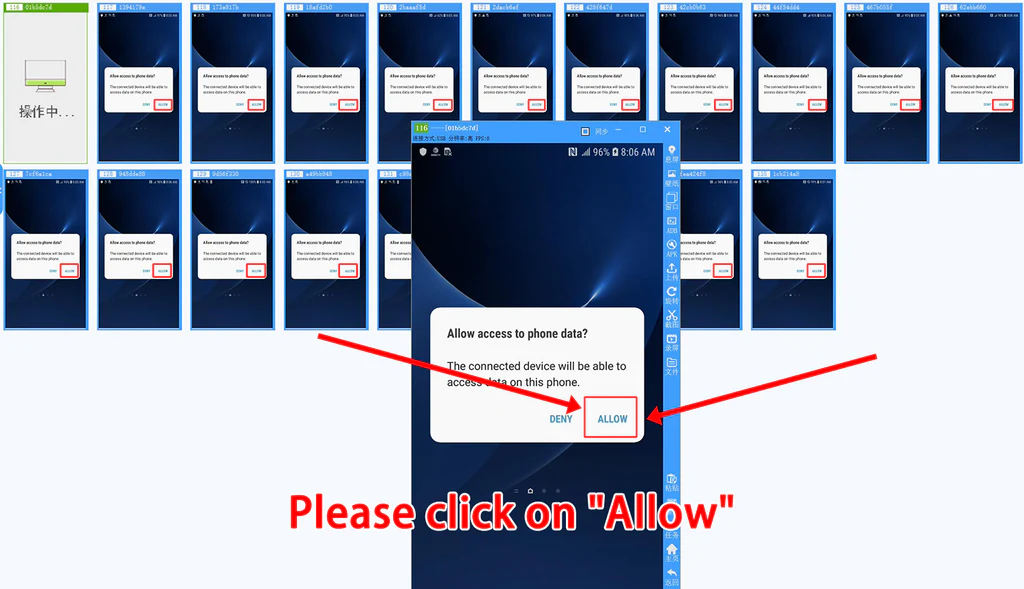

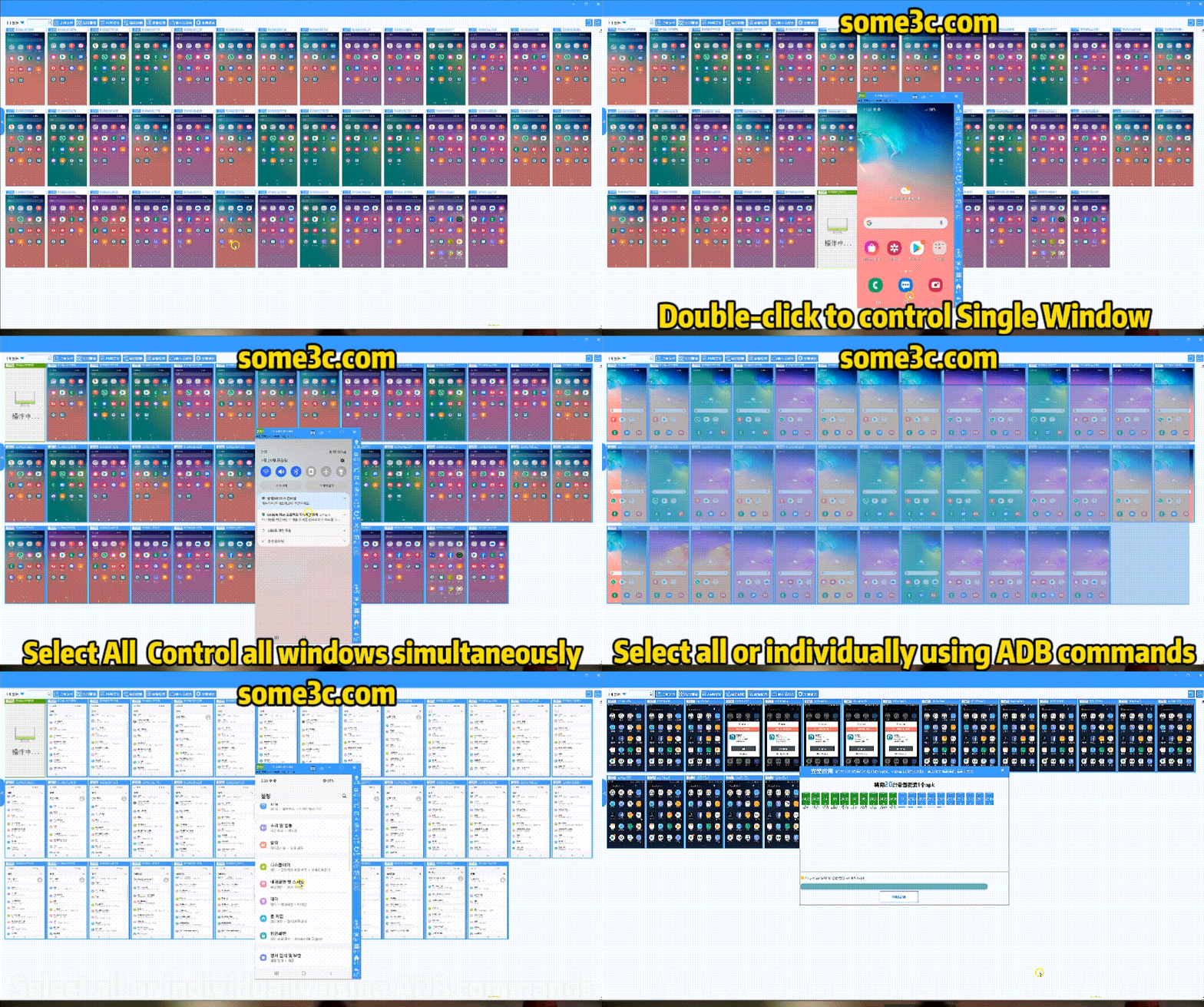
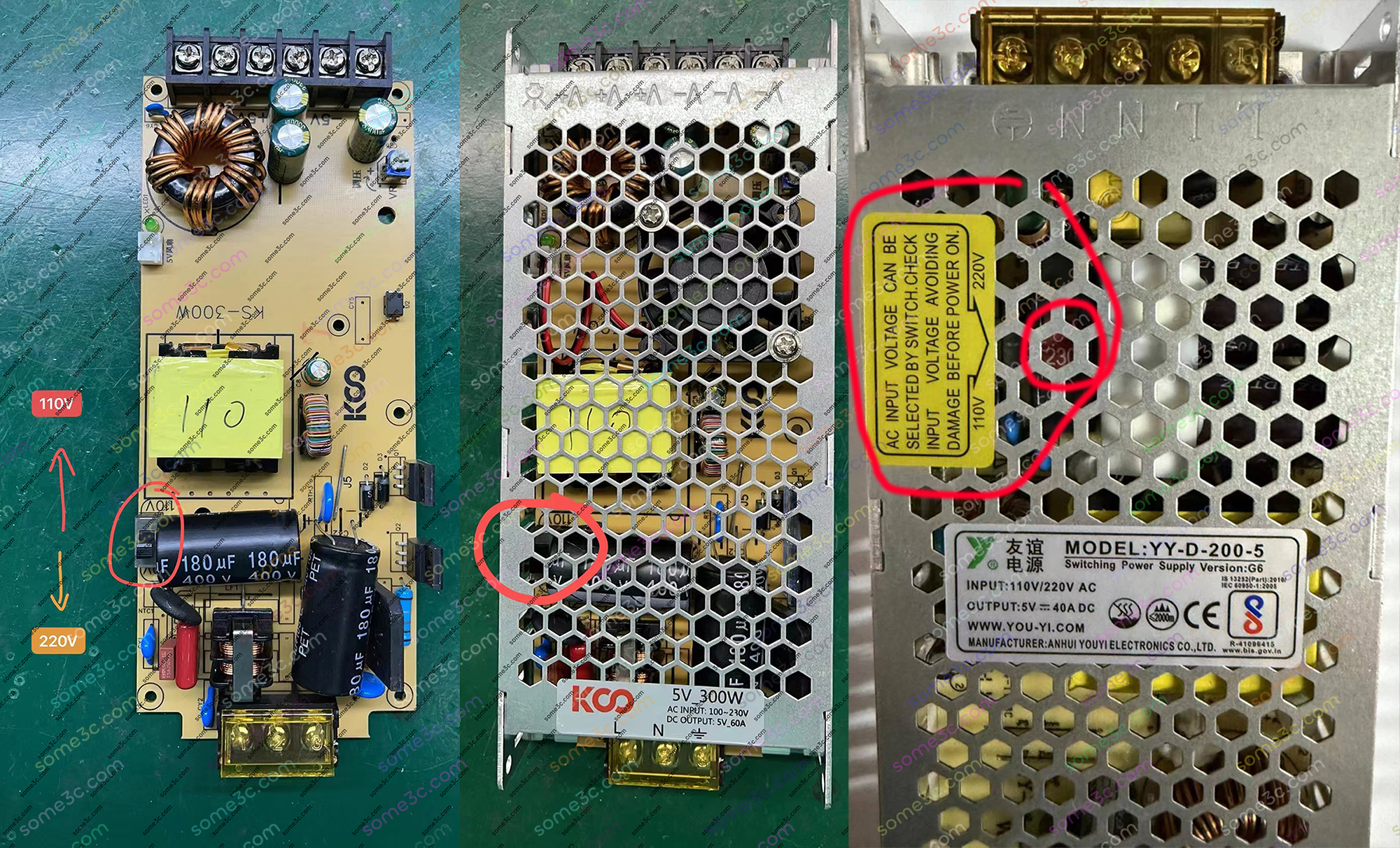


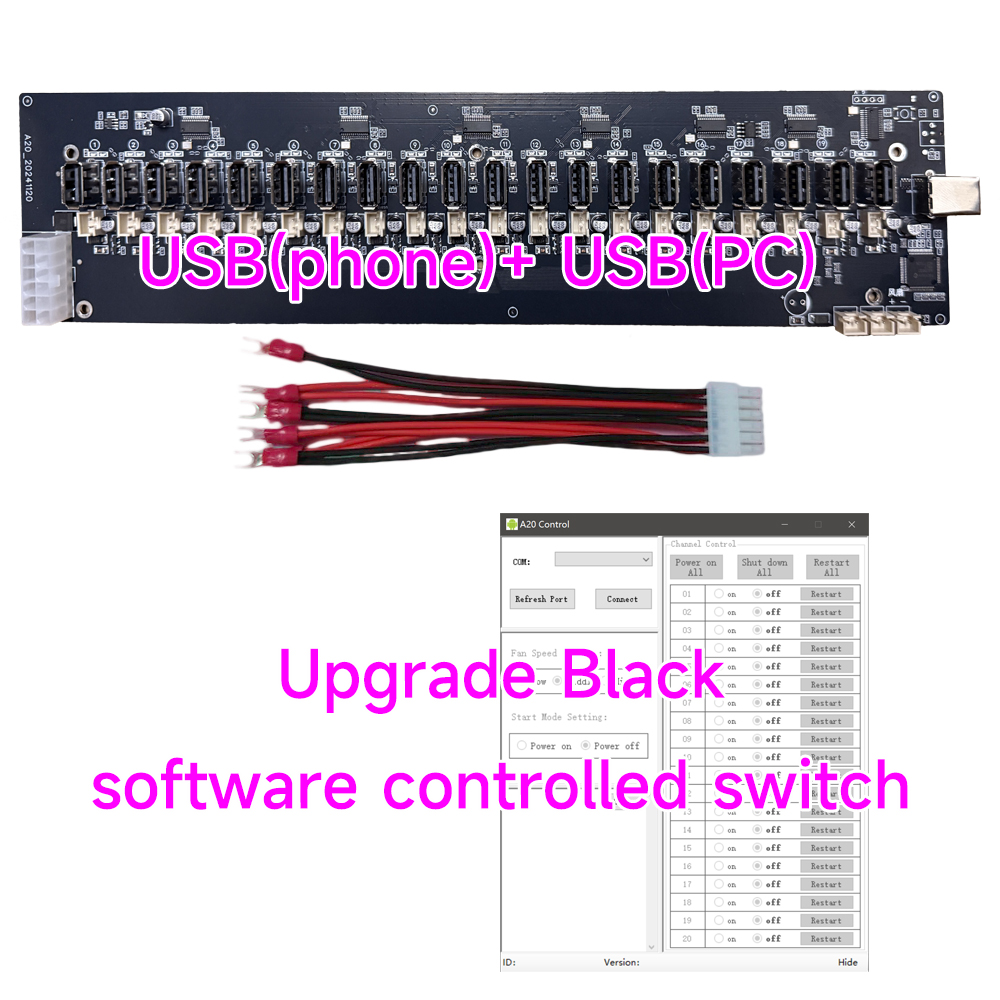
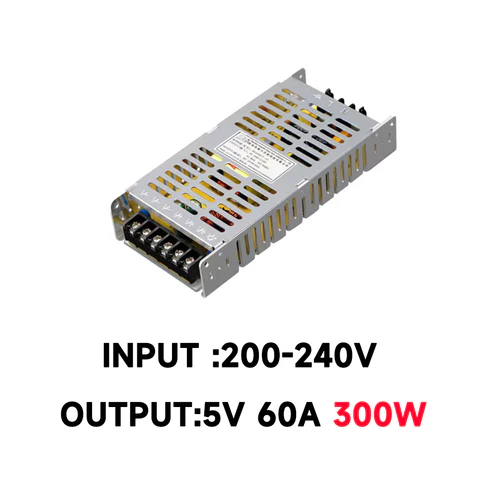

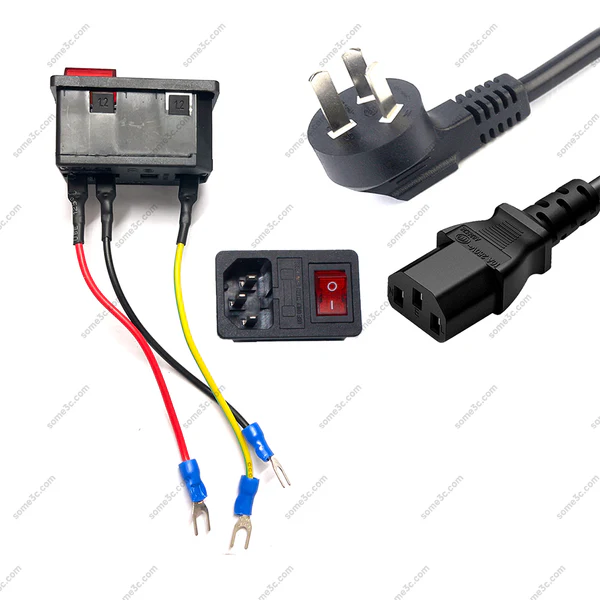
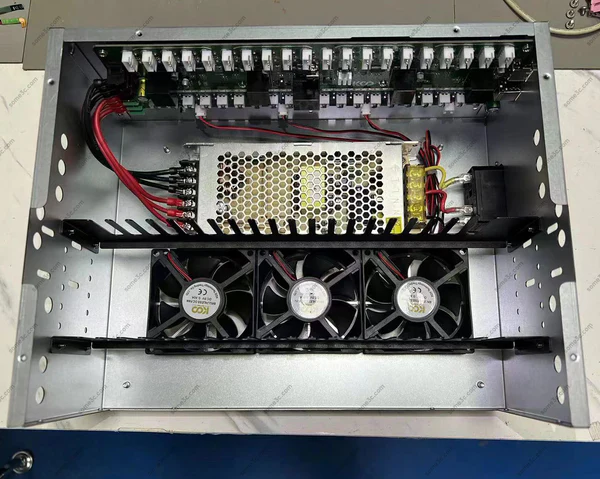 |
| 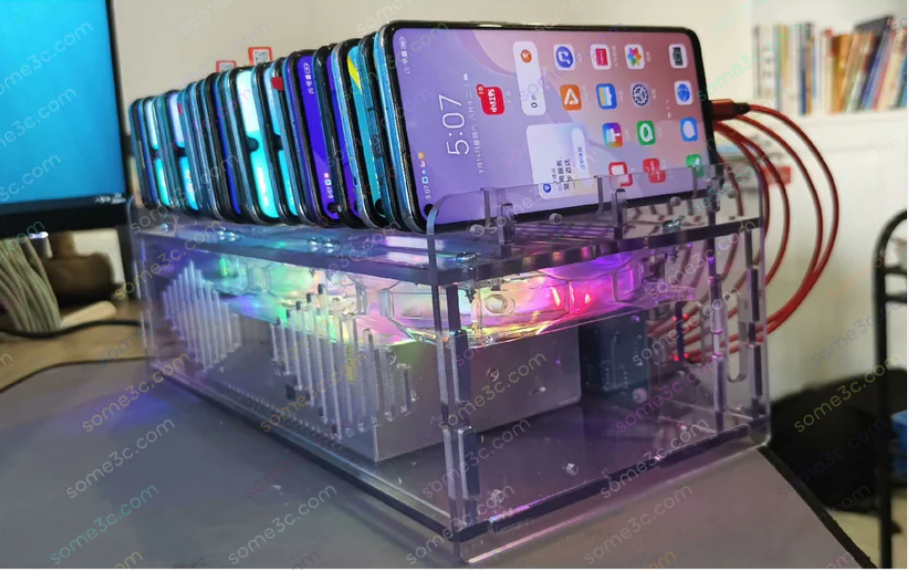 |
### 8.Mirror Android phone screen to computer
It is recommended to use Panda Mirror Screen Casting. It is permanently free for 40 mobile phones. It has powerful functions. "[Click Down](/panda-manual/download)"
|
### 8.Mirror Android phone screen to computer
It is recommended to use Panda Mirror Screen Casting. It is permanently free for 40 mobile phones. It has powerful functions. "[Click Down](/panda-manual/download)"


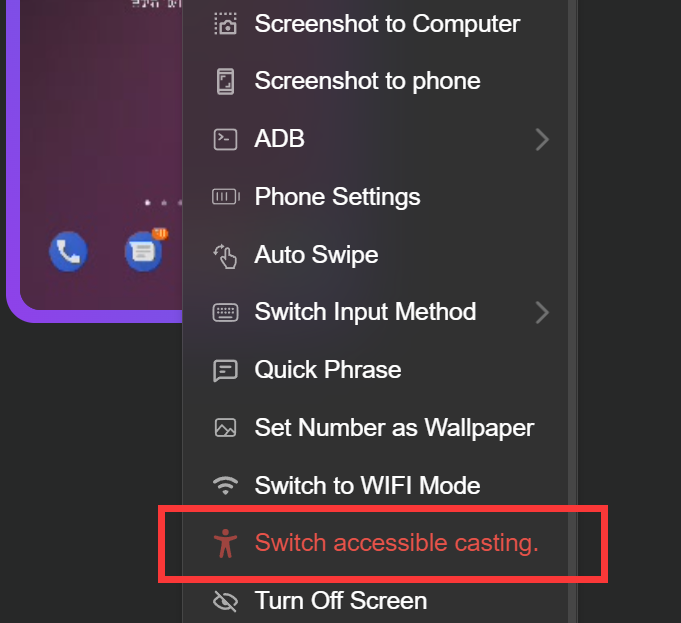
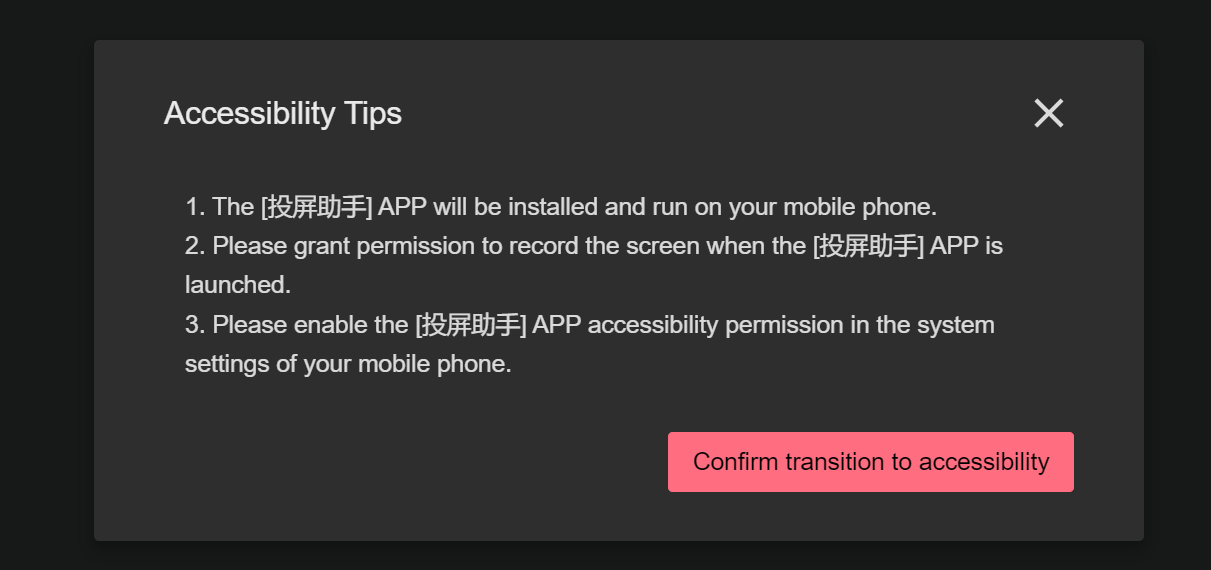
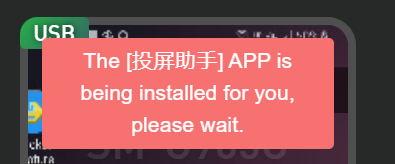
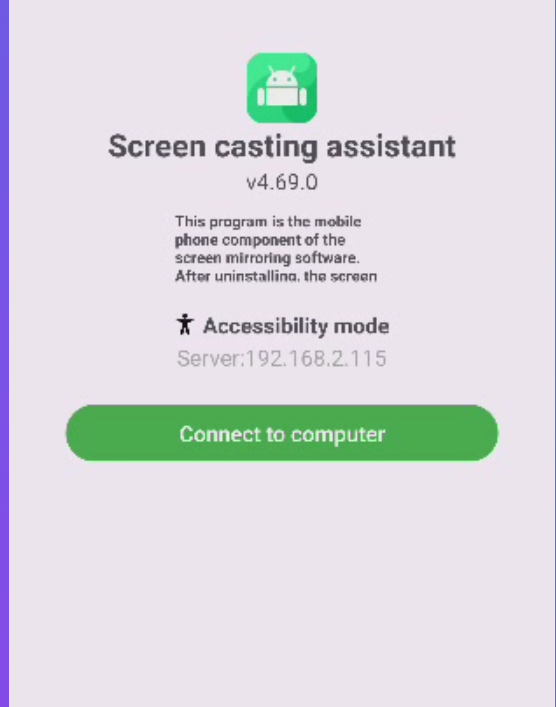
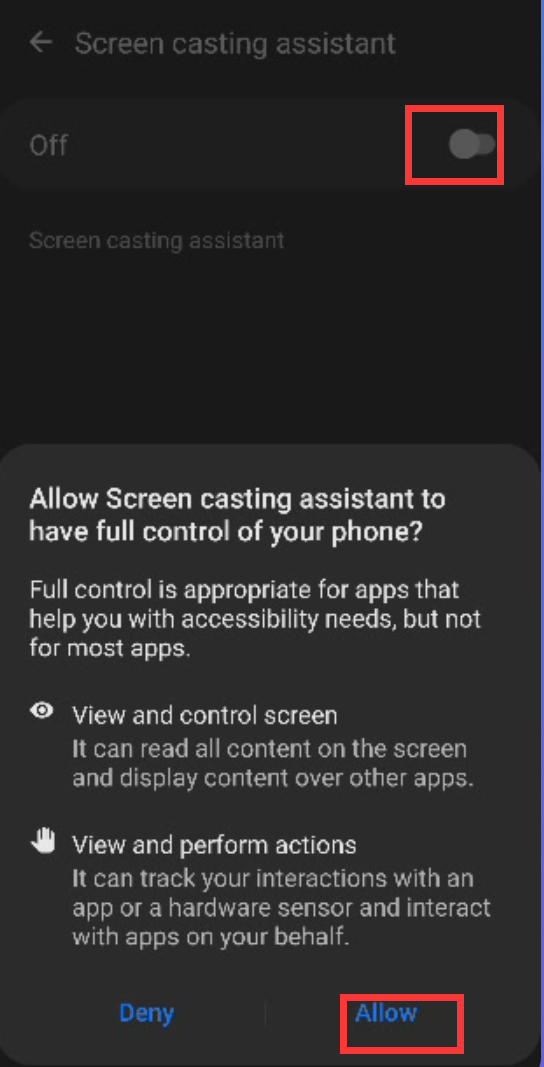
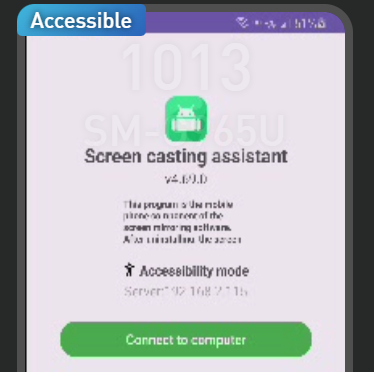


 |
|  |
## 12.How to adjust the window size, image quality, and frame rate?
1. Drag the slider with the mouse to adjust the size, image quality, and frame rate of the small screen.
2. You can also use the shortcut key ctrl+mouse wheel to adjust the size of the small screen
|
## 12.How to adjust the window size, image quality, and frame rate?
1. Drag the slider with the mouse to adjust the size, image quality, and frame rate of the small screen.
2. You can also use the shortcut key ctrl+mouse wheel to adjust the size of the small screen